UI/UX Design Portfolio: Year 6 Edition
HELLO RAVEN
Case Study
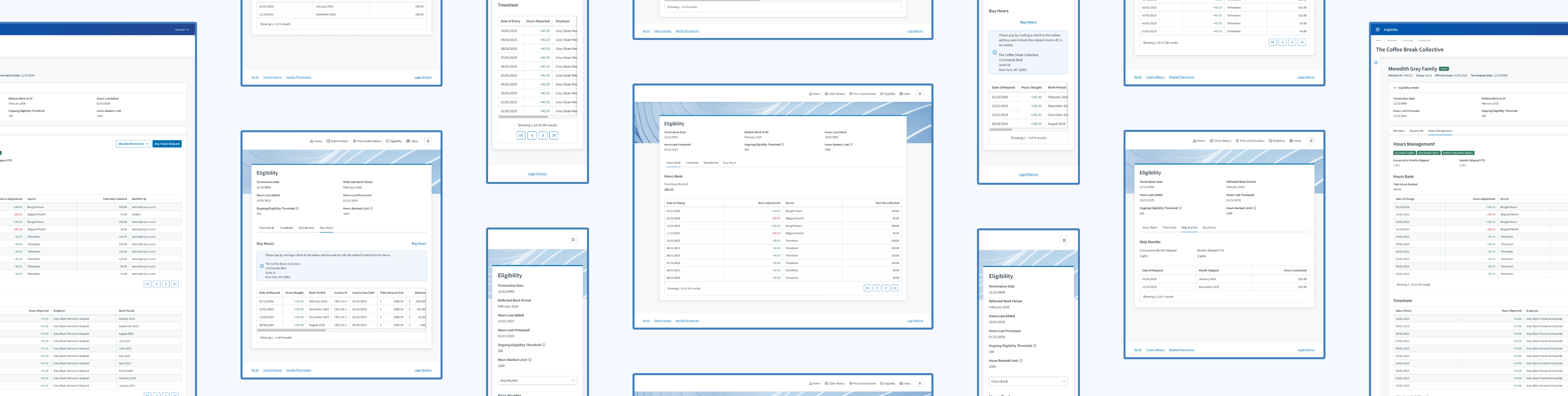
Clarity. Control. Cardholder.
How might we increase transparency and autonomy for cardholders?
Cross-Team Coordination
Omnichannel
Real-Time Data Display
Systemic Design Patterns
A Collaboration Between 3 Teams:
Development, Project Management, & User Experience
Fine Print
Role
Lead UI/UX Designer
Responsibilities
User Interface
UX Design
User Research
Duration
2 Weeks / 1 Sprint
Tools
Figma
Lucidchart
Primary Deliverables
4 New Data Displays
4 Updated Data Displays
1 Self-Service Feature
Secondary Deliverables
User Research Feedback
High-Fidelity Wireframes
Prototypes
Company
Judi Health
Industry
Health Tech
At a Glance
Chapter 01
The Discovery
My product team needed to give cardholders the ability to view their hours data and some control over their benefit eligibility; however, our product is restricted to 2 user types that don’t include cardholders. Where would this request come to life?
Chapter 02
The Challenges
- Our Eligibility product didn’t have features in the member portal. I was starting with a blank slate.
- Since I was starting with a blank slate, I had to follow established design patterns within the member portal.
- I needed to ensure the benefit administrator experience within Judi® and the member portal experience aligned.
- Historically, I’ve only had access to benefit administrators for design reviews—not cardholders.
Solution: Let’s utilize the member portal to display cardholder hours while offering self-service features.
Chapter 03
The Opportunities
- Collaboration between two product teams
- Work on a different Judi Health product
- Enhance features within my own product
- Have a user interview with a cardholder (very rare)
Chapter 04
The Process
This is where I designed the necessary features, then reviewed my design solutions with my developers, the member portal team, and a cardholder.
Chapter 05
The Final Results
Cardholders gained the ability…
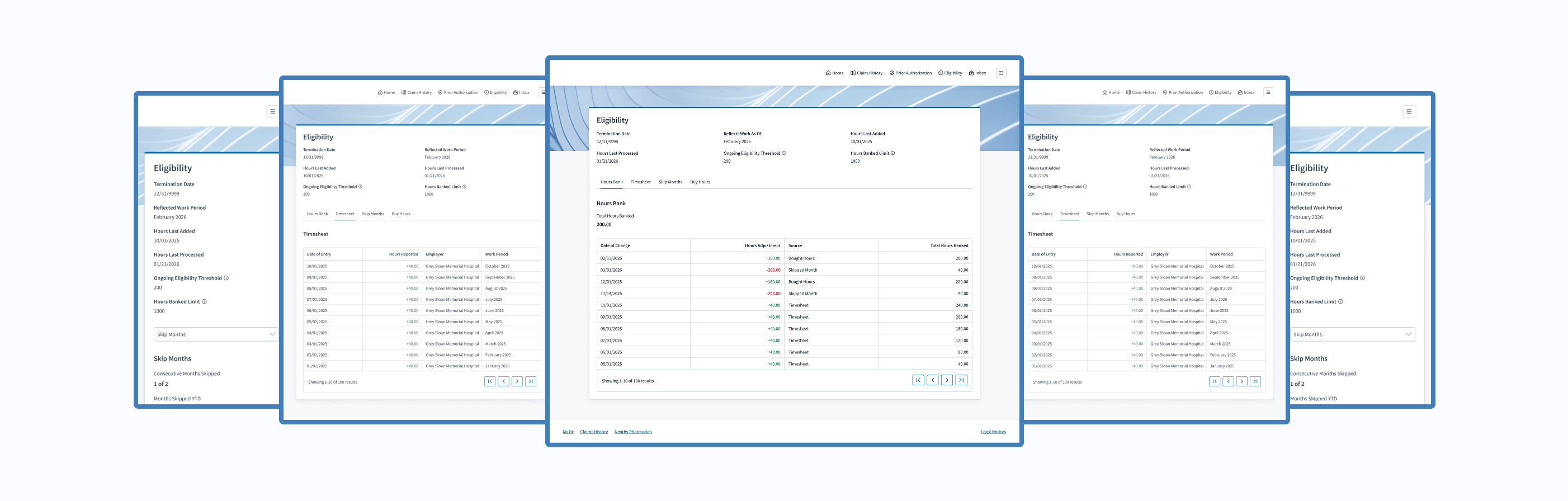
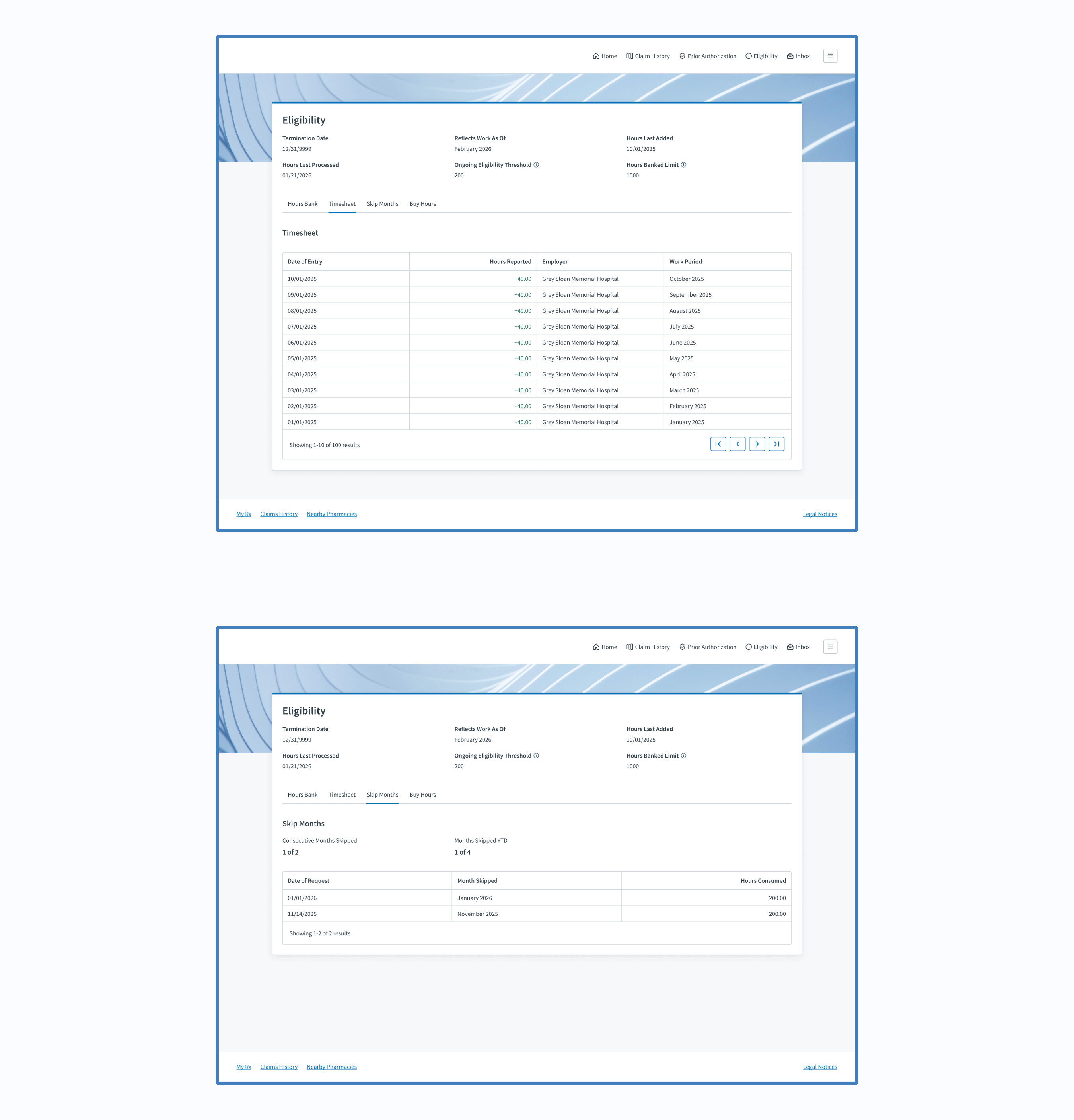
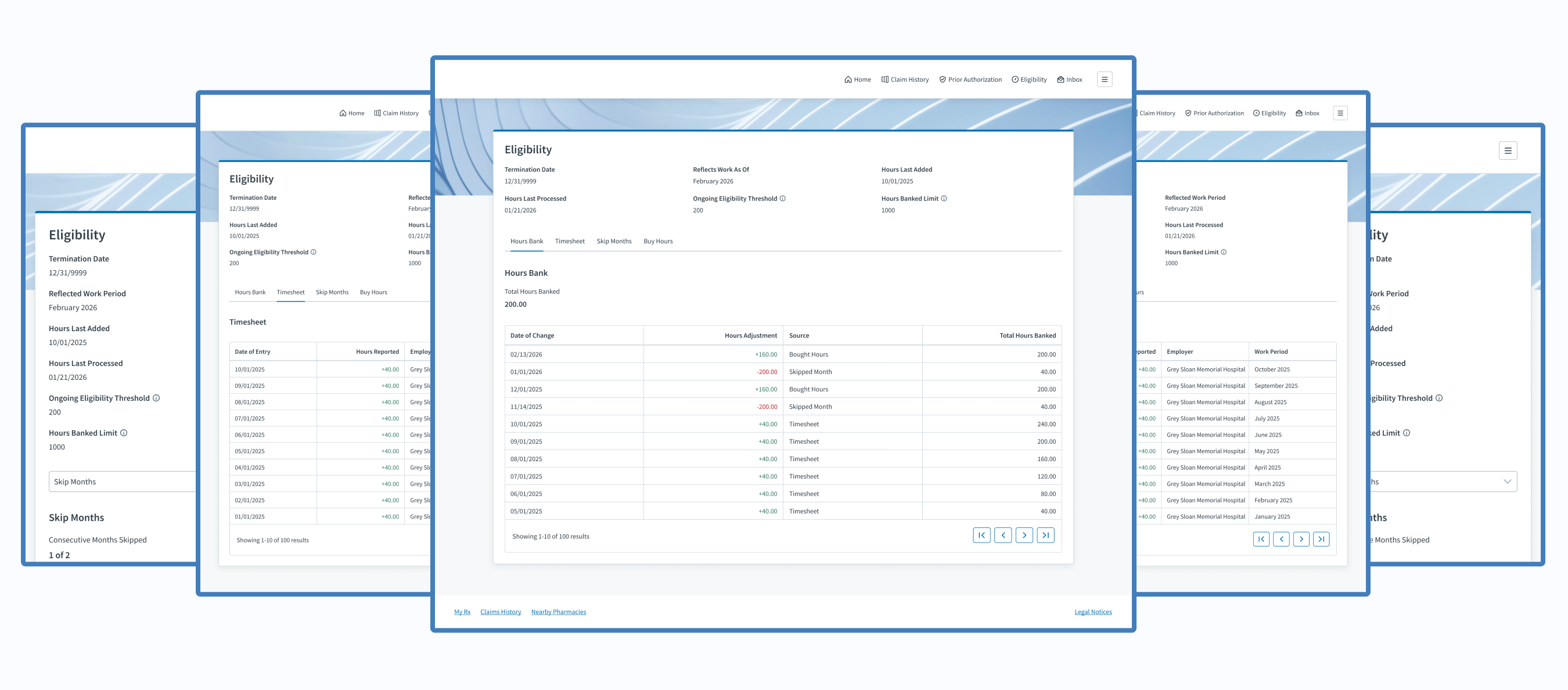
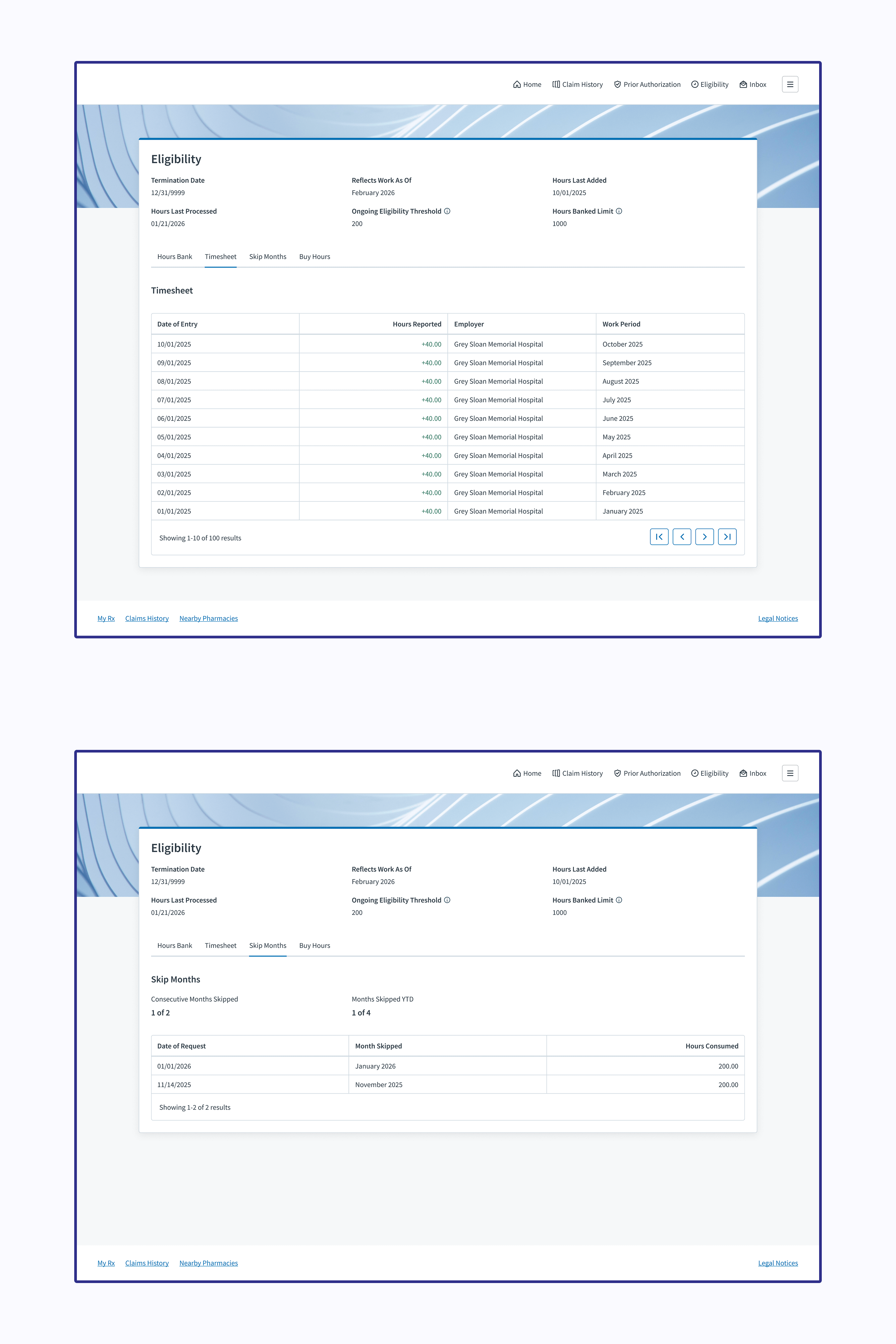
- to view their hours bank, timesheet, skipped months, bought hours, and useful information about their benefit eligibility status
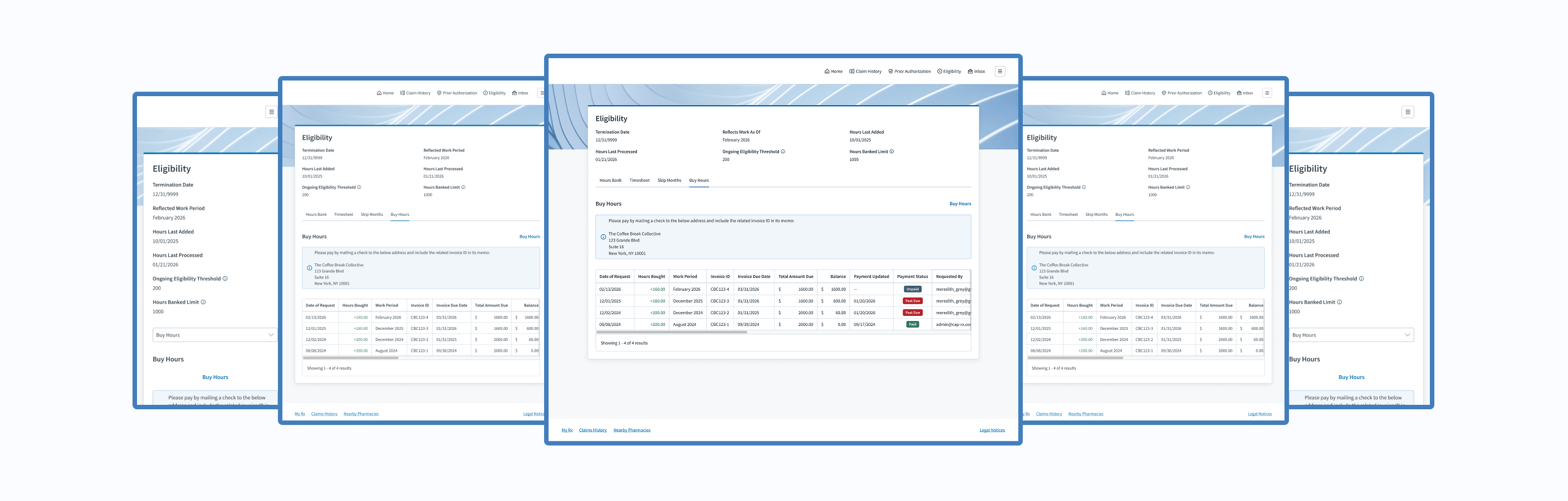
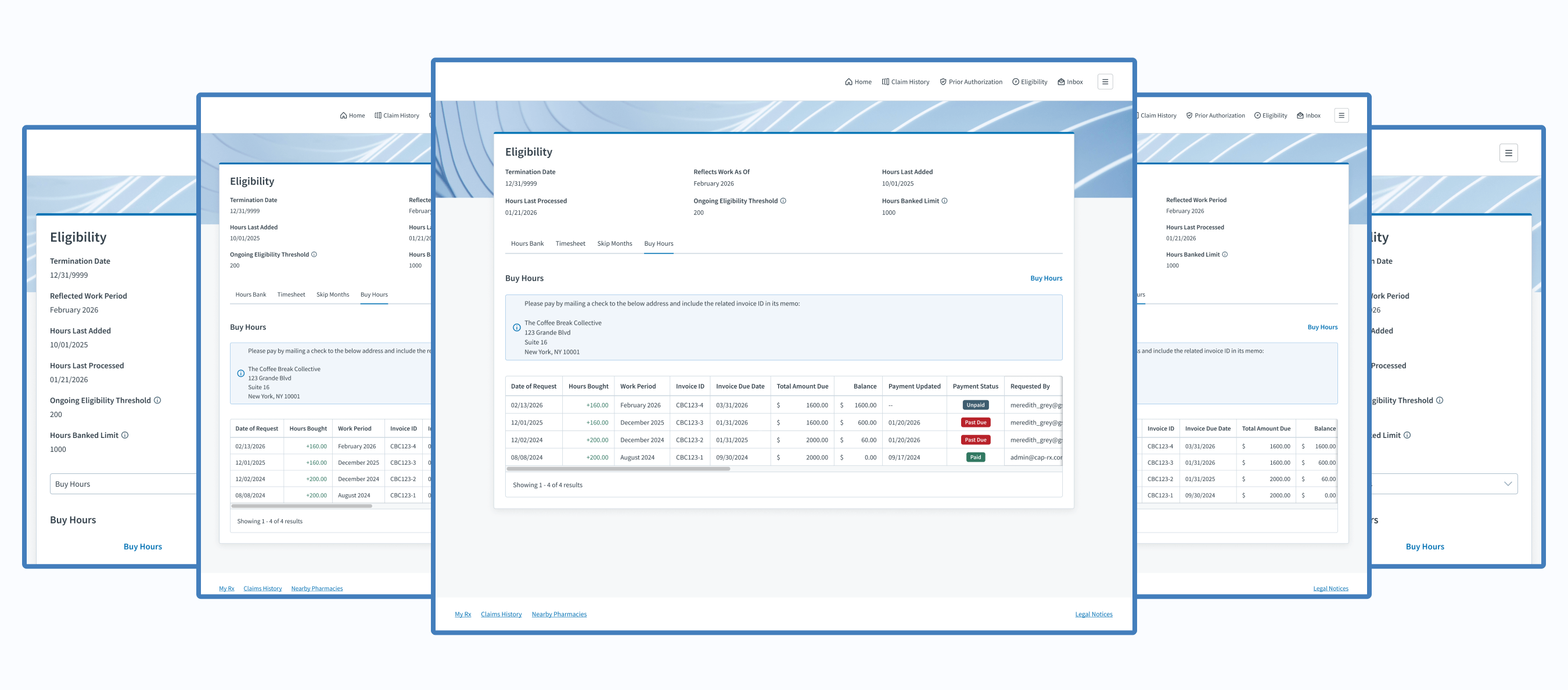
- to buy hours to maintain their benefit eligibility
My Takeaway: Minimal user research capabilities are better than none. If resources are limited, maximize the research value by asking targeted questions and jotting down actionable next steps.





The Introduction
About Judi Health
This case study originates from work done at Judi Health, a health technology company focused on transforming how prescriptions are priced and patient care works to deliver the healthcare we all deserve. It acts as a pharmacy benefit manager (PBM) and pharmacy benefit administrator (PBA), working with health systems, universities, employers, and more.

Relevant Products
Judi®
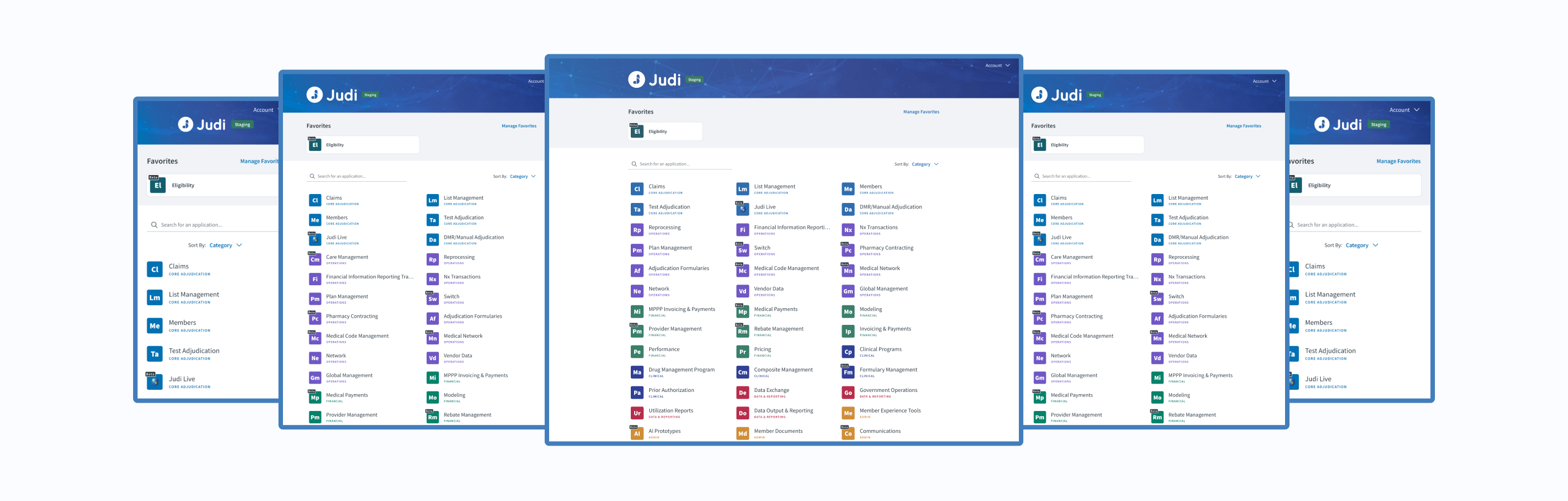
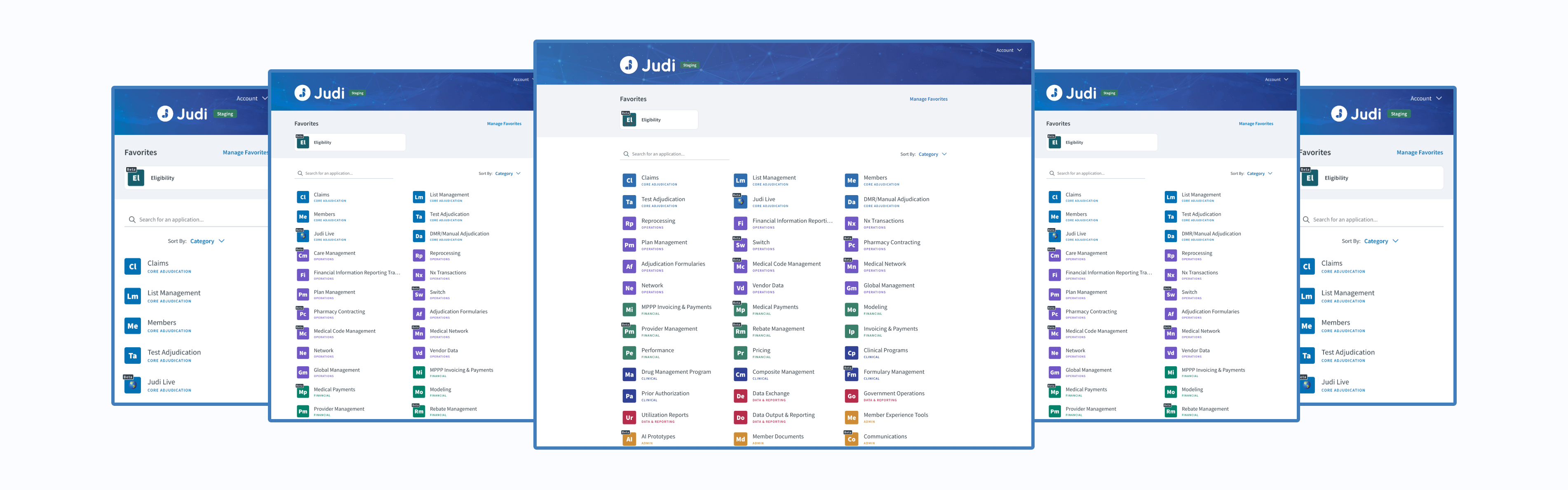
Judi® is a health platform built to grow and adapt with any organization. It makes it easy to handle new regulations and requirements, resulting in faster results, smoother operations, and a better experience for members overall.
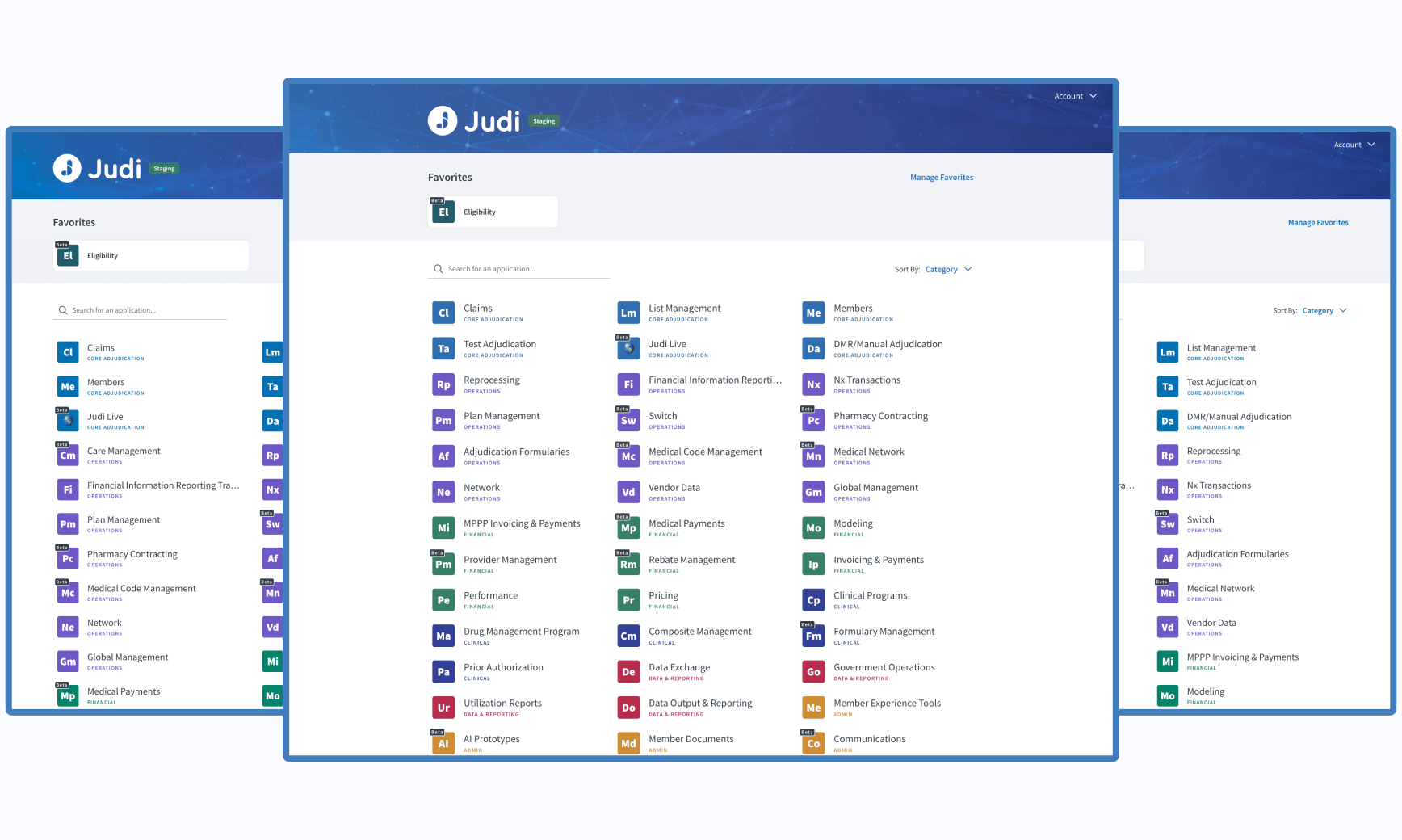
Eligibility
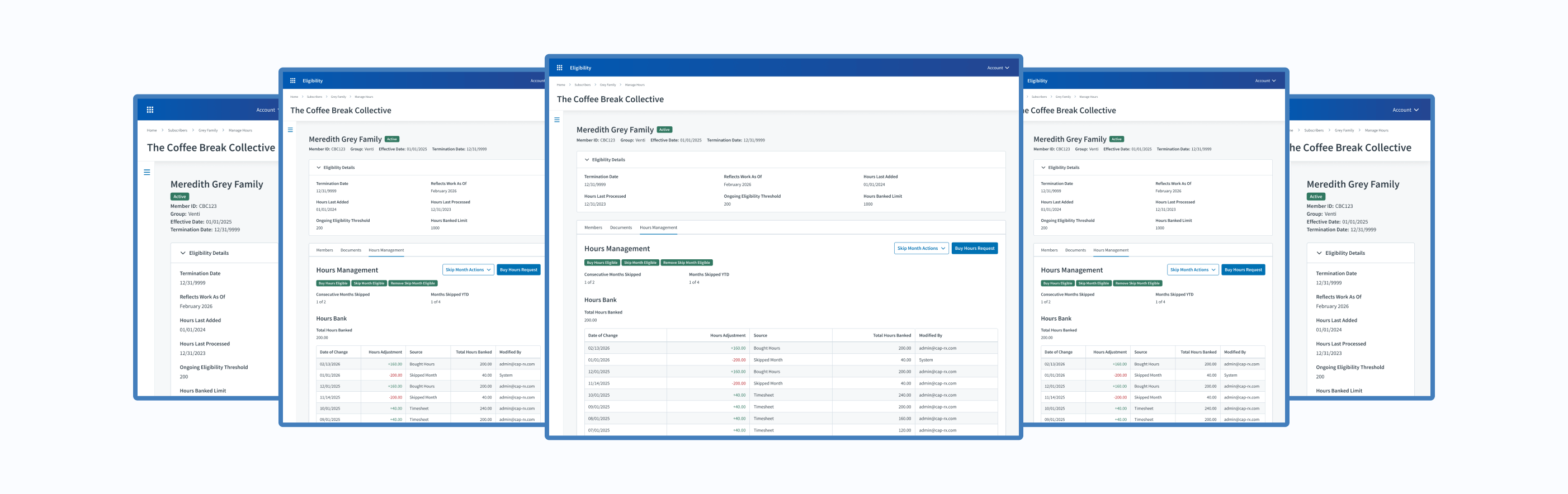
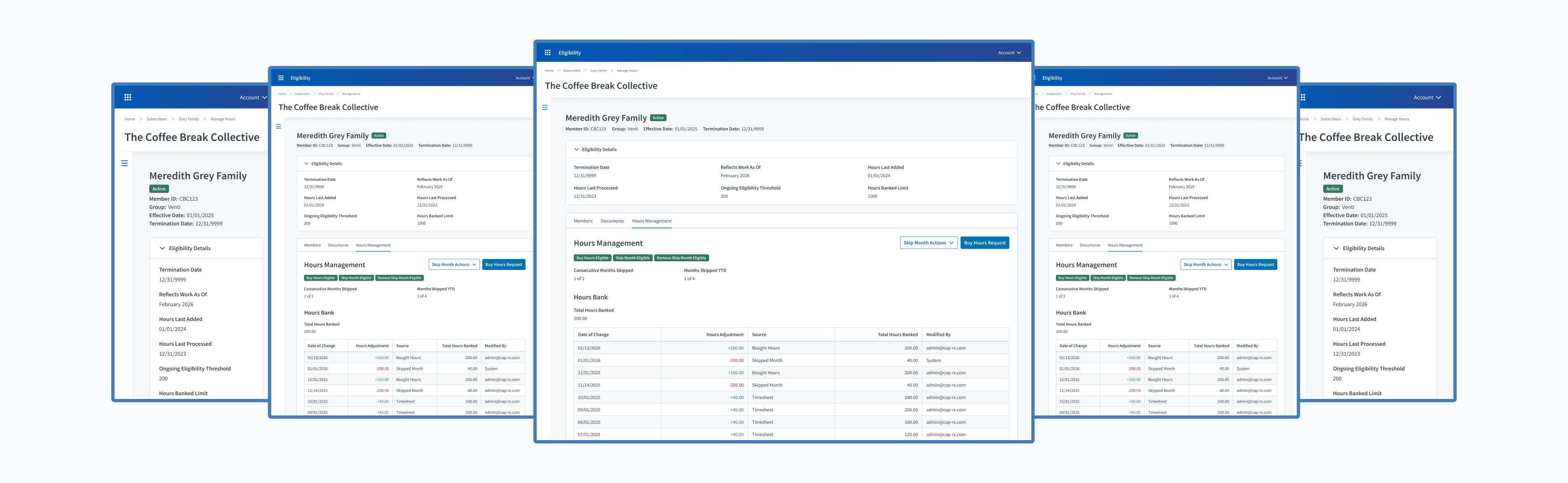
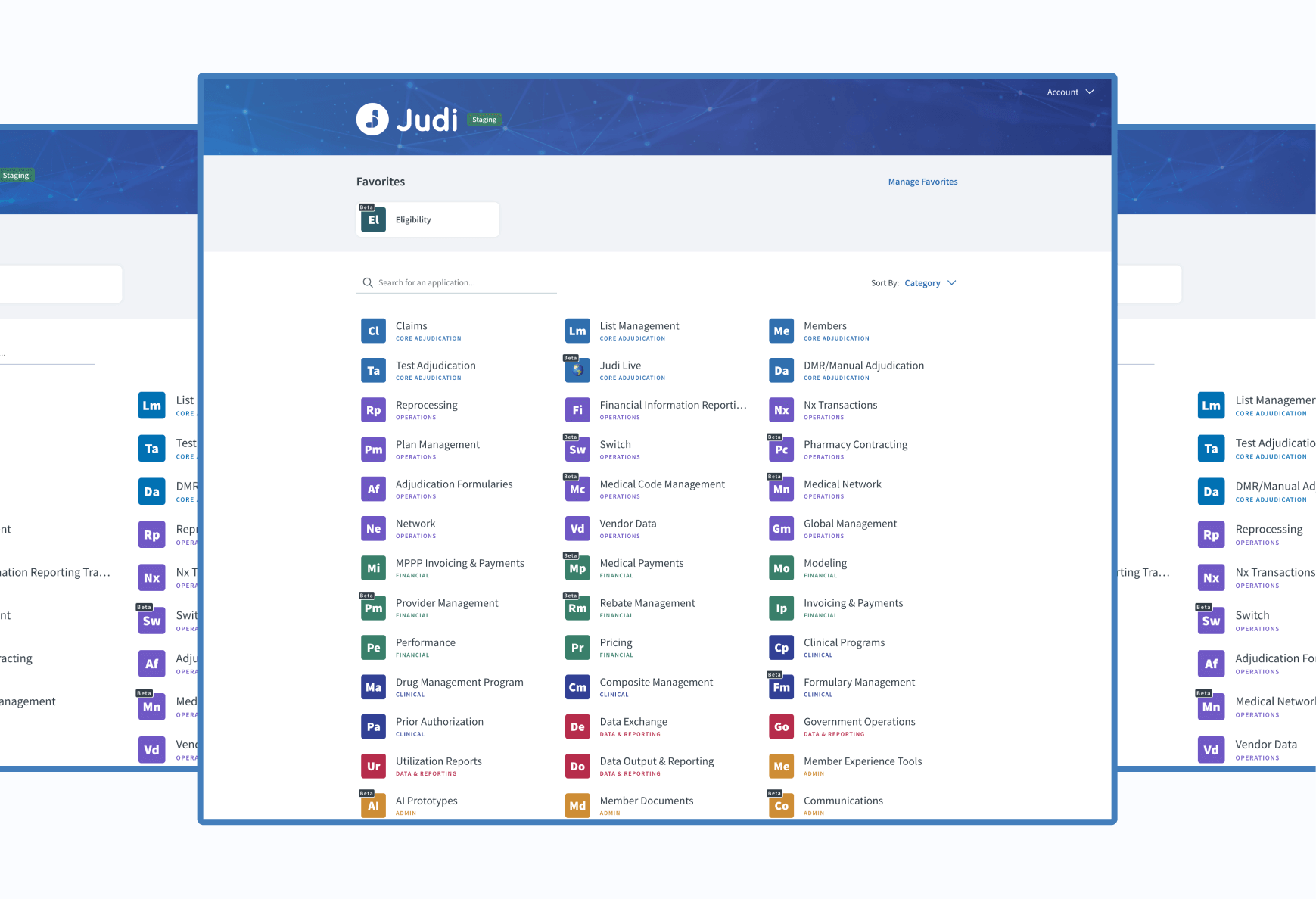
Within Judi®, my cross-functional Agile team owns the third-party administrator (TPA) Eligibility product, where benefit administrators configure requirements and manage cardholders, and employers submit timesheets and pay invoices.
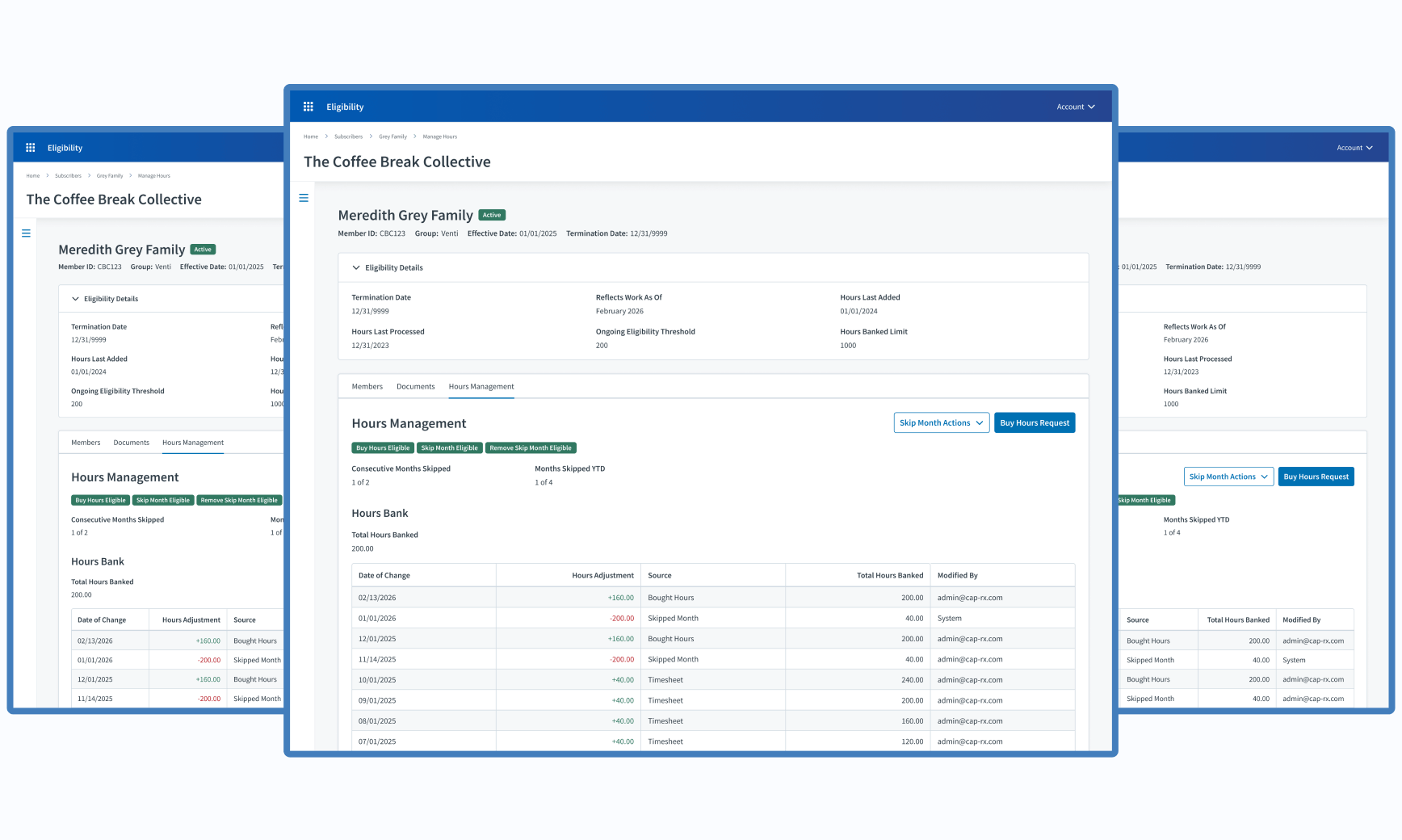
Member Portal
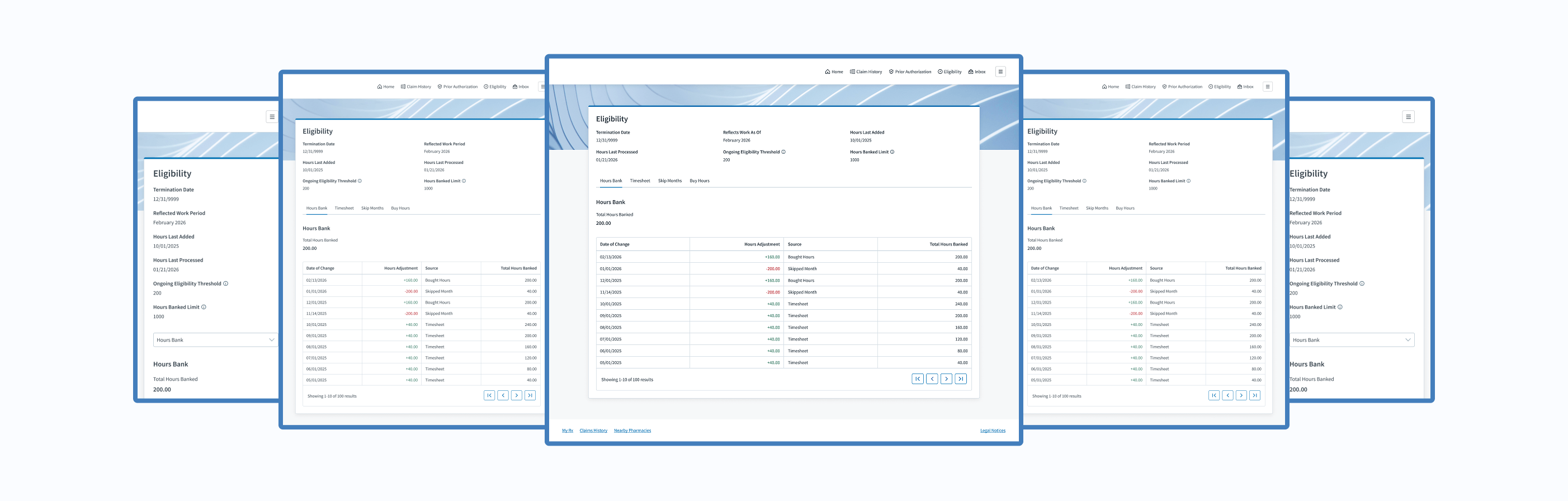
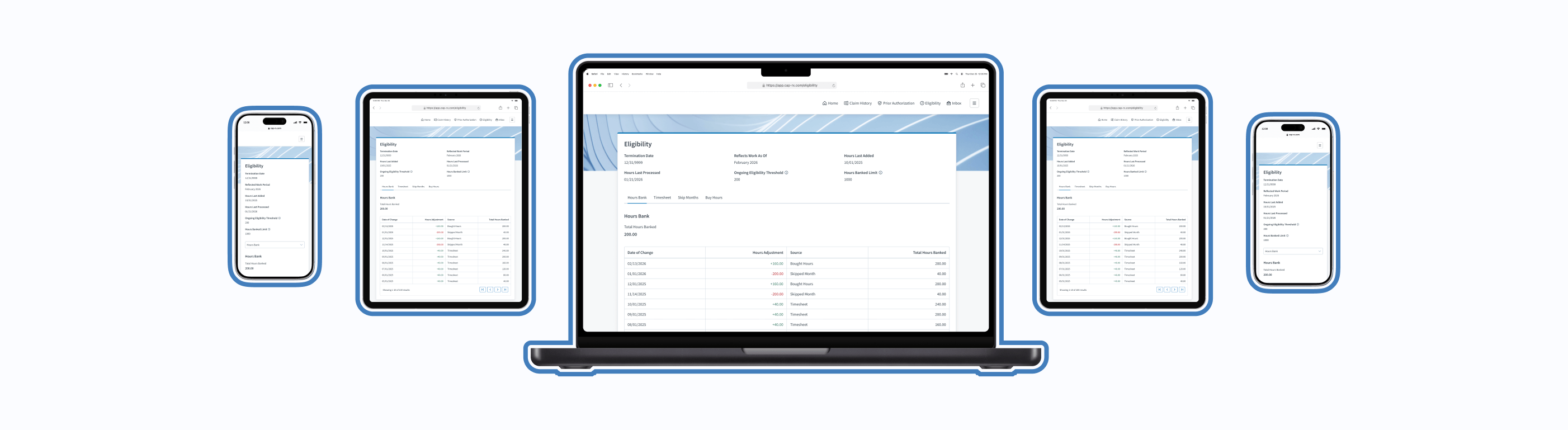
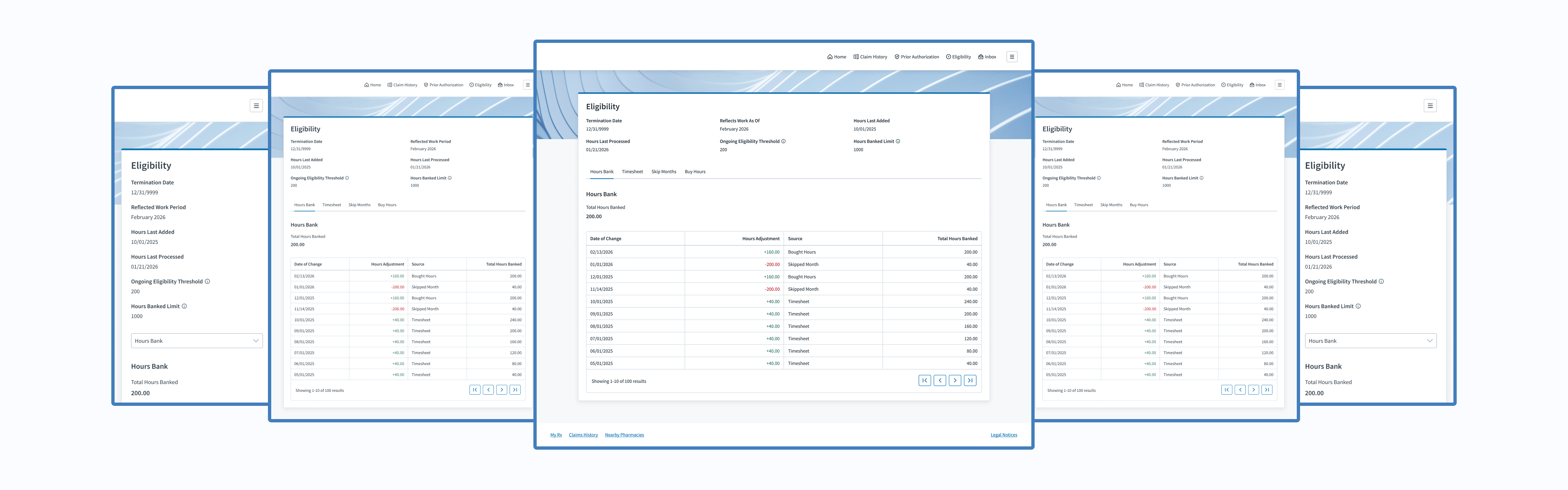
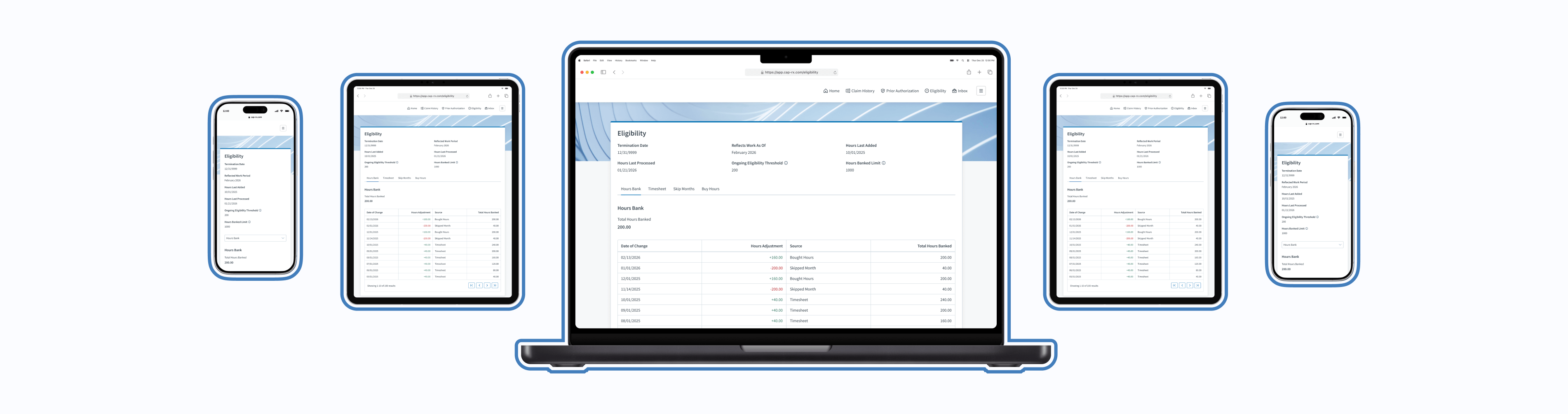
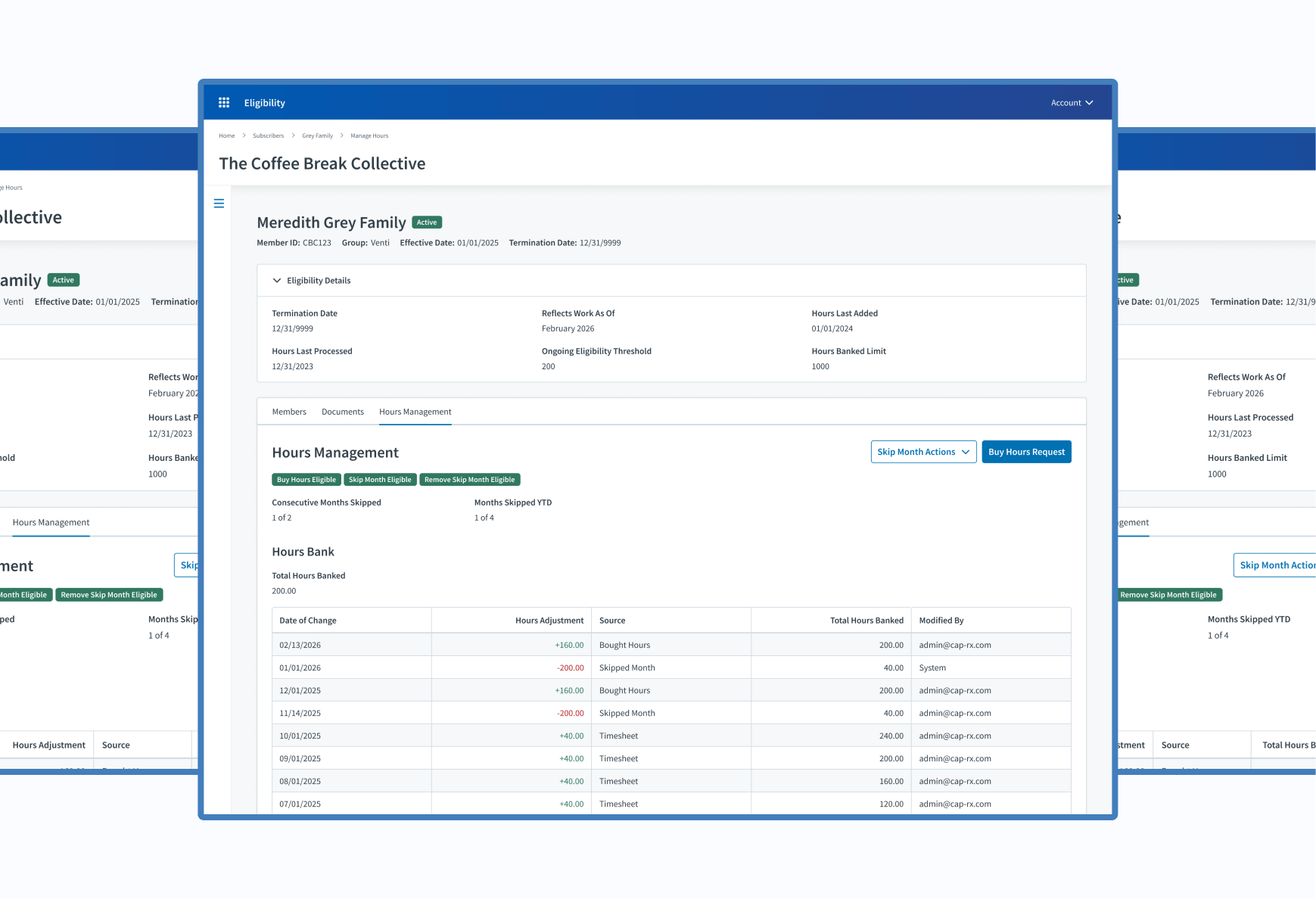
The Member Portal is a digital platform separate from, but still related to, Judi®. It gives members comprehensive access to their pharmacy benefits and related health information.
New Product Feature
Imagine relying on your manager or an admin to learn about how many hours you’ve worked and whether you’ve qualified for the offered employer benefits. That was the annoying reality for thousands of cardholders within the Eligibility product. They had to contact their manager or a benefit administrator to know their latest hours and benefit eligibility stats. Stakeholders suggested that we give them better access to their information, and the product team did just that.
The Discovery
Business Need
Give cardholders the ability to view their hours data and some control over their benefit eligibility.
How Might We...
How might we allow users to view their hours data?
How might we give more power to cardholders?
How might we increase transparency and autonomy for cardholders?
The Discovery
The Solution
Let’s utilize the member portal, a separate Judi Health product, to display cardholder hours while offering self-service features. Our Eligibility product is restricted to 2 user types that don’t include cardholders, so this was the best route.
The Challenges
Blank Slate
Our Eligibility product didn’t have features in the member portal. I was starting with a completely blank slate.

Thoughts
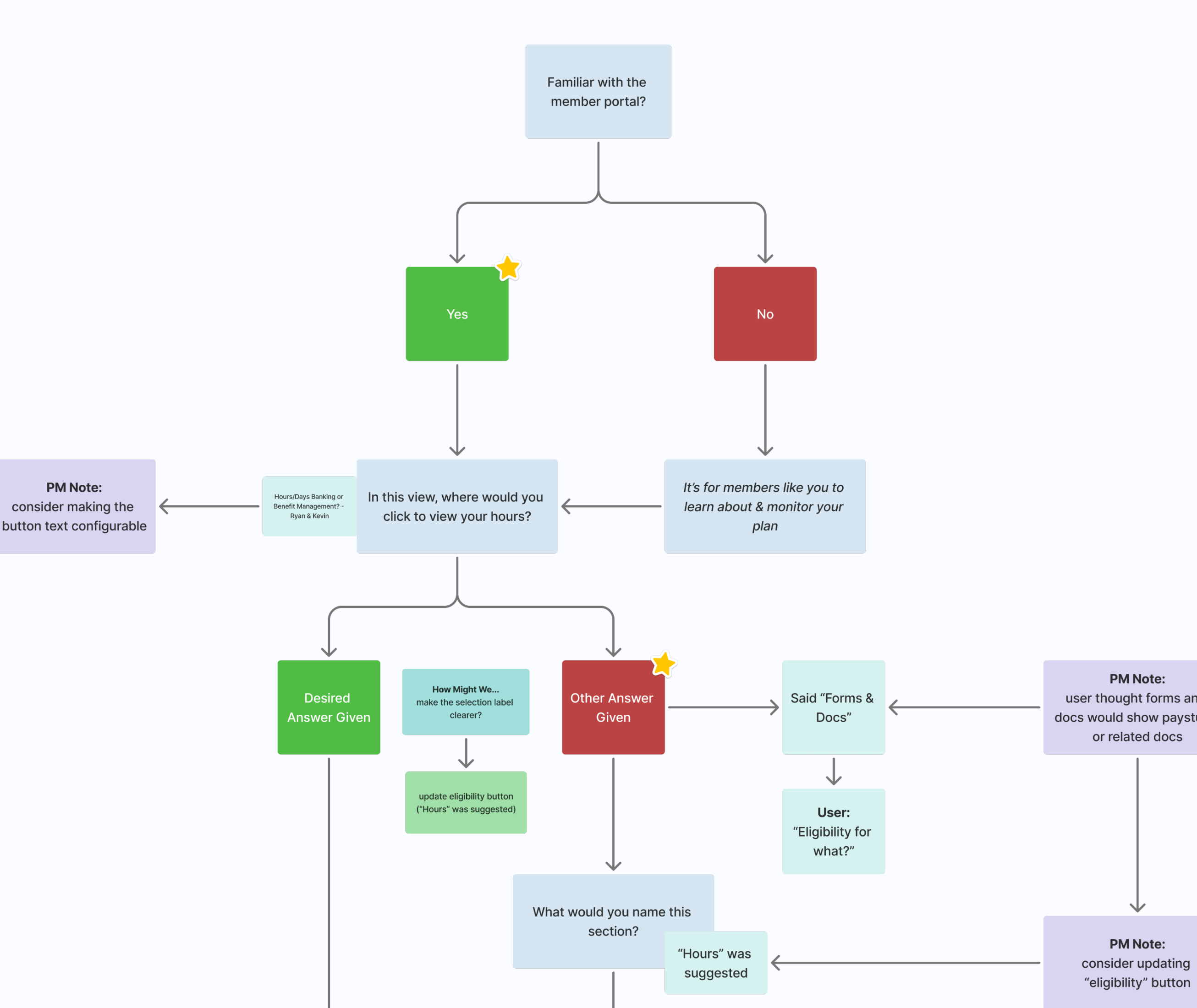
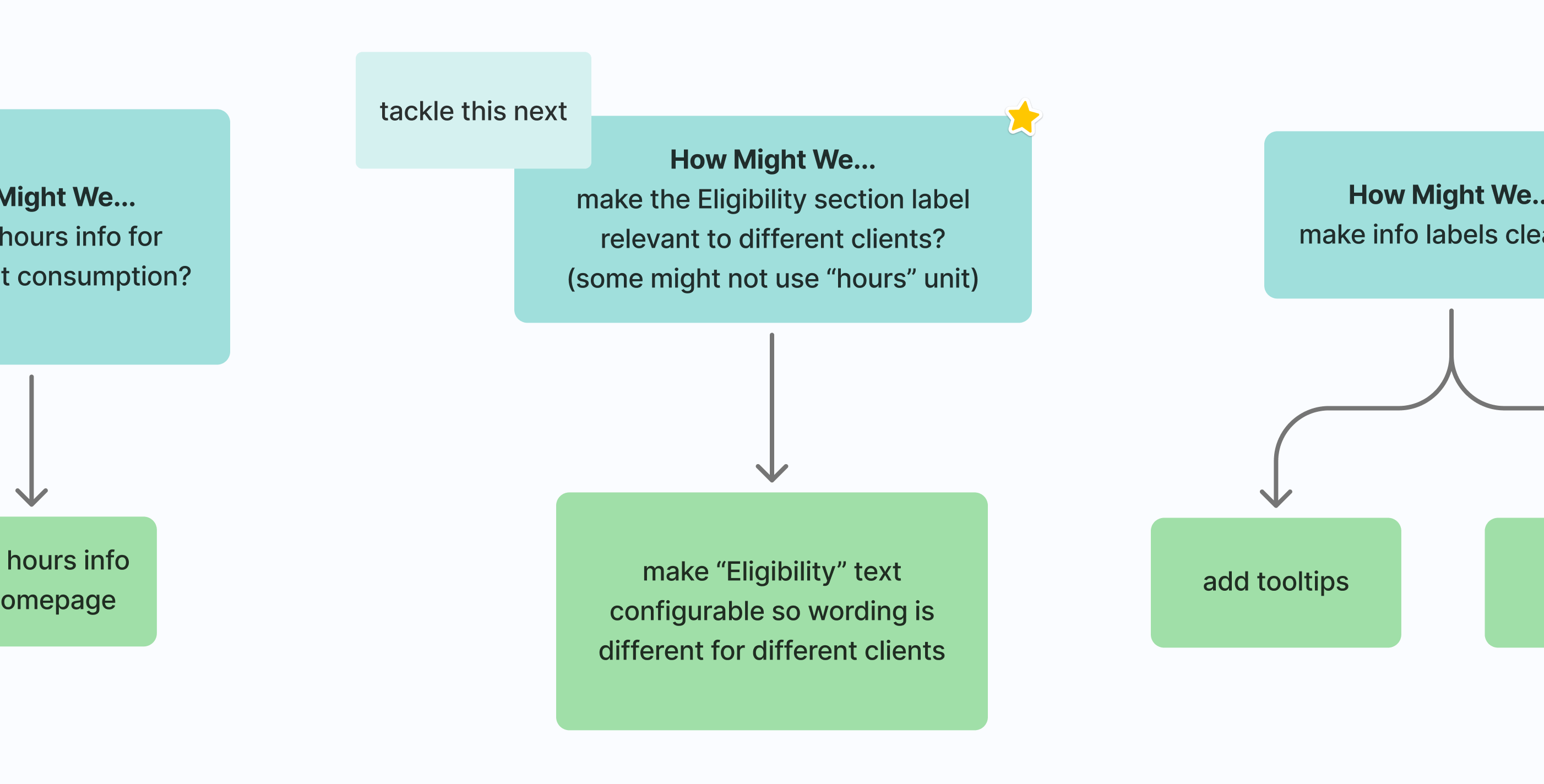
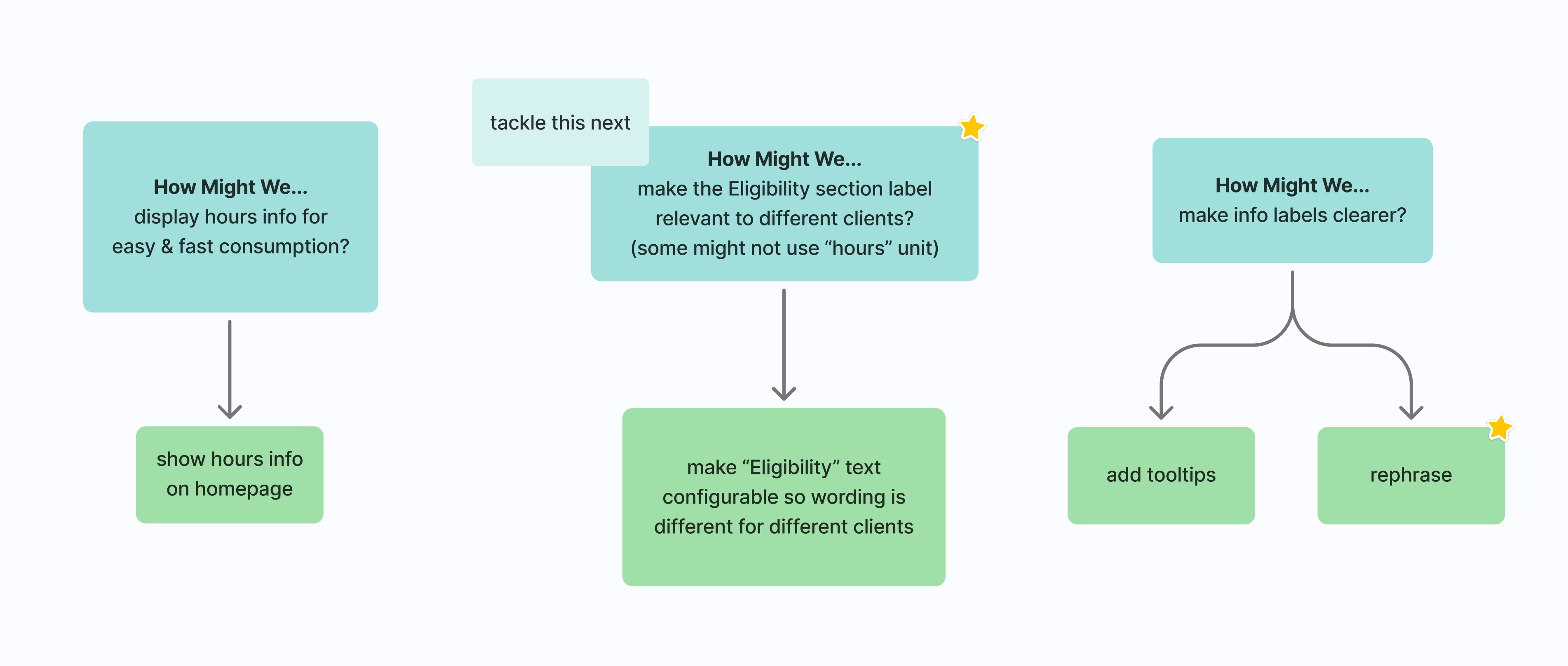
There will be a menu item to access our features, but what should we call it? Should it just be “Eligibility” to match our module name? I’ll ask users, if possible.
Established Patterns
Since I was starting with a blank slate, I had to follow established design patterns within the member portal.
Thoughts
- Would their design patterns be drastically different than the patterns of my product? If so, how will that affect the experience of my users?
- I’ll ask the member portal UX team for feedback throughout my design process, so I don’t get far into my design and be completely off base; however, I do have access to the wireframes of other parts of the member portal, so that scenario shouldn’t happen.
Multi-Experience Consistency
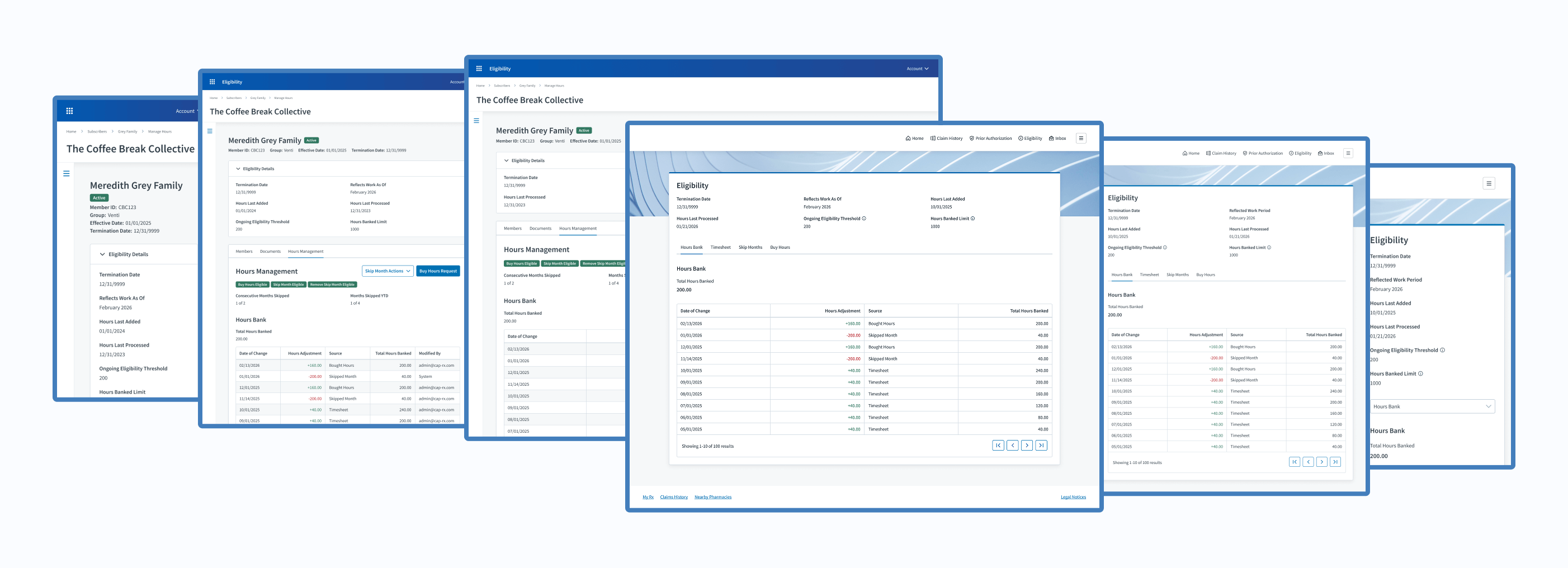
I needed to ensure the benefit administrator experience within Judi® and the member portal experience aligned in case cardholders called admins for assistance.
Thought
While doing so, what areas could improve within the admin experience that I could apply to the new member experience?
User Access
Historically, I’ve only had access to benefit administrators for design reviews. Access to cardholders has been denied in the past.
Thought
Can I review my design solutions with at least one cardholder, or would I have to depend on benefit administrators or stakeholders to relay user feedback to me?
Skip to The Process: User Research
The Opportunities
Design Collaboration
Adding Eligibility product features to the member portal required collaboration with the UX designers and product manager. Fun!
Product Crossover
For the first time, I had the chance to work on a different product within the greater Judi Health ecosystem.
Thought
What could I learn from its design?
UX Enhancements
Within Judi®, I had the chance to enhance the relevant benefit administrator features.
Thought
Does any design pattern need the latest design handbook updates?
Rare User Interview
Later in my design process, I was told that I could review my design solution with one cardholder!
Thought
With only one design review, what questions should I ask to make interaction as valuable as possible?
The Process
Design
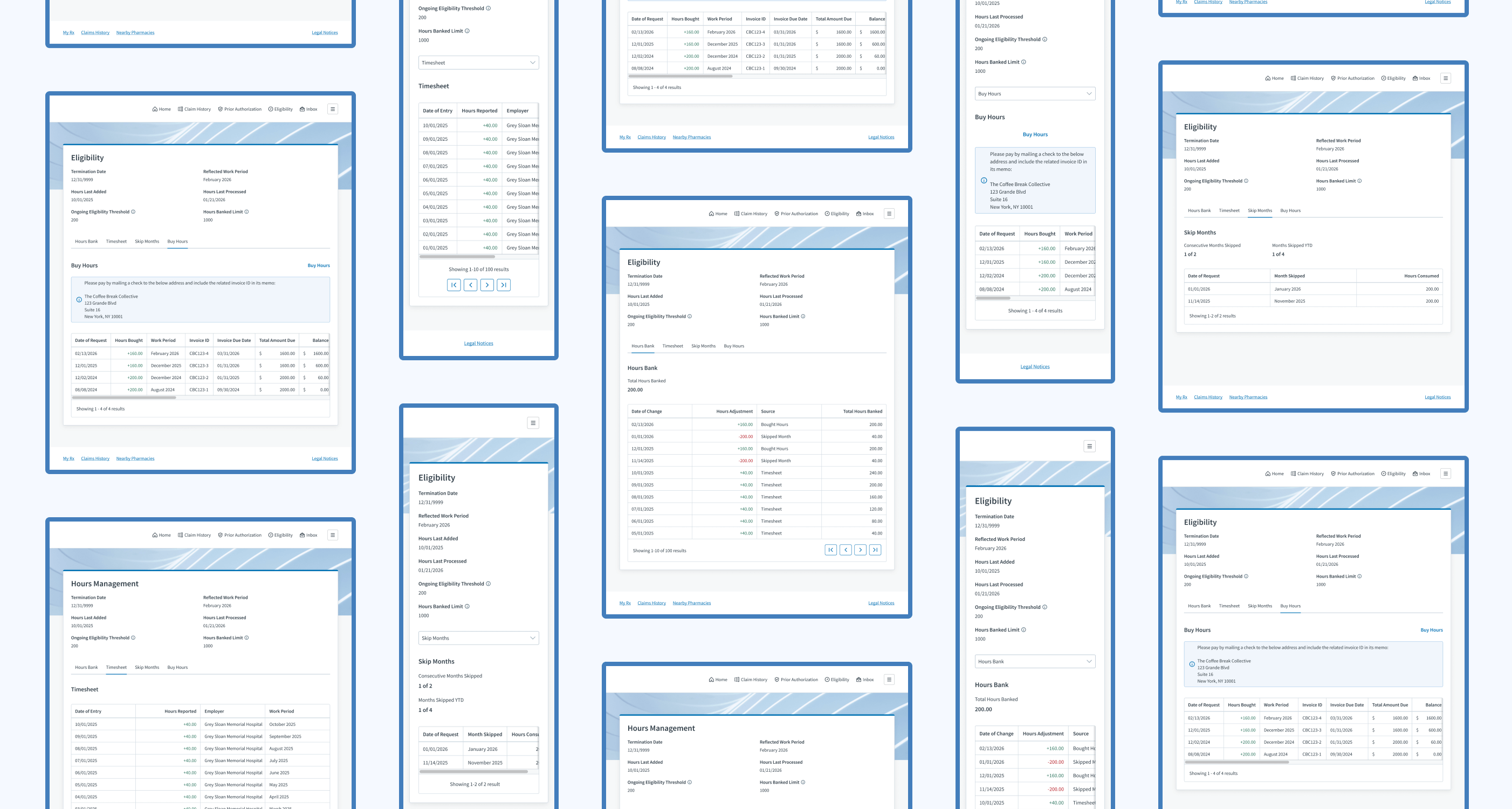
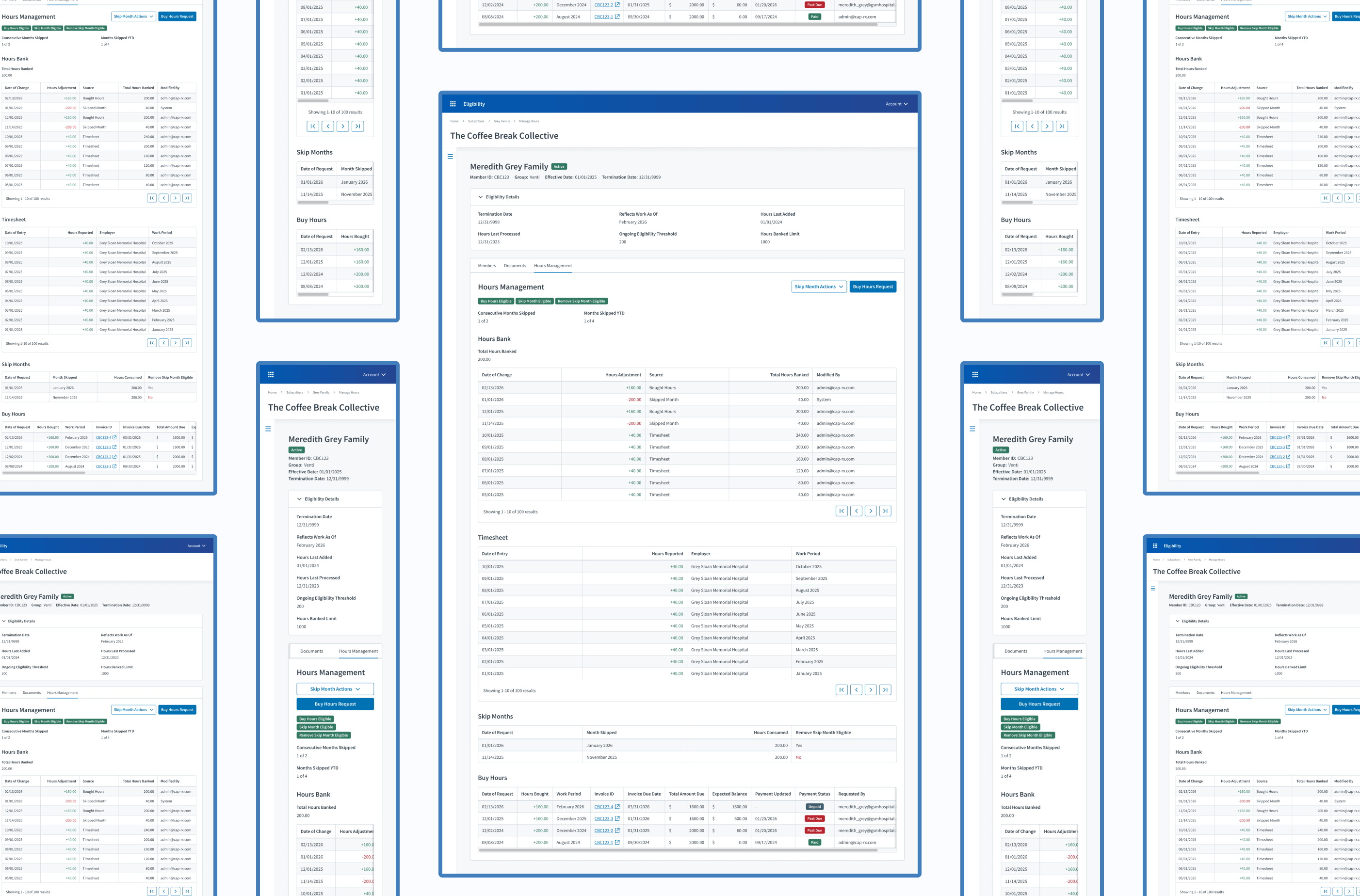
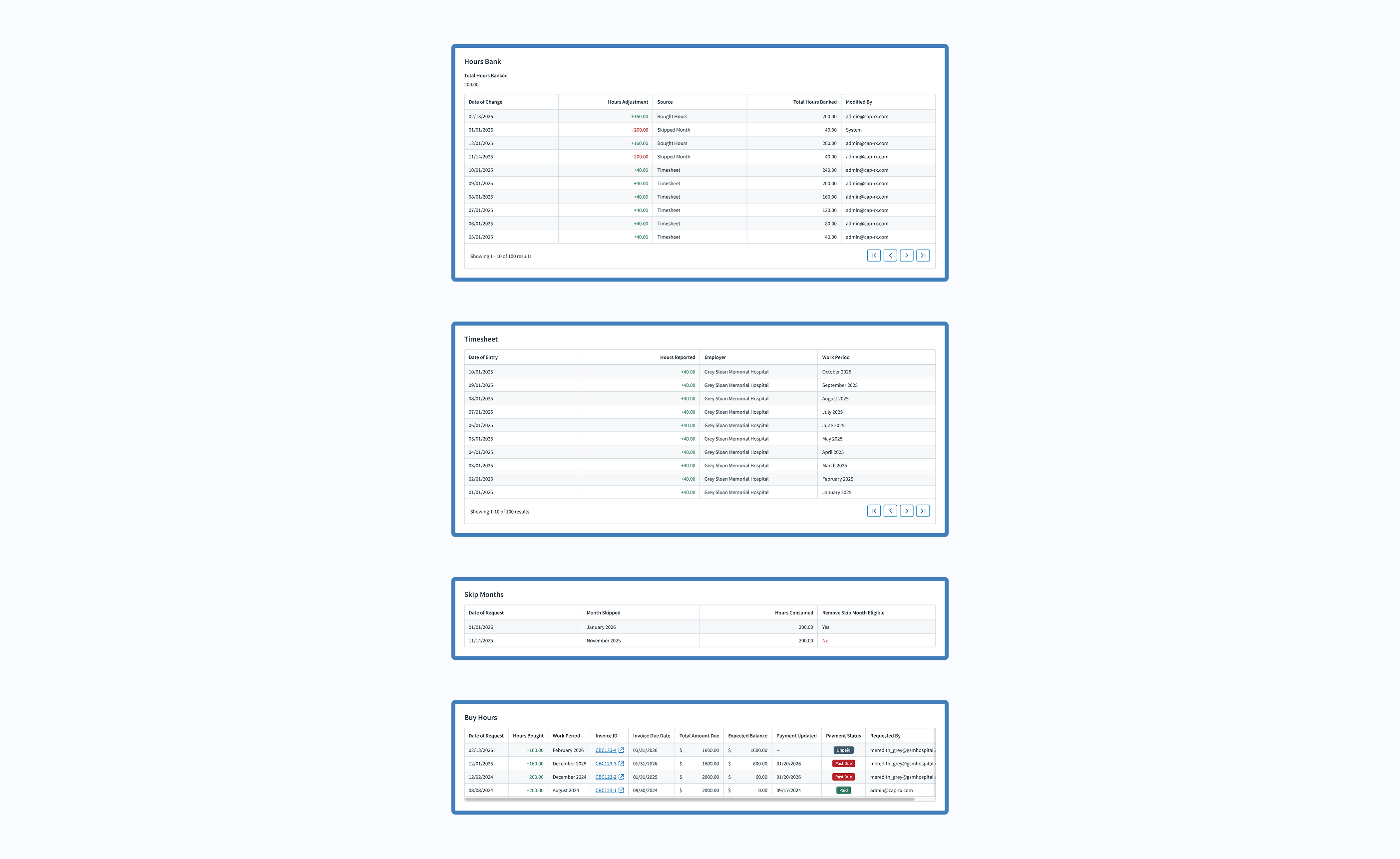
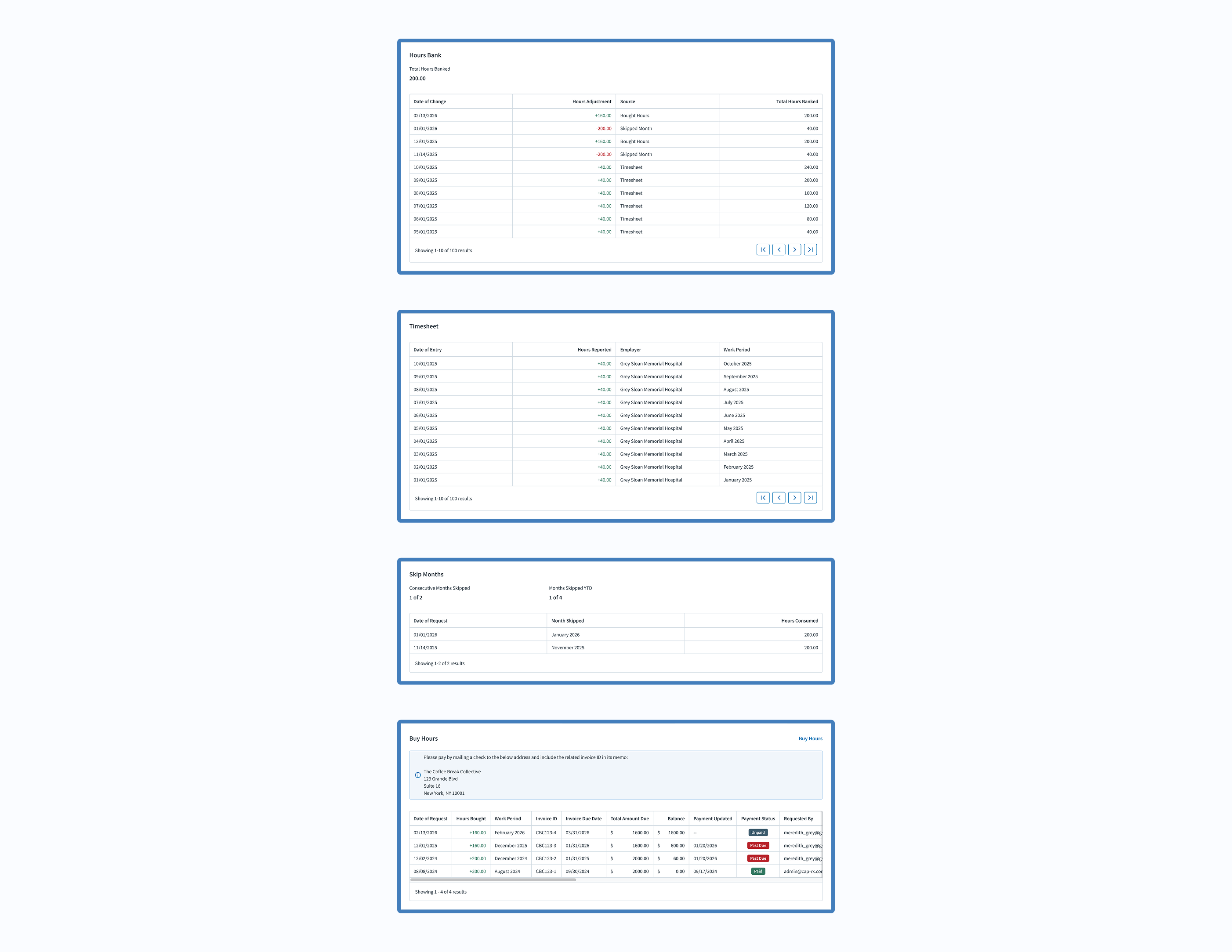
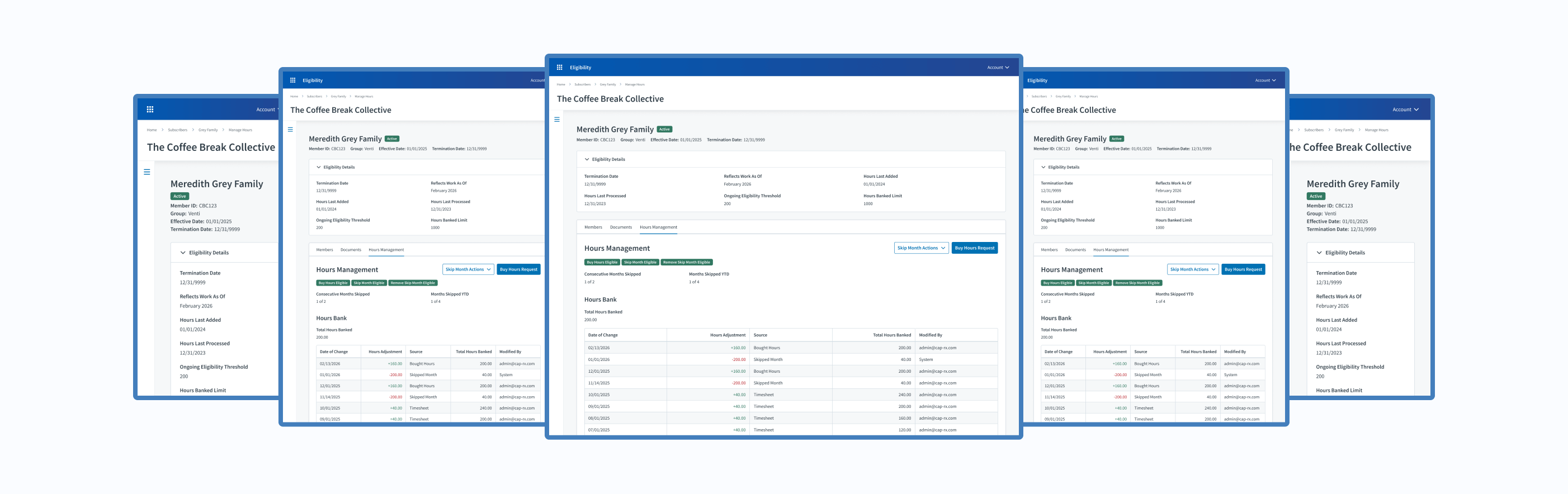
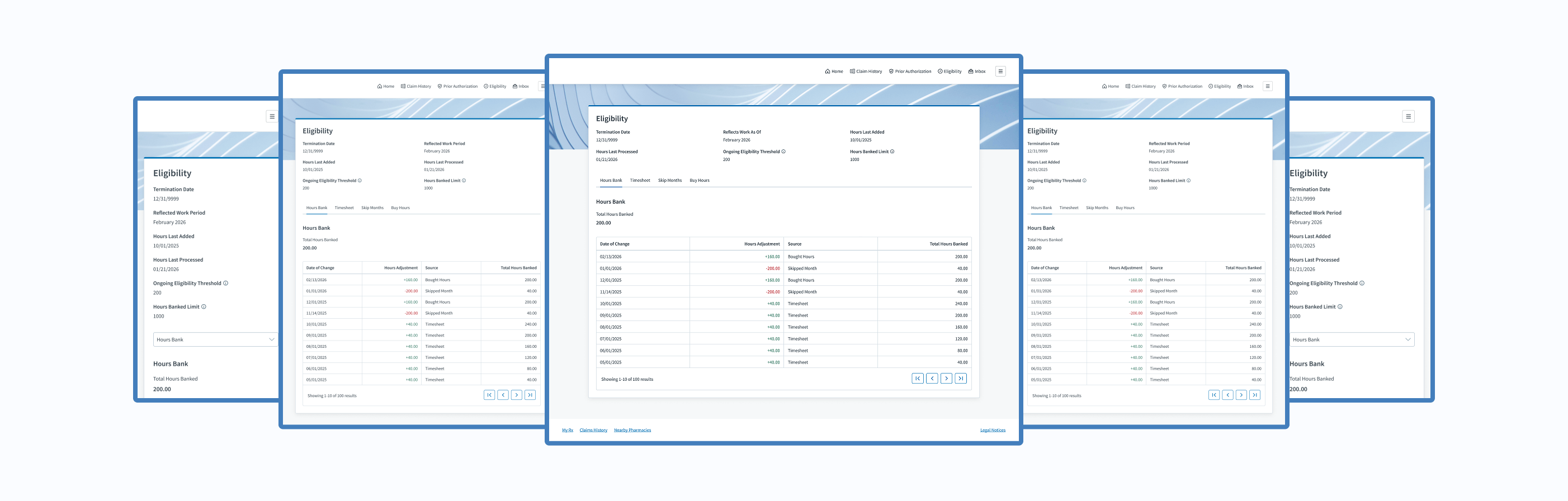
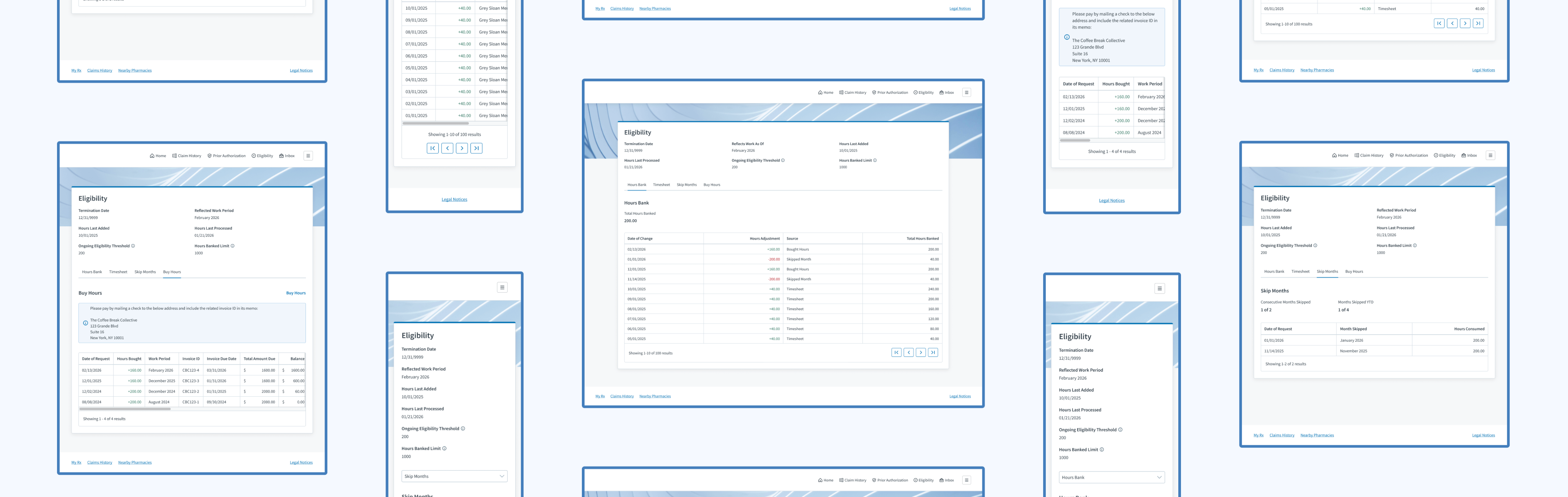
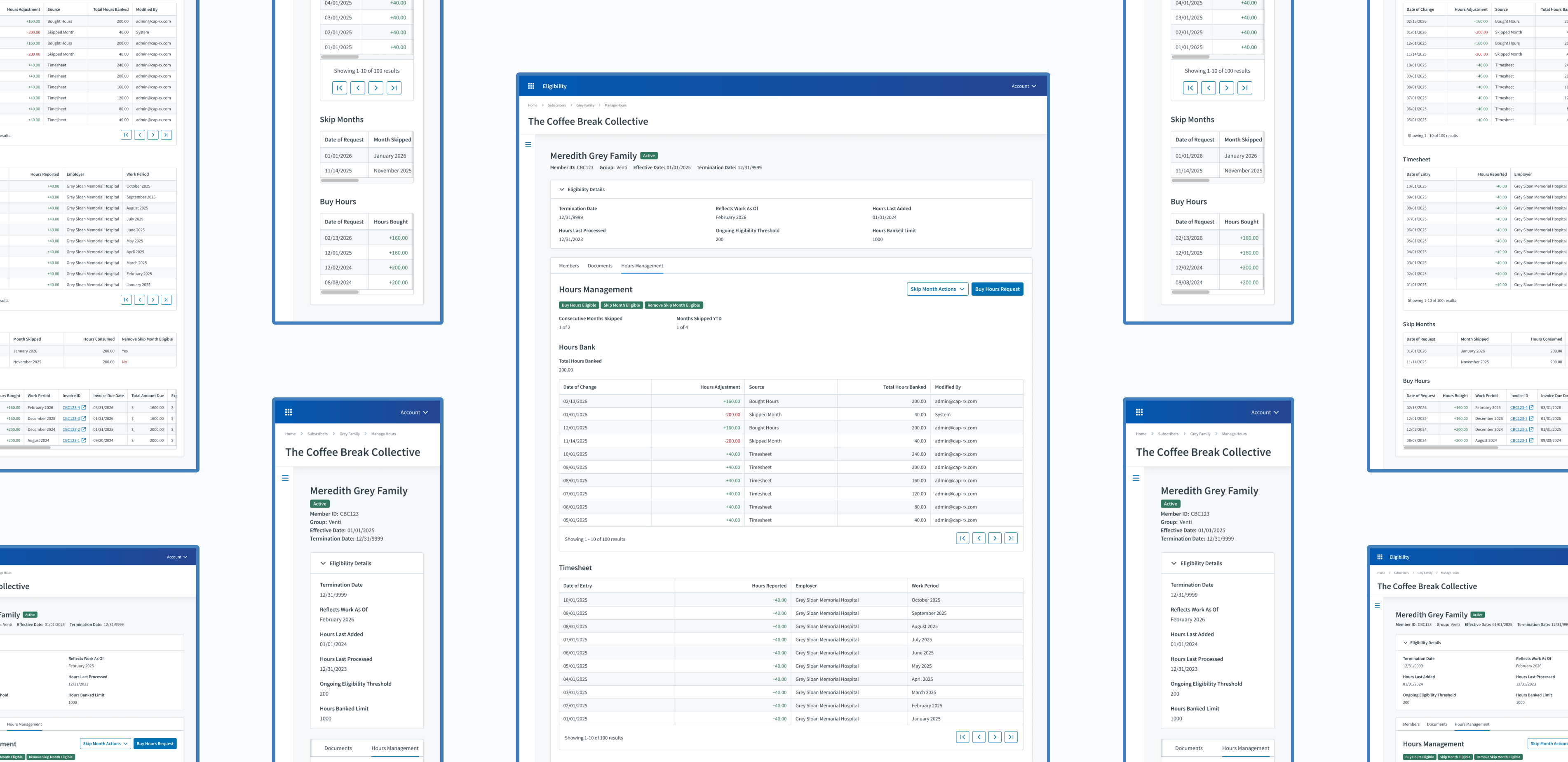
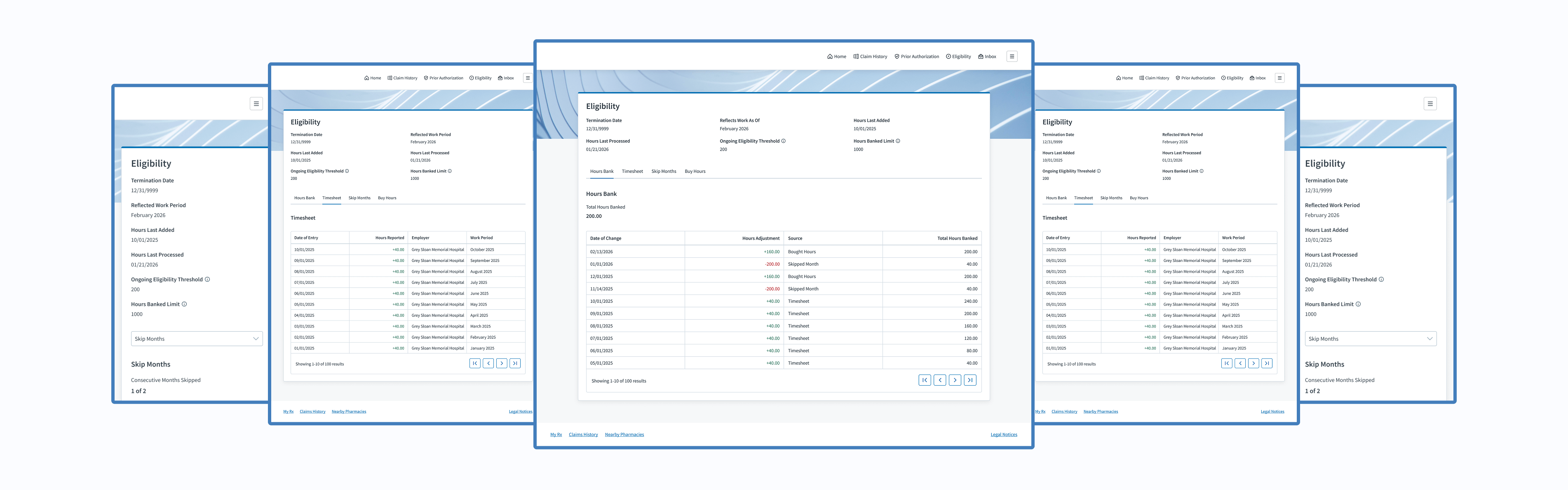
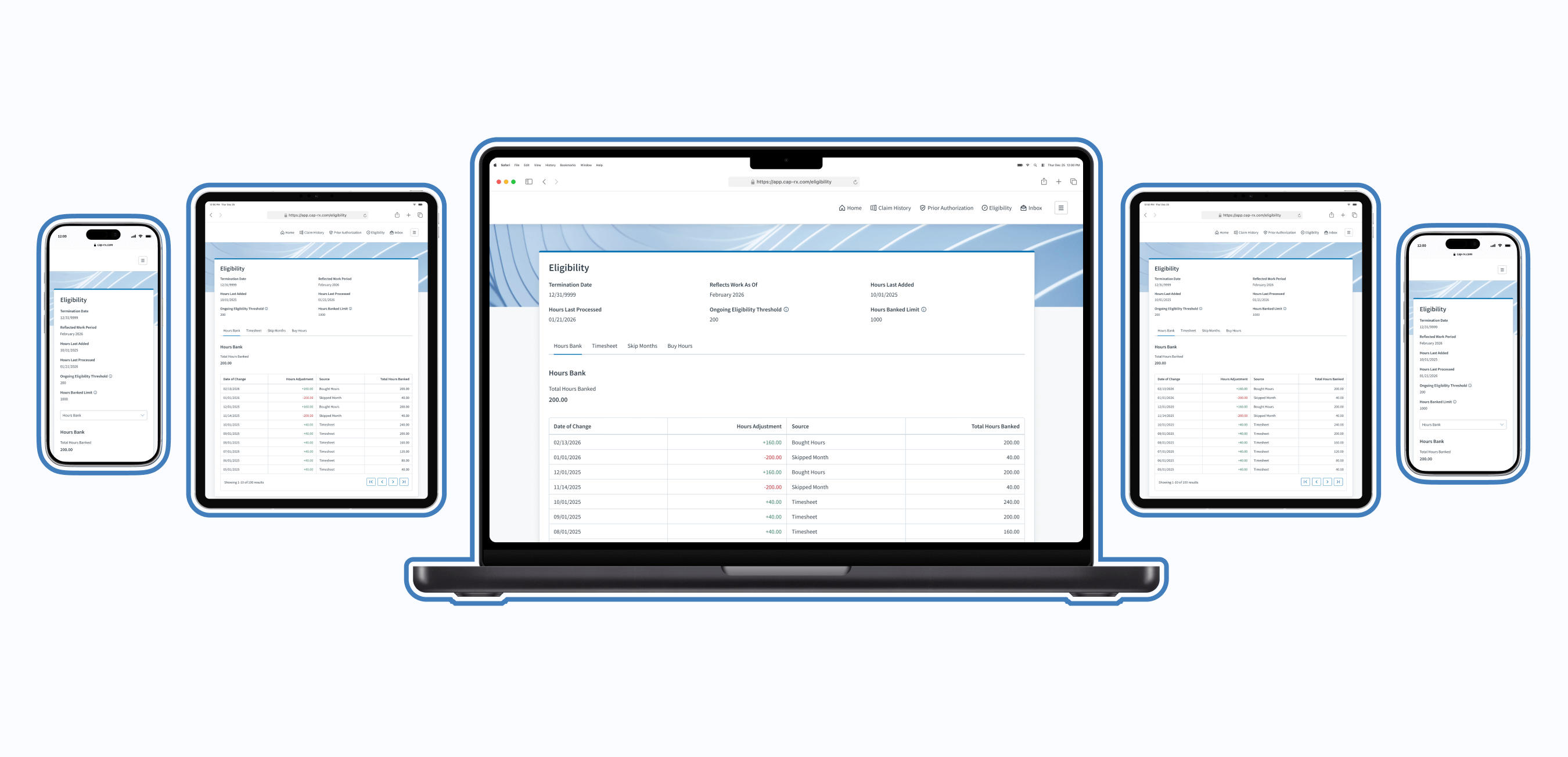
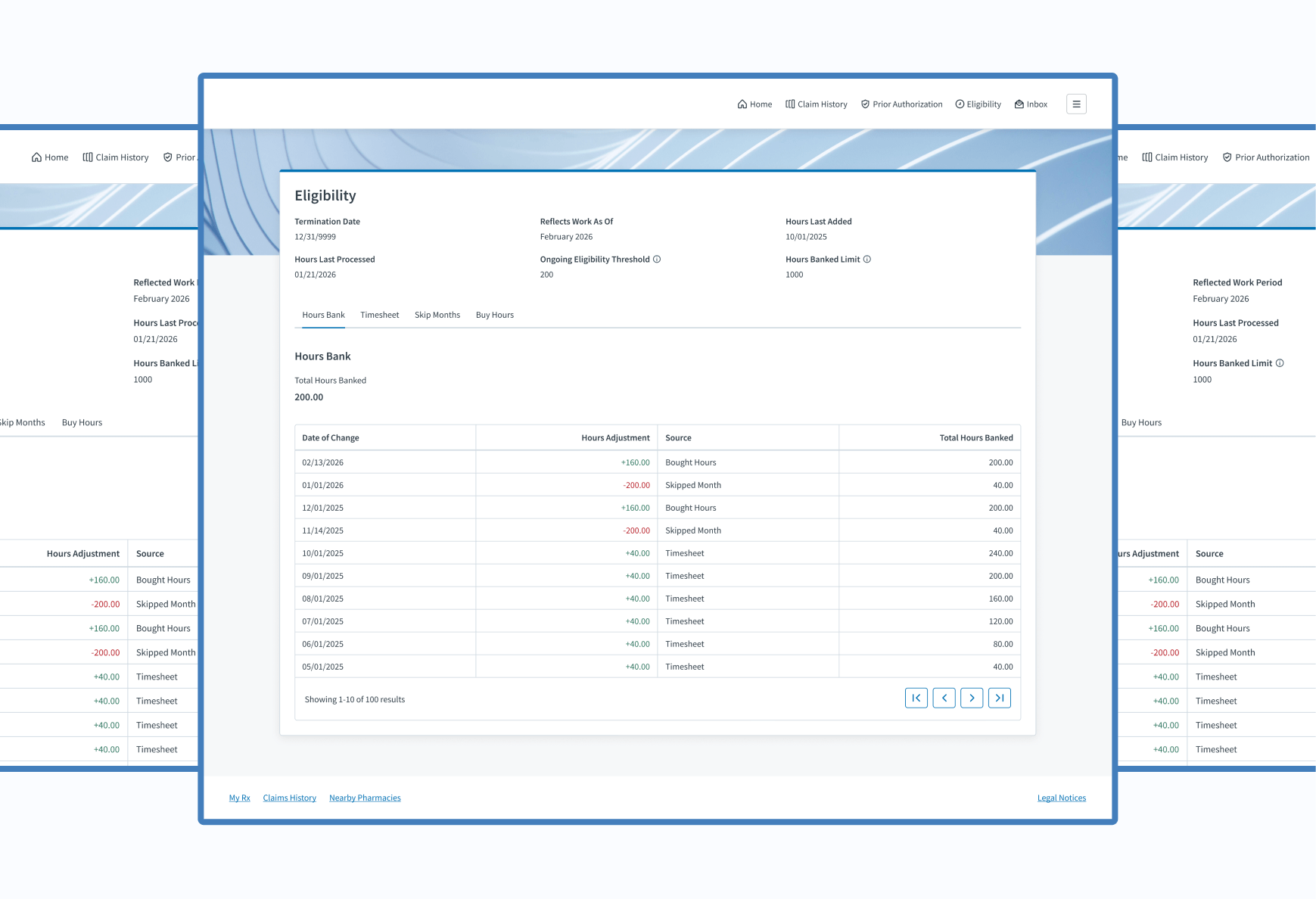
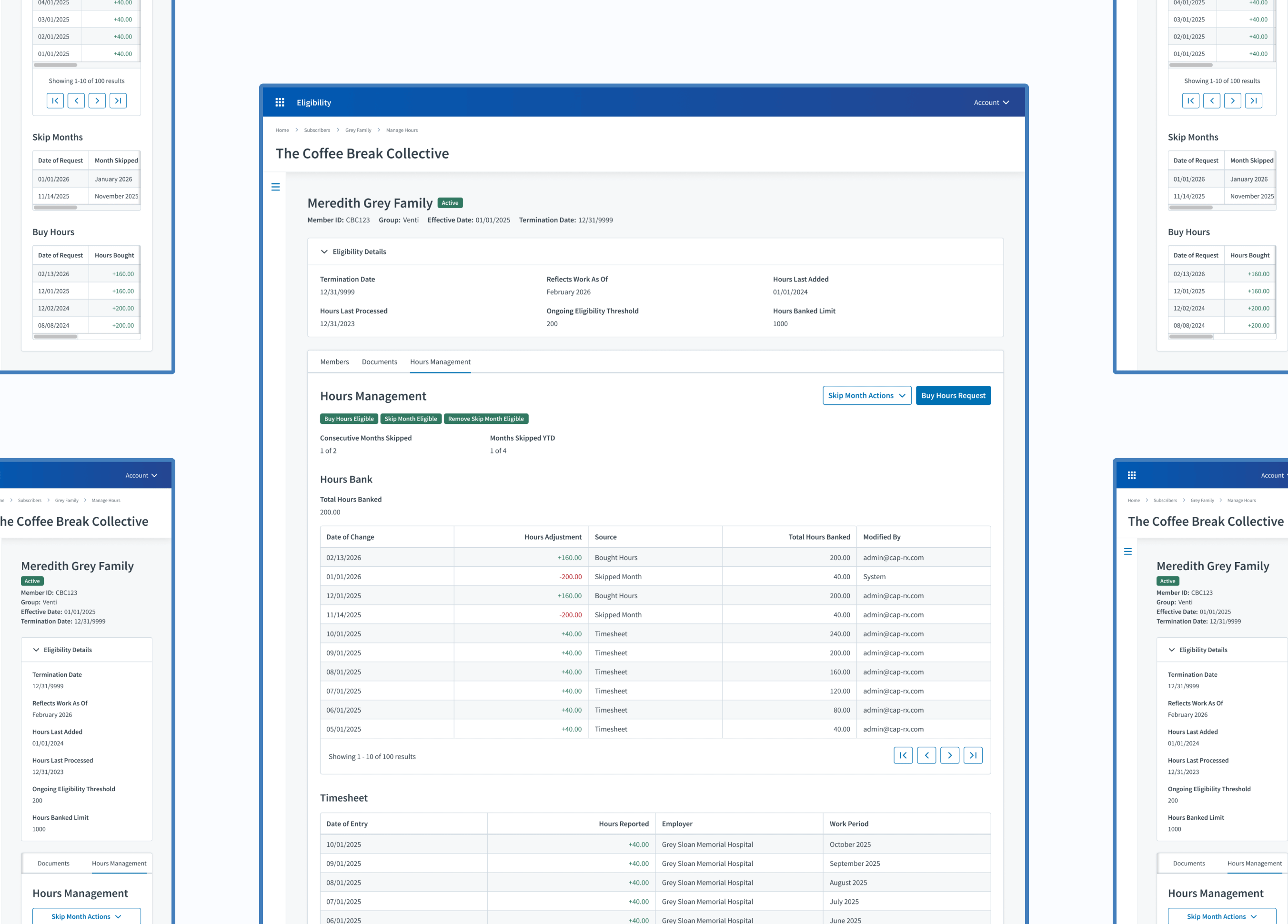
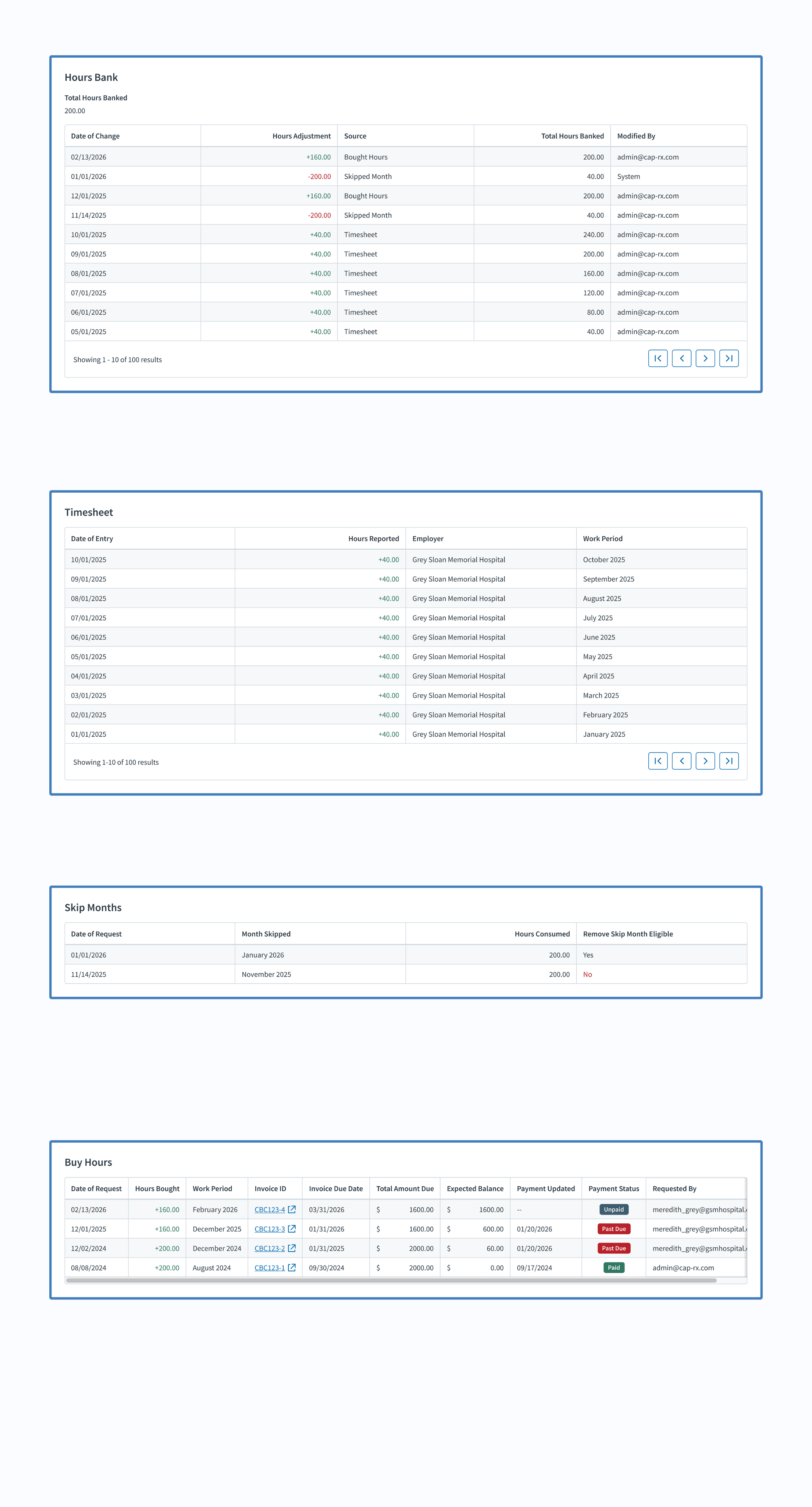
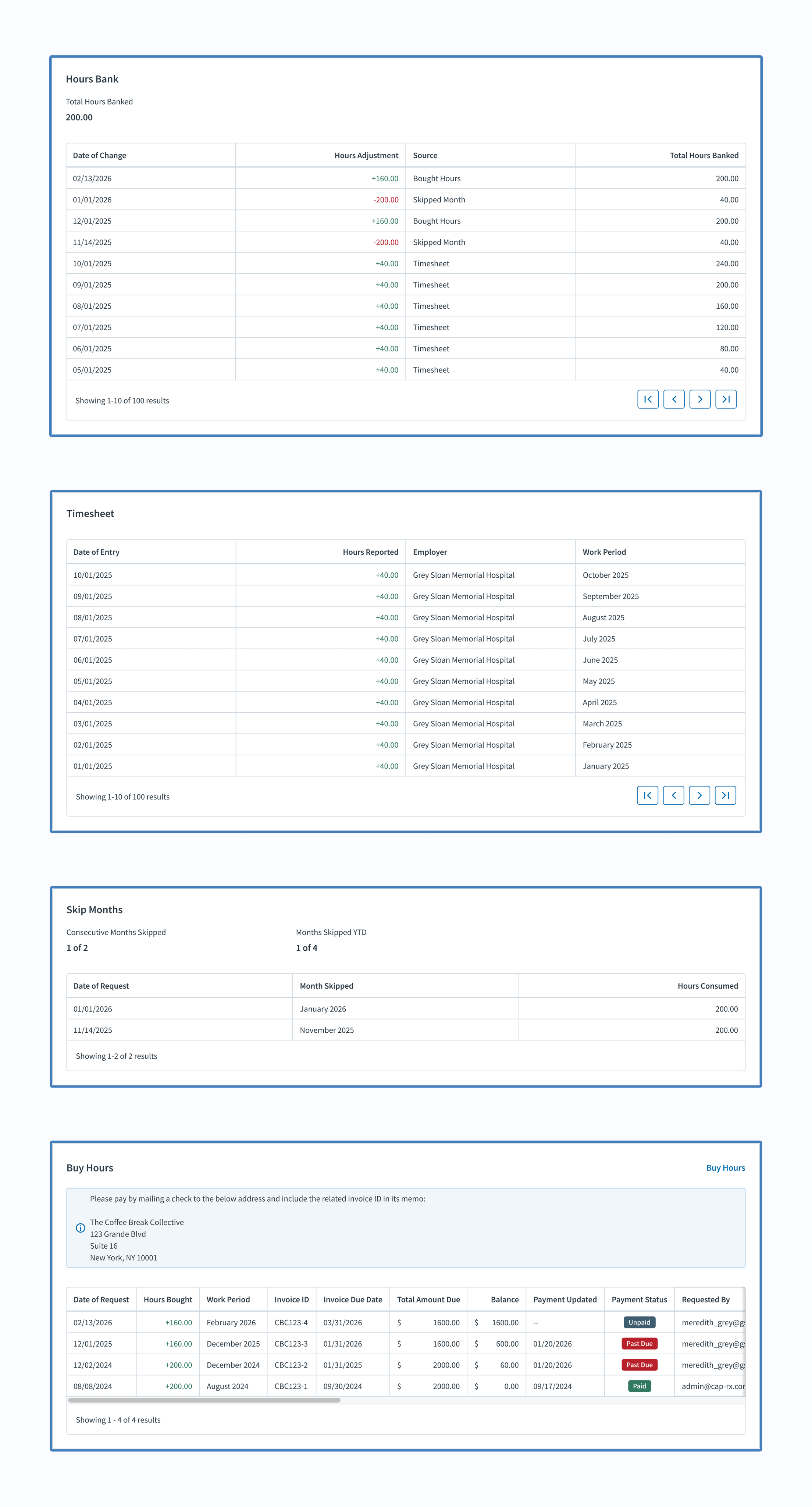
First, I started working on the member portal experience by migrating features from the benefit administrator experience within the Eligibility product. Along with useful information about their benefit eligibility, cardholders were now able to view their hours bank, timesheet, and more.
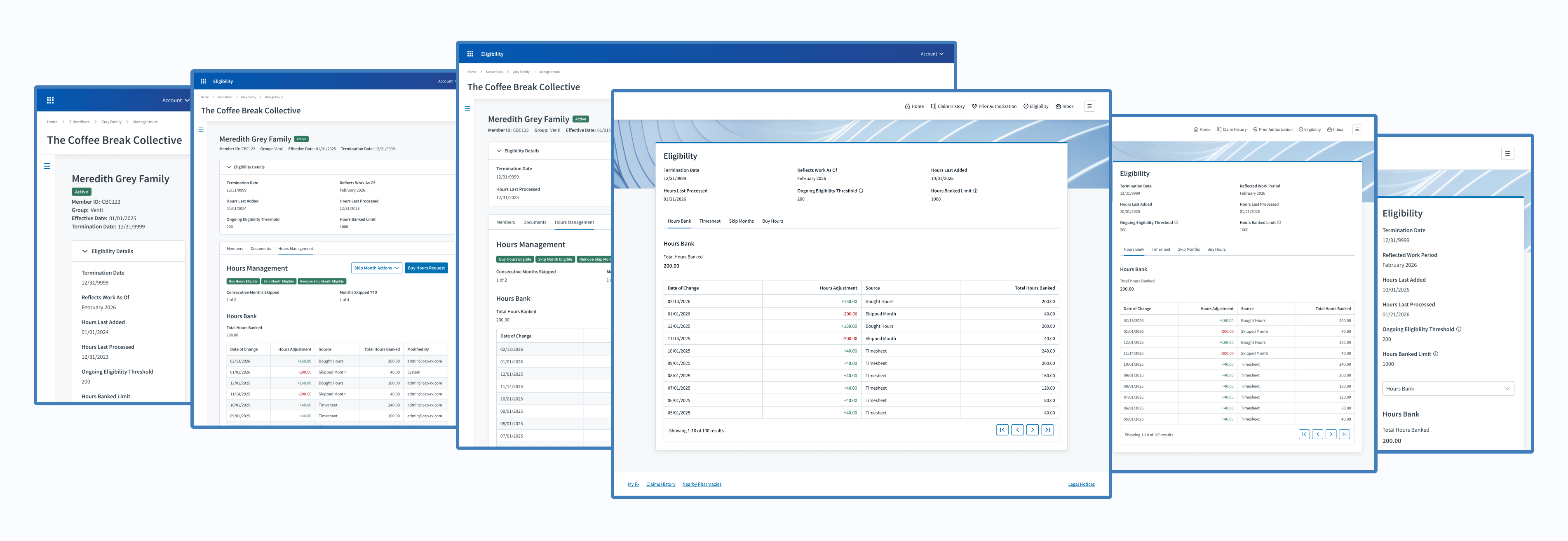
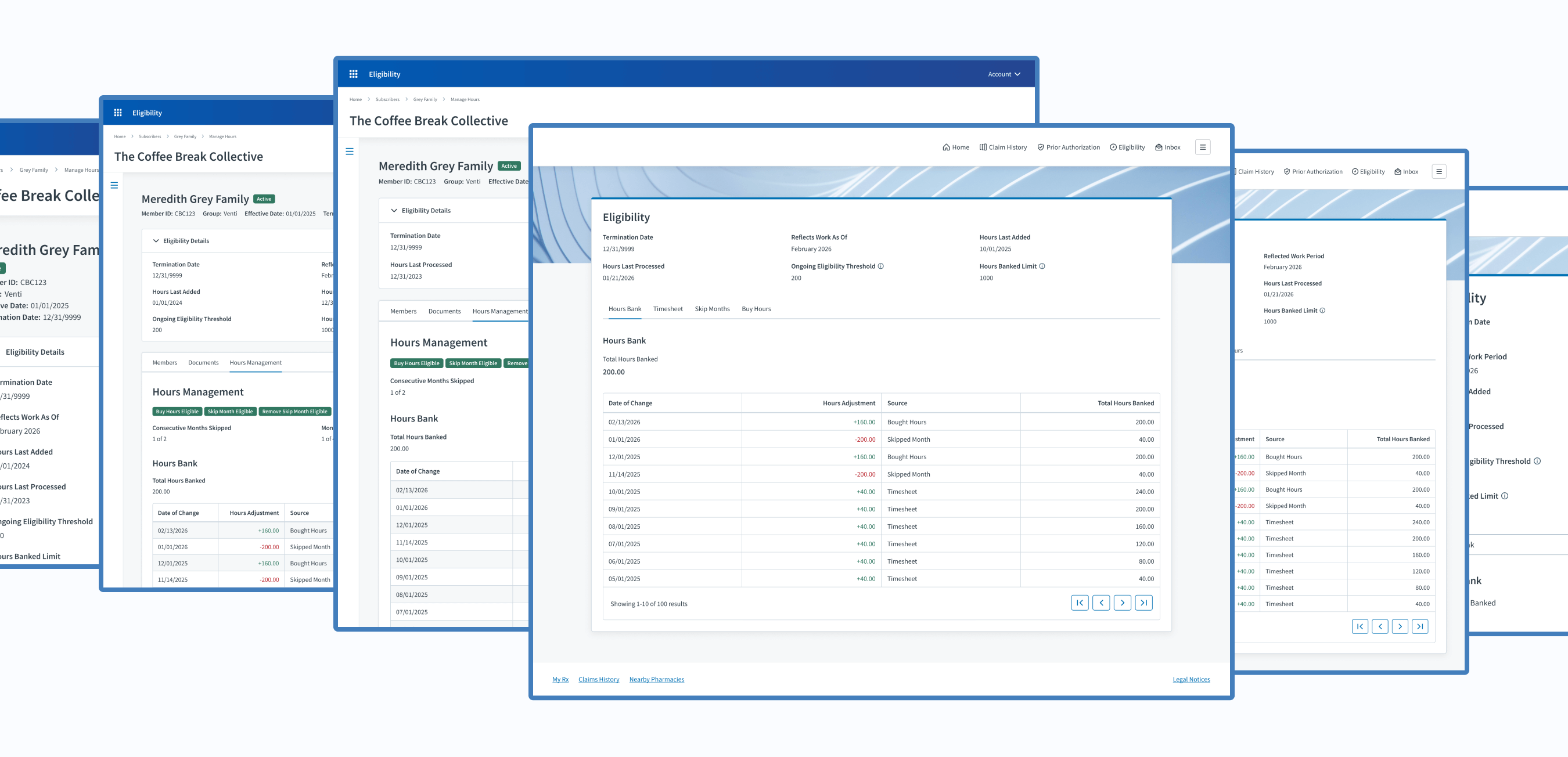
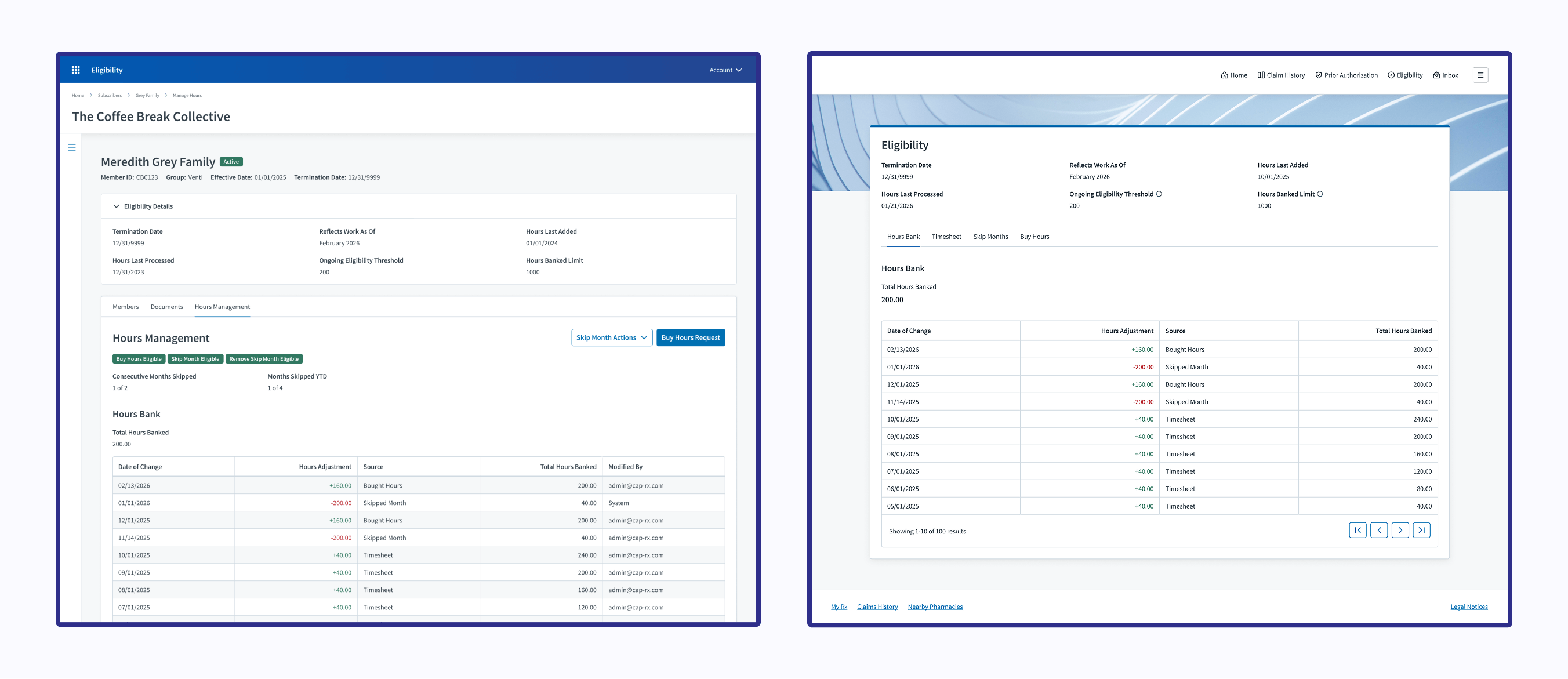
After finishing the member portal design, I ensured the user interface and copy from the benefit administrator experience matched the member portal experience.
Developer Constraints
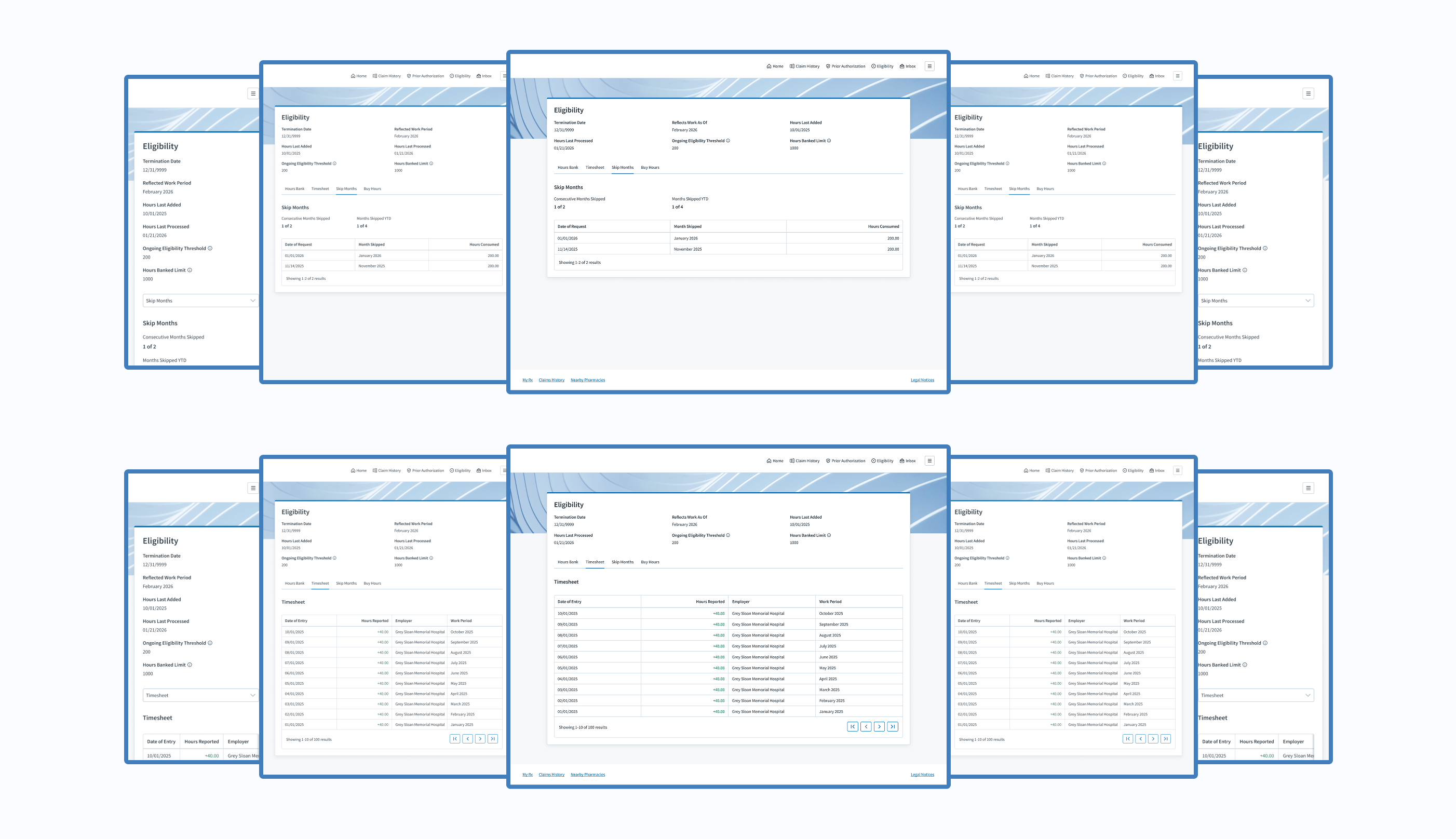
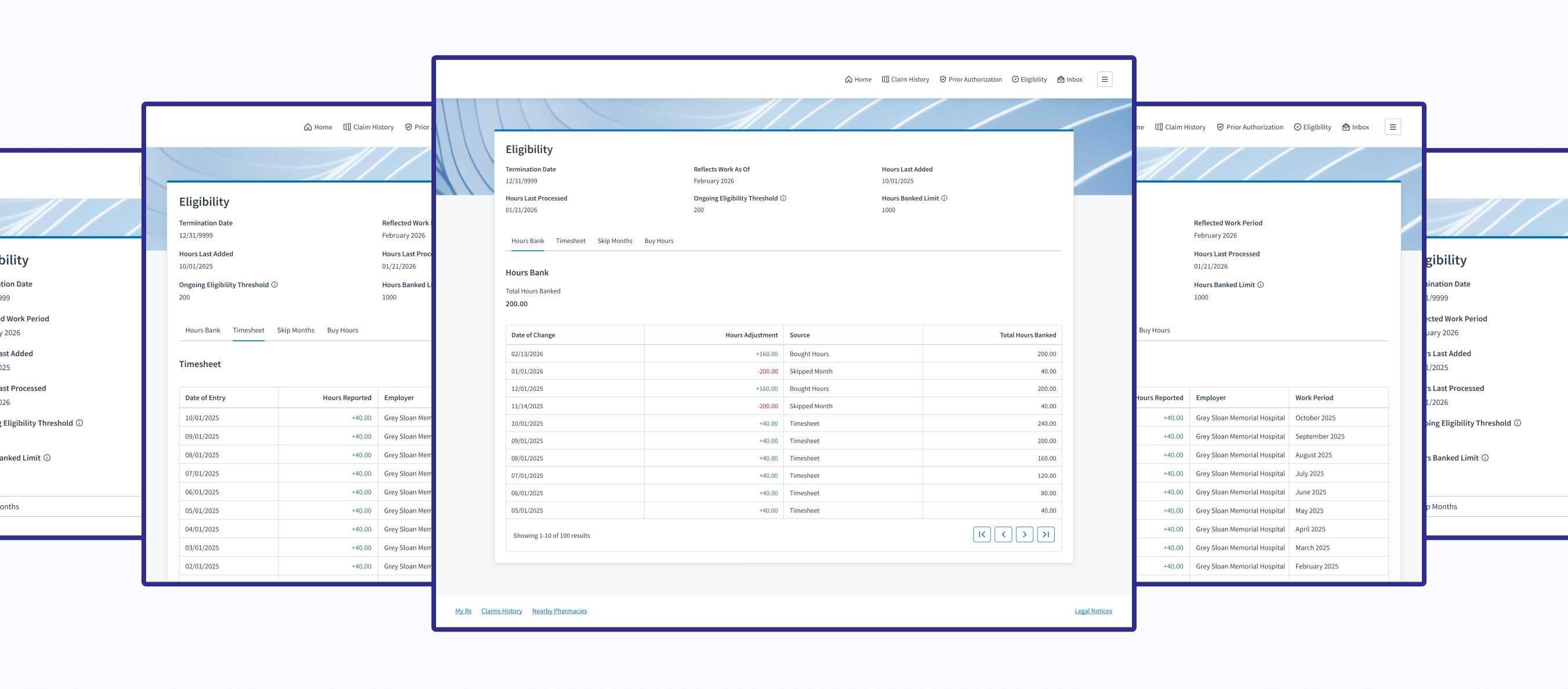
Notice in the member portal (below on the right), I gave each table its own tab instead of making it a long panel like for admins. This was due to a developer constraint. I was advised to design separate tabs for each table to lessen the potential of lagging, so that is the design direction I went with.
Design Review
Once I finished the member portal designs, I reviewed them with the member portal UI/UX designers and product manager. That way, they were aware of the updates to their product.
The Process
User Stories
The Cardholder
As a cardholder, I need to view and manage my hours within the member portal to ensure I qualify for my employer’s benefits.
Acceptance Criteria
Give cardholders the ability to view and buy their hours.
The Benefit Administrator
As a benefit administrator, my experience must be consistent with the cardholders’ experience within the member portal, so I can easily address any comments or concerns they may have.
Acceptance Criteria
Ensure the admin experience within our product aligns with the cardholder experience within the member portal.
The Process
User Research
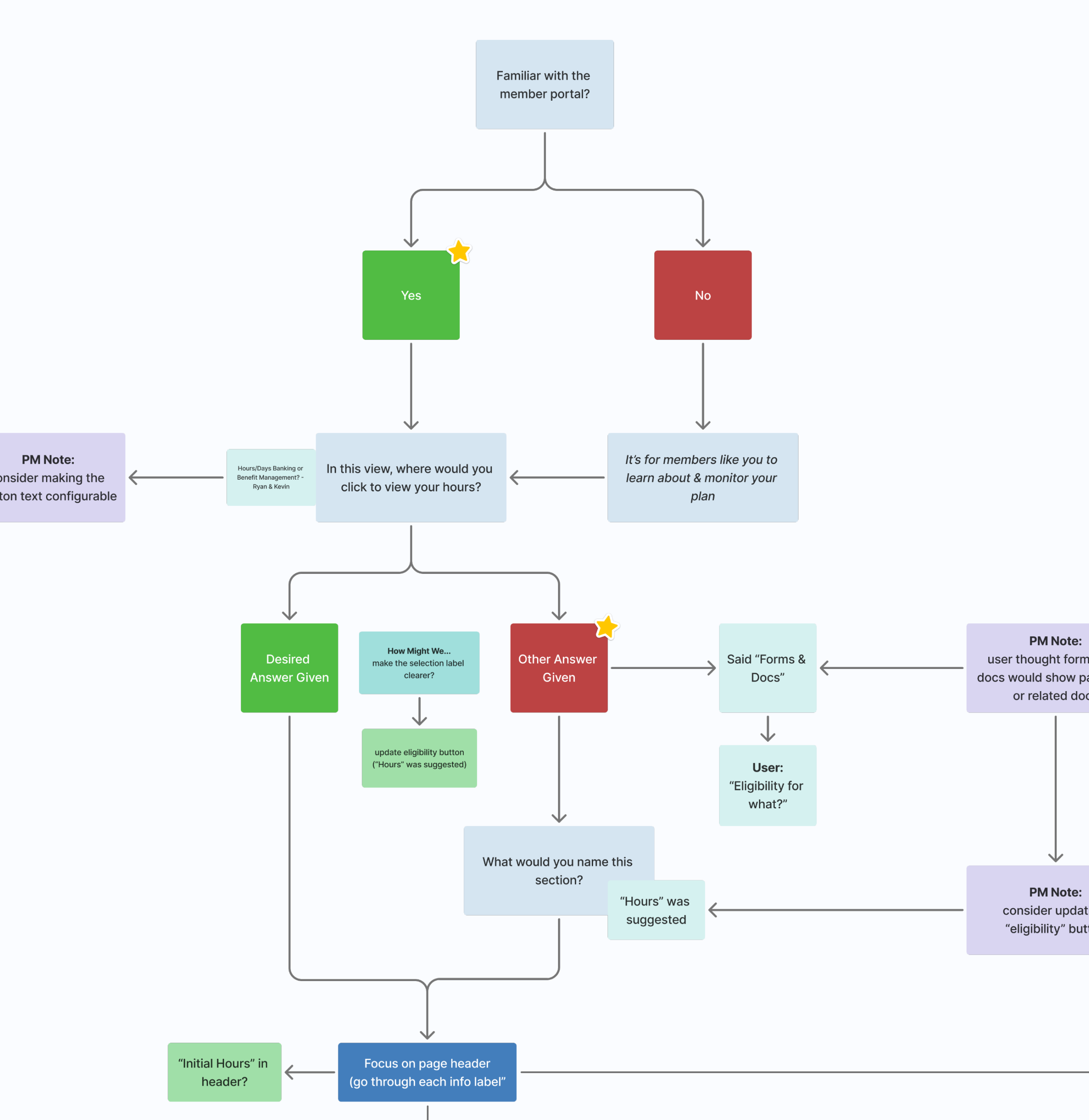
Once my developers confirmed technical feasibility and the member portal team approved the designs, I proceeded to the next step: user research to validate that my designs met the needs of cardholders.
Research Constraints
My team didn’t have great access to our cardholders; nevertheless, thanks to stakeholder magic, I was able to review my designs with one cardholder.
User Interview
Since this cardholder didn’t have access to Figma (nor could we get him access), I decided to simply walk through the designs and ask open-ended questions about the experience. After the meeting, I gathered my notes and highlighted possible improvements for future iterations.
View User Interview Notes

The Final Results
Outcomes
So, how did we increase transparency and autonomy for cardholders?
Transparency
By giving cardholders the ability to view their hours bank, timesheet, skipped months, bought hours, and useful information about their benefit eligibility status
Autonomy
By giving cardholders the ability to buy hours to maintain their benefit eligibility
Experiences
Benefit Administrators (Judi®)
Explore Admin Experience

Cardholders (Member Portal)
Explore Cardholder Experience
Project Achievements
1 Member Self-Service Feature Created
4 Real-Time Data Displays Developed
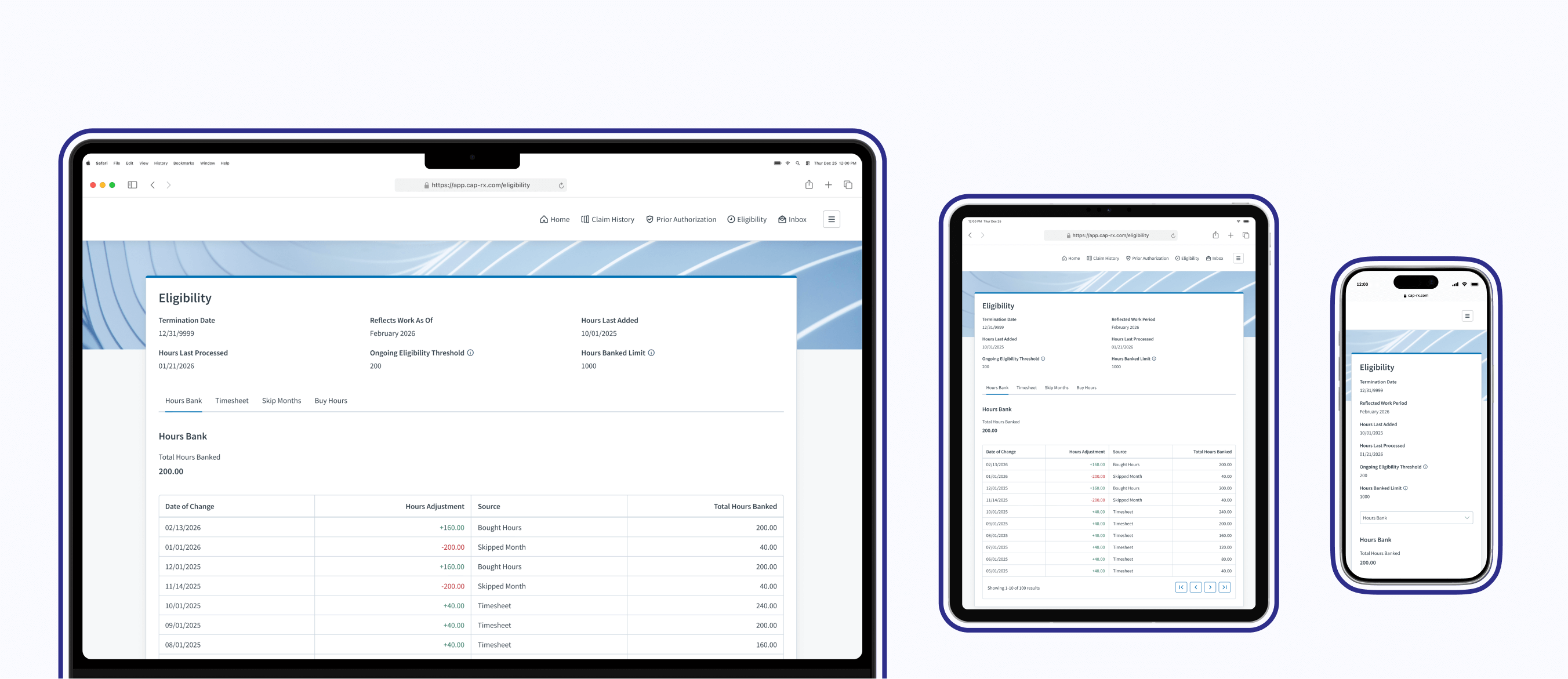
4 Admin & Member Experiences Unified
66,000+ Members Gained Transparency & Autonomy
Next Steps
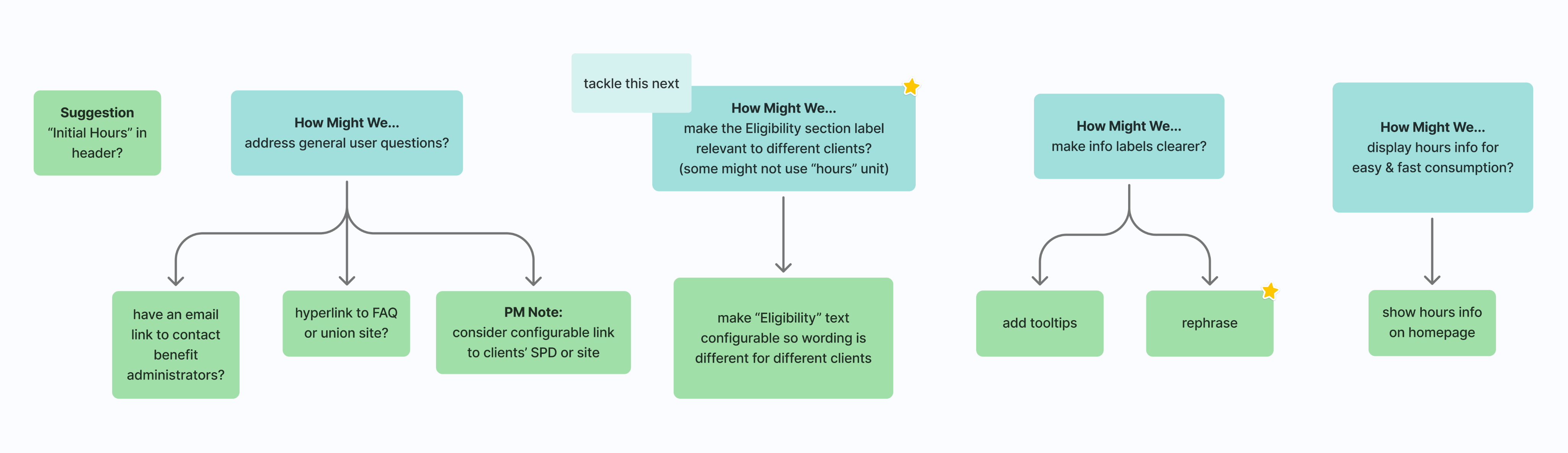
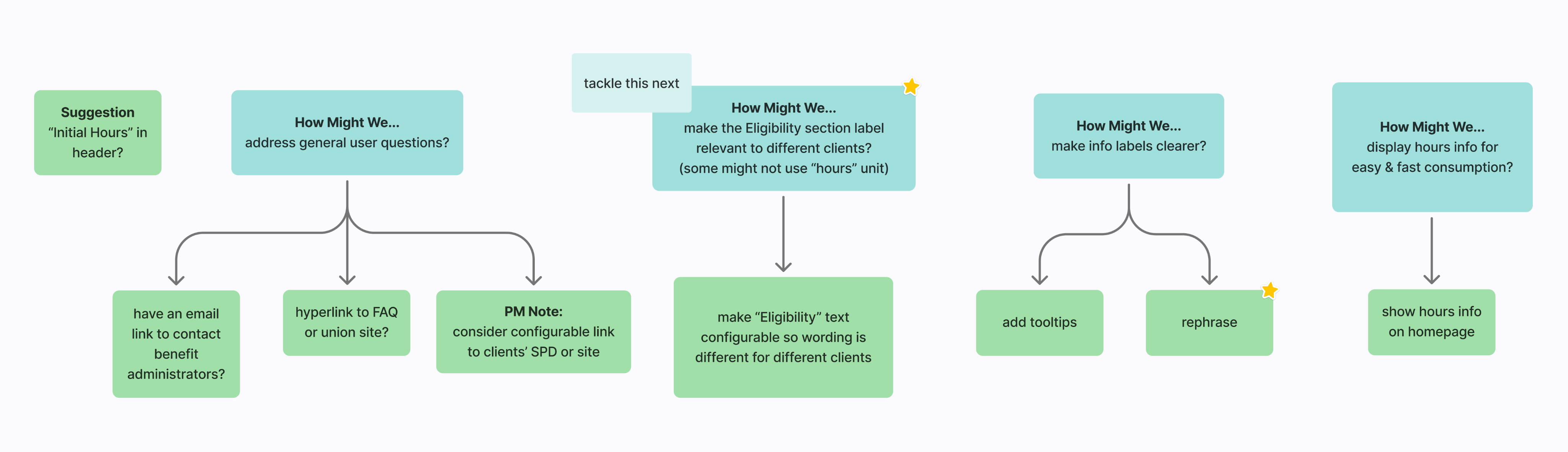
Take action on the most valuable, user-suggested improvements mentioned during the user interview.
The Final Results
My Takeaways
Minimal user research capabilities are better than none. If resources are limited, maximize the research value by asking targeted questions and jotting down actionable next steps.
Credits
Project Management
Eric Martinson
Scrum Master
Kelly Smith
Project Manager
Software Engineers
Ahmed Gamal
Technical QA Analyst
Cam Montgomery
Senior Full-Stack Software Developer 2
David Luther
Senior Back-End Software Developer 2
Enrique Mendez Castro
Software Developer
Hector Ubiera
Director Front-End Software Developer
Mindaugas Zukauskas (MZ)
Staff Software Developer
Mohammad Althayabeh
Senior Full-Stack Software Developer 2
User Experience
Raven Caffey
UI/UX Designer
UI/UX Design Portfolio: Year 6 Edition
Case Study
Clarity. Control. Cardholder.
How might we increase transparency and autonomy for cardholders?
Cross-Team Coordination
Omnichannel
Real-Time Data Display
Systemic Design Patterns
A Collaboration Between 3 Teams:
Development, Project Management, & User Experience
At a Glance
Chapter 01
The Discovery
My product team needed to give cardholders the ability to view their hours data and some control over their benefit eligibility; however, our product is restricted to 2 user types that don’t include cardholders. Where would this request come to life?
Chapter 02
The Challenges
- Our Eligibility product didn’t have features in the member portal. I was starting with a blank slate.
- Since I was starting with a blank slate, I had to follow established design patterns within the member portal.
- I needed to ensure the benefit administrator experience within Judi® and the member portal experience aligned.
- Historically, I’ve only had access to benefit administrators for design reviews—not cardholders.
Solution: Let’s utilize the member portal to display cardholder hours while offering self-service features.
Chapter 03
The Opportunities
- Collaboration between two product teams
- Work on a different Judi Health product
- Enhance features within my own product
- Have a user interview with a cardholder (very rare)
Chapter 04
The Process
This is where I designed the necessary features, then reviewed my design solutions with my developers, the member portal team, and a cardholder.
Chapter 05
The Final Results
Cardholders gained the ability…
- to view their hours bank, timesheet, skipped months, bought hours, and useful information about their benefit eligibility status
- to buy hours to maintain their benefit eligibility
My Takeaway: Minimal user research capabilities are better than none. If resources are limited, maximize the research value by asking targeted questions and jotting down actionable next steps.
Fine Print
Role
Lead UI/UX Designer
Responsibilities
User Interface
UX Design
User Research
Duration
2 Weeks / 1 Sprint
Tools
Figma
Lucidchart
Primary Deliverables
4 New Data Displays
4 Updated Data Displays
1 Self-Service Feature
Secondary Deliverables
User Research Feedback
High-Fidelity Wireframes
Prototypes
Company
Judi Health
Industry
Health Tech
Outline
Front Matter
Chapter 01
Chapter 02
Chapter 03
Chapter 04
Chapter 05
Appendix
The Introduction
About Judi Health
This case study originates from work done at Judi Health, a health technology company focused on transforming how prescriptions are priced and patient care works to deliver the healthcare we all deserve. It acts as a pharmacy benefit manager (PBM) and pharmacy benefit administrator (PBA), working with health systems, universities, employers, and more.

Relevant Products
Judi®
Judi® is a health platform built to grow and adapt with any organization. It makes it easy to handle new regulations and requirements, resulting in faster results, smoother operations, and a better experience for members overall.
Eligibility
Within Judi®, my cross-functional Agile team owns the third-party administrator (TPA) Eligibility product, where benefit administrators configure requirements and manage cardholders, and employers submit timesheets and pay invoices.
Member Portal
The Member Portal is a digital platform separate from, but still related to, Judi®. It gives members comprehensive access to their pharmacy benefits and related health information.
New Product Feature
Imagine relying on your manager or an admin to learn about how many hours you’ve worked and whether you’ve qualified for the offered employer benefits. That was the annoying reality for thousands of cardholders within the Eligibility product. They had to contact their manager or a benefit administrator to know their latest hours and benefit eligibility stats. Stakeholders suggested that we give them better access to their information, and the product team did just that.
The Discovery
Business Need
Give cardholders the ability to view their hours data and some control over their benefit eligibility.
How Might We...
How might we allow users to view their hours data?
How might we give more power to cardholders?
How might we increase transparency and autonomy for cardholders?
The Discovery
The Solution
Let’s utilize the member portal, a separate Judi Health product, to display cardholder hours while offering self-service features. Our Eligibility product is restricted to 2 user types that don’t include cardholders, so this was the best route.
The Challenges
Blank Slate
Our Eligibility product didn’t have features in the member portal. I was starting with a completely blank slate.
Thoughts
There will be a menu item to access our features, but what should we call it? Should it just be “Eligibility” to match our module name? I’ll ask users, if possible.
Established Patterns
Since I was starting with a blank slate, I had to follow established design patterns within the member portal.
Thoughts
- Would their design patterns be drastically different than the patterns of my product? If so, how will that affect the experience of my users?
- I’ll ask the member portal UX team for feedback throughout my design process, so I don’t get far into my design and be completely off base; however, I do have access to the wireframes of other parts of the member portal, so that scenario shouldn’t happen.
Multi-Experience Consistency
I needed to ensure the benefit administrator experience within Judi® and the member portal experience aligned in case cardholders called admins for assistance.
Thought
While doing so, what areas could improve within the admin experience that I could apply to the new member experience?
User Access
Historically, I’ve only had access to benefit administrators for design reviews. Access to cardholders has been denied in the past.
Thought
Can I review my design solutions with at least one cardholder, or would I have to depend on benefit administrators or stakeholders to relay user feedback to me?
The Opportunities
Design Collaboration
Adding Eligibility product features to the member portal required collaboration with the UX designers and product manager. Fun!
Product Crossover
For the first time, I had the chance to work on a different product within the greater Judi Health ecosystem.
Thought
What could I learn from its design?
UX Enhancements
Within Judi®, I had the chance to enhance the relevant benefit administrator features.
Thought
Does any design pattern need the latest design handbook updates?
Rare User Interview
Later in my design process, I was told that I could review my design solution with one cardholder!
Thought
With only one design review, what questions should I ask to make interaction as valuable as possible?
The Process
Design
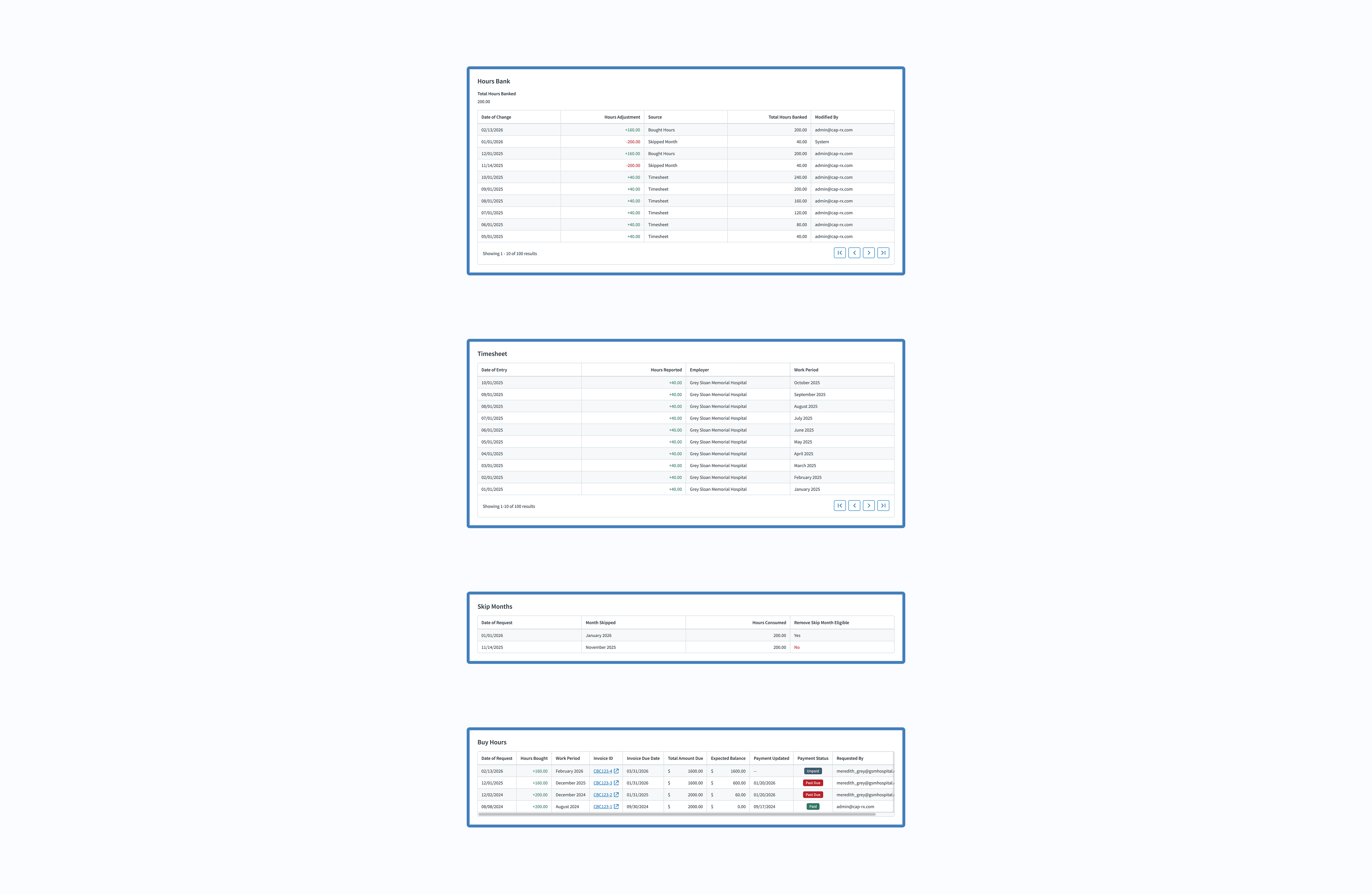
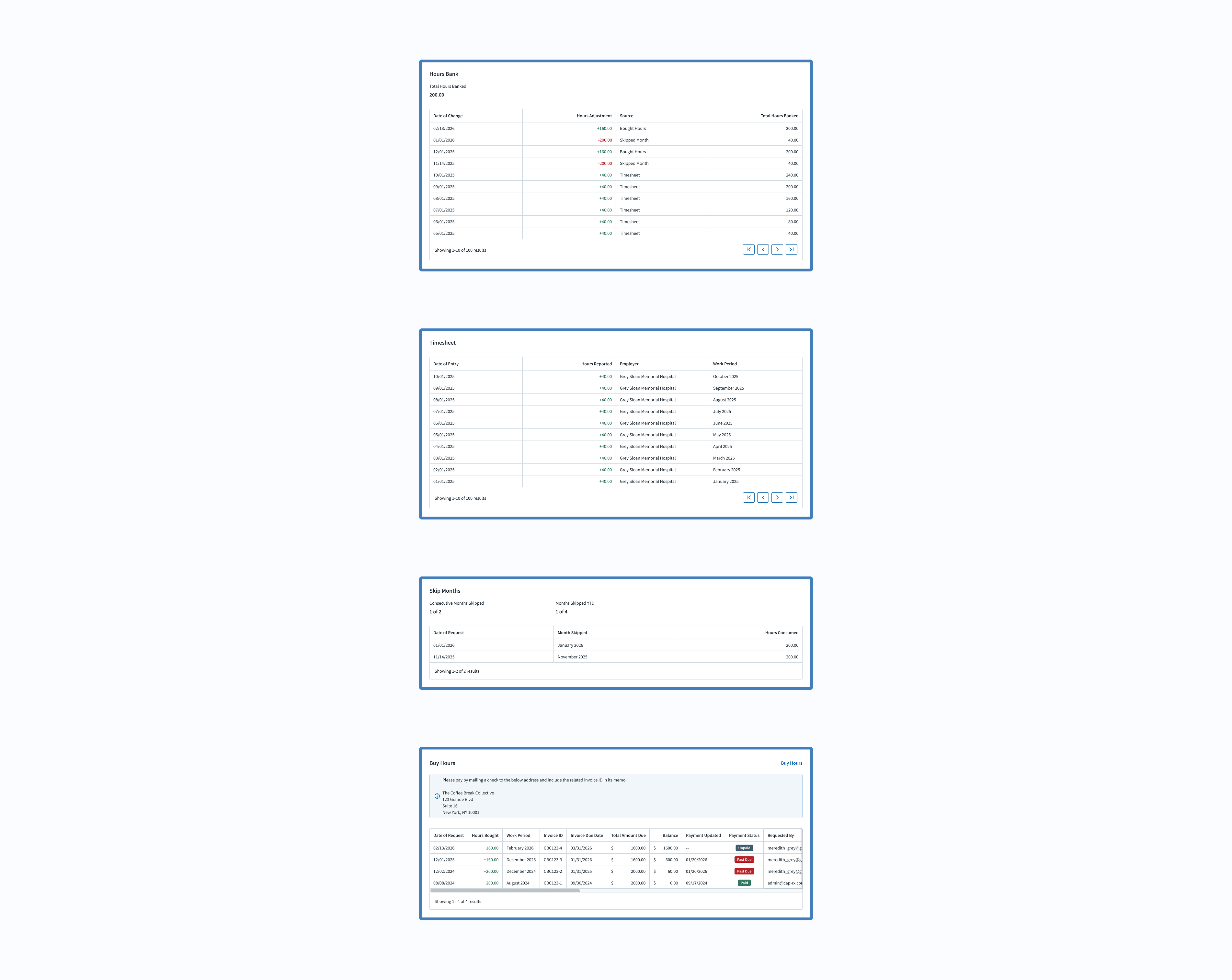
First, I started working on the member portal experience by migrating features from the benefit administrator experience within the Eligibility product. Along with useful information about their benefit eligibility, cardholders were now able to view their hours bank, timesheet, and more.
After finishing the member portal design, I ensured the user interface and copy from the benefit administrator experience matched the member portal experience.
Developer Constraints
Notice in the member portal (below on the right), I gave each table its own tab instead of making it a long panel like for admins. This was due to a developer constraint. I was advised to design separate tabs for each table to lessen the potential of lagging, so that is the design direction I went with.
Design Review
Once I finished the member portal designs, I reviewed them with the member portal UI/UX designers and product manager. That way, they were aware of the updates to their product.
The Process
User Stories
The Cardholder
As a cardholder, I need to view and manage my hours within the member portal to ensure I qualify for my employer’s benefits.
Acceptance Criteria
Give cardholders the ability to view and buy their hours.
The Benefit Administrator
As a benefit administrator, my experience must be consistent with the cardholders’ experience within the member portal, so I can easily address any comments or concerns they may have.
Acceptance Criteria
Ensure the admin experience within our product aligns with the cardholder experience within the member portal.
The Process
User Research
Once my developers confirmed technical feasibility and the member portal team approved the designs, I proceeded to the next step: user research to validate that my designs met the needs of cardholders.
Research Constraints
My team didn’t have great access to our cardholders; nevertheless, thanks to stakeholder magic, I was able to review my designs with one cardholder.
User Interview
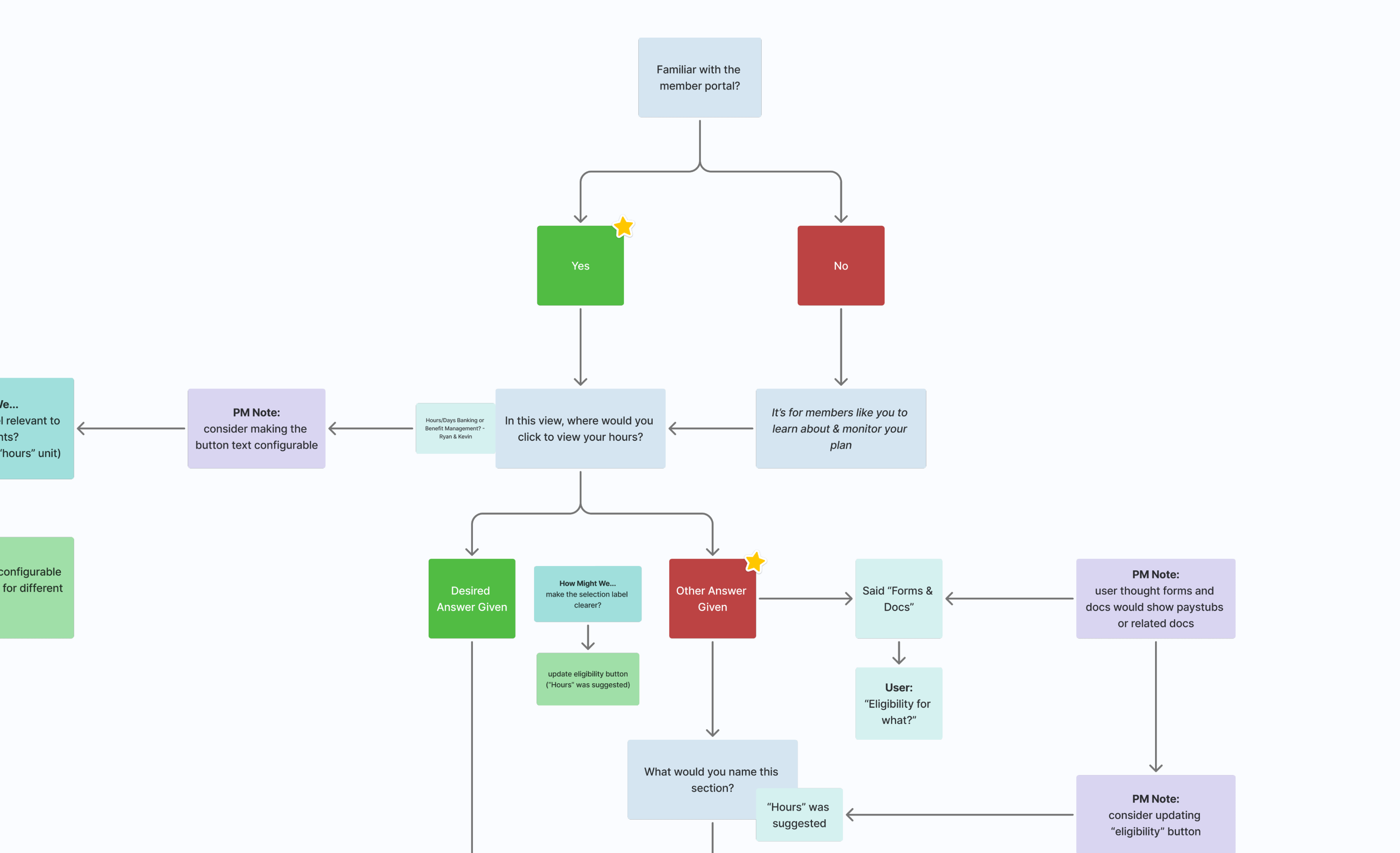
Since this cardholder didn’t have access to Figma (nor could we get him access), I decided to simply walk through the designs and ask open-ended questions about the experience. After the meeting, I gathered my notes and highlighted possible improvements for future iterations.
View User Interview Notes
The Final Results
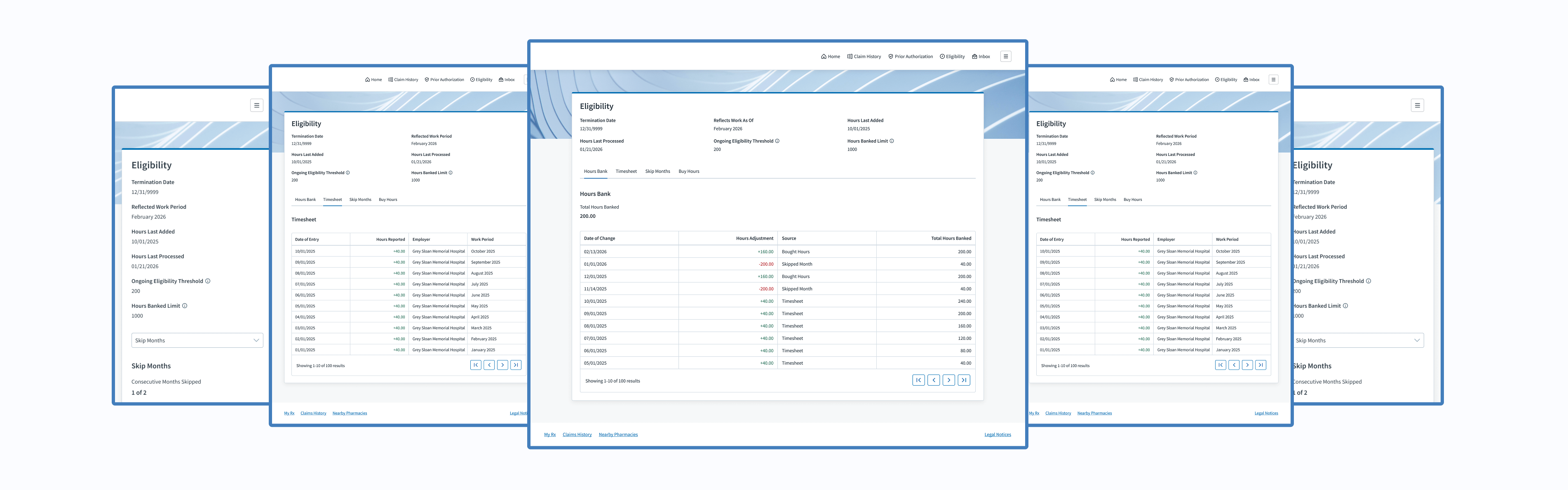
Transparency
By giving cardholders the ability to view their hours bank, timesheet, skipped months, bought hours, and useful information about their benefit eligibility status
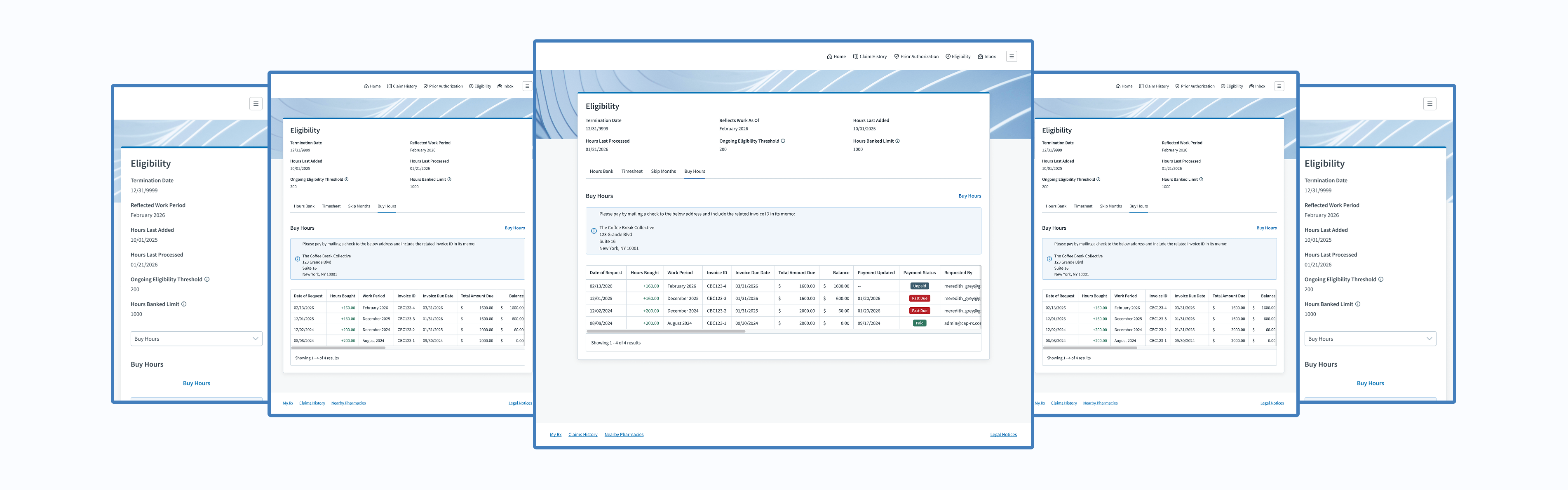
Autonomy
By giving cardholders the ability to buy hours to maintain their benefit eligibility
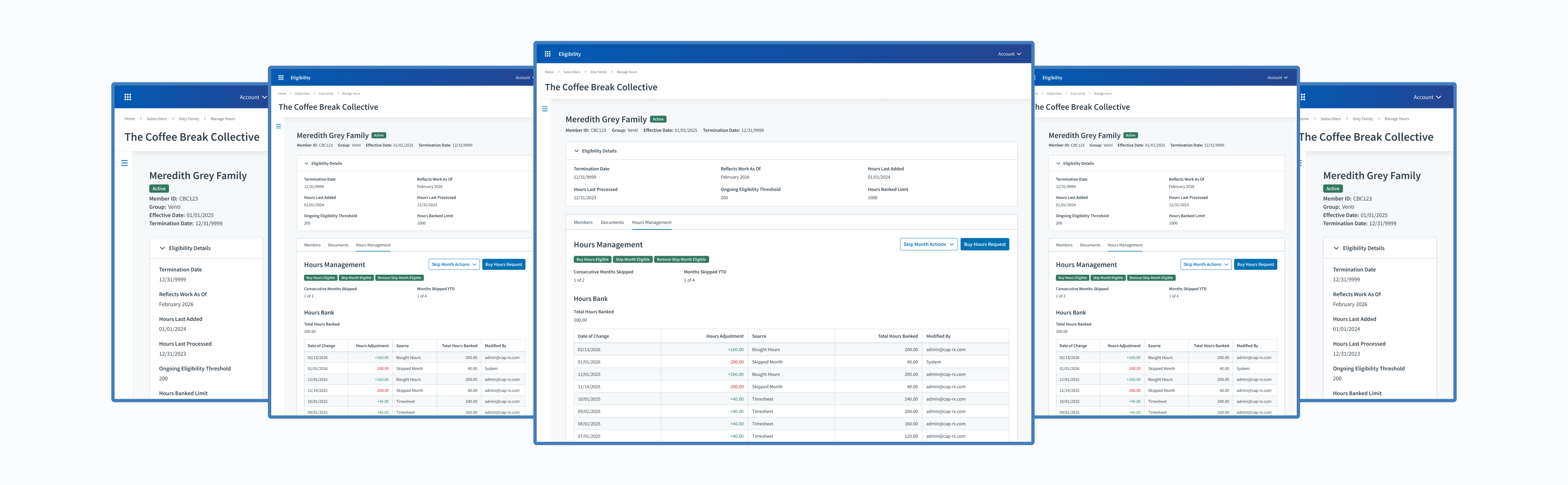
Experiences
Benefit Administrators (Judi®)
Explore Admin Experience
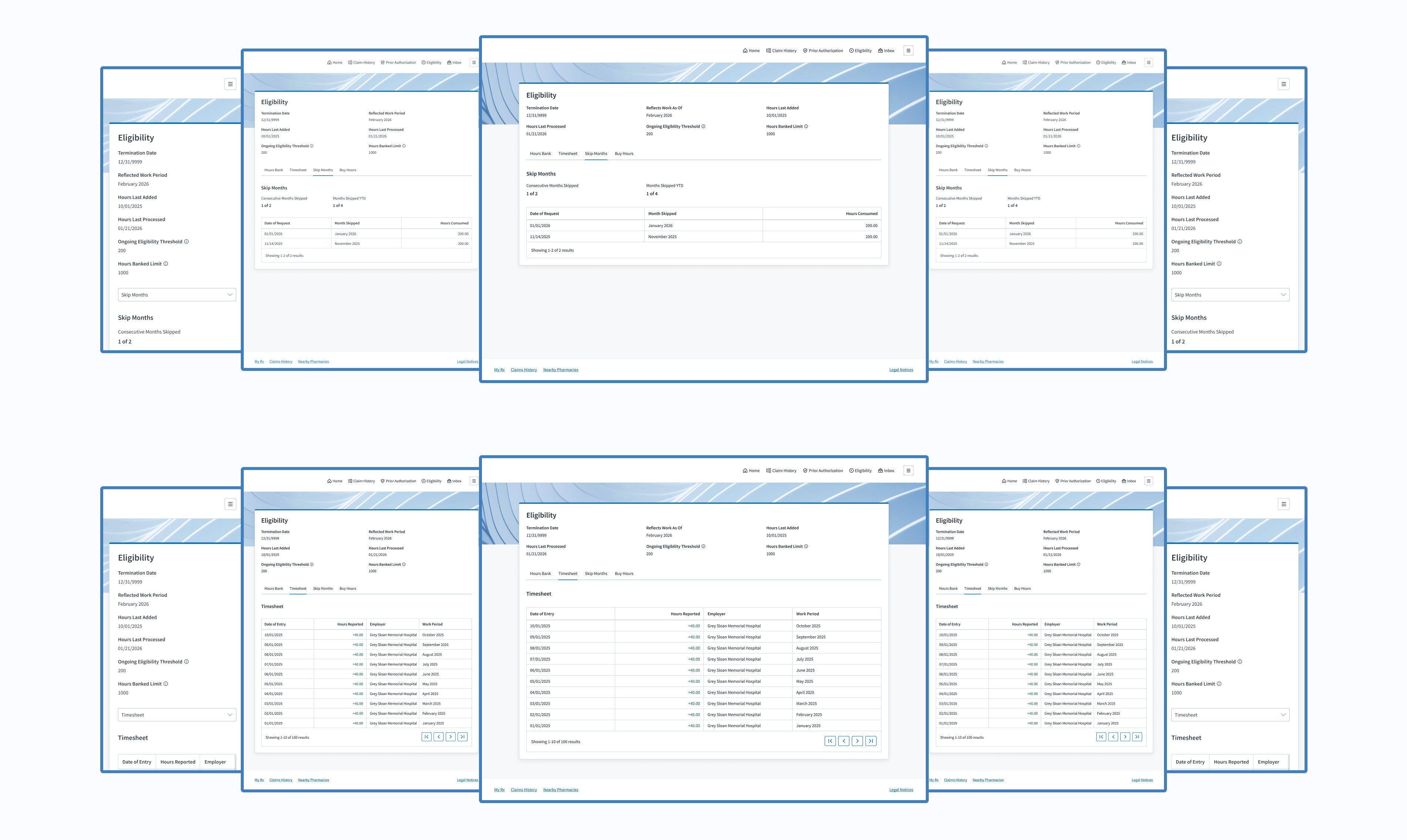
Outcomes
So, how did we increase transparency and autonomy for cardholders?
Cardholders (Member Portal)
Explore Cardholder Experience
Project Achievements
1 Member Self-Service Feature Created
4 Real-Time Data Displays Developed
4 Admin & Member Experiences Unified
66,000+ Members Gained Transparency & Autonomy
Next Steps
Take action on the most valuable, user-suggested improvements mentioned during the user interview.
The Final Results
My Takeaways
Minimal user research capabilities are better than none. If resources are limited, maximize the research value by asking targeted questions and jotting down actionable next steps.
Credits
Project Management
Eric Martinson
Scrum Master
Kelly Smith
Project Manager
Software Engineers
Ahmed Gamal
Technical QA Analyst
Cam Montgomery
Senior Full-Stack Software Developer 2
David Luther
Senior Back-End Software Developer 2
Enrique Mendez Castro
Software Developer
Hector Ubiera
Director Front-End Software Developer
Mindaugas Zukauskas (MZ)
Staff Software Developer
Mohammad Althayabeh
Senior Full-Stack Software Developer 2
User Experience
Raven Caffey
UI/UX Designer
UI/UX Design Portfolio: Year 6 Edition
Case Study
Clarity. Control. Cardholder.
How might we increase transparency and autonomy for cardholders?
Cross-Team Coordination
Omnichannel
Real-Time Data Display
Systemic Design Patterns
A Collaboration Between 3 Teams:
Development, Project Management, & User Experience
At a Glance
Chapter 01
The Discovery
My product team needed to give cardholders the ability to view their hours data and some control over their benefit eligibility; however, our product is restricted to 2 user types that don’t include cardholders. Where would this request come to life?
Chapter 02
The Challenges
- Our Eligibility product didn’t have features in the member portal. I was starting with a blank slate.
- Since I was starting with a blank slate, I had to follow established design patterns within the member portal.
- I needed to ensure the benefit administrator experience within Judi® and the member portal experience aligned.
- Historically, I’ve only had access to benefit administrators for design reviews—not cardholders.
Solution: Let’s utilize the member portal to display cardholder hours while offering self-service features.
Chapter 03
The Opportunities
- Collaboration between two product teams
- Work on a different Judi Health product
- Enhance features within my own product
- Have a user interview with a cardholder (very rare)
Chapter 04
The Process
This is where I designed the necessary features, then reviewed my design solutions with my developers, the member portal team, and a cardholder.
Chapter 05
The Final Results
Cardholders gained the ability…
- to view their hours bank, timesheet, skipped months, bought hours, and useful information about their benefit eligibility status
- to buy hours to maintain their benefit eligibility
My Takeaway: Minimal user research capabilities are better than none. If resources are limited, maximize the research value by asking targeted questions and jotting down actionable next steps.

Fine Print
Role
Lead UI/UX Designer
Responsibilities
User Interface
UX Design
User Research
Duration
2 Weeks / 1 Sprint
Tools
Figma
Lucidchart
Primary Deliverables
4 New Data Displays
4 Updated Data Displays
1 Self-Service Feature
Secondary Deliverables
User Research Feedback
High-Fidelity Wireframes
Prototypes
Company
Judi Health
Industry
Health Tech
Outline
Front Matter
Chapter 01
Chapter 02
Chapter 03
Chapter 04
Chapter 05
Appendix
The Introduction
About Judi Health
This case study originates from work done at Judi Health, a health technology company focused on transforming how prescriptions are priced and patient care works to deliver the healthcare we all deserve. It acts as a pharmacy benefit manager (PBM) and pharmacy benefit administrator (PBA), working with health systems, universities, employers, and more.
Relevant Products
Judi®
Judi® is a health platform built to grow and adapt with any organization. It makes it easy to handle new regulations and requirements, resulting in faster results, smoother operations, and a better experience for members overall.
Eligibility
Within Judi®, my cross-functional Agile team owns the third-party administrator (TPA) Eligibility product, where benefit administrators configure requirements and manage cardholders, and employers submit timesheets and pay invoices.
Member Portal
The Member Portal is a digital platform separate from, but still related to, Judi®. It gives members comprehensive access to their pharmacy benefits and related health information.
New Product Feature
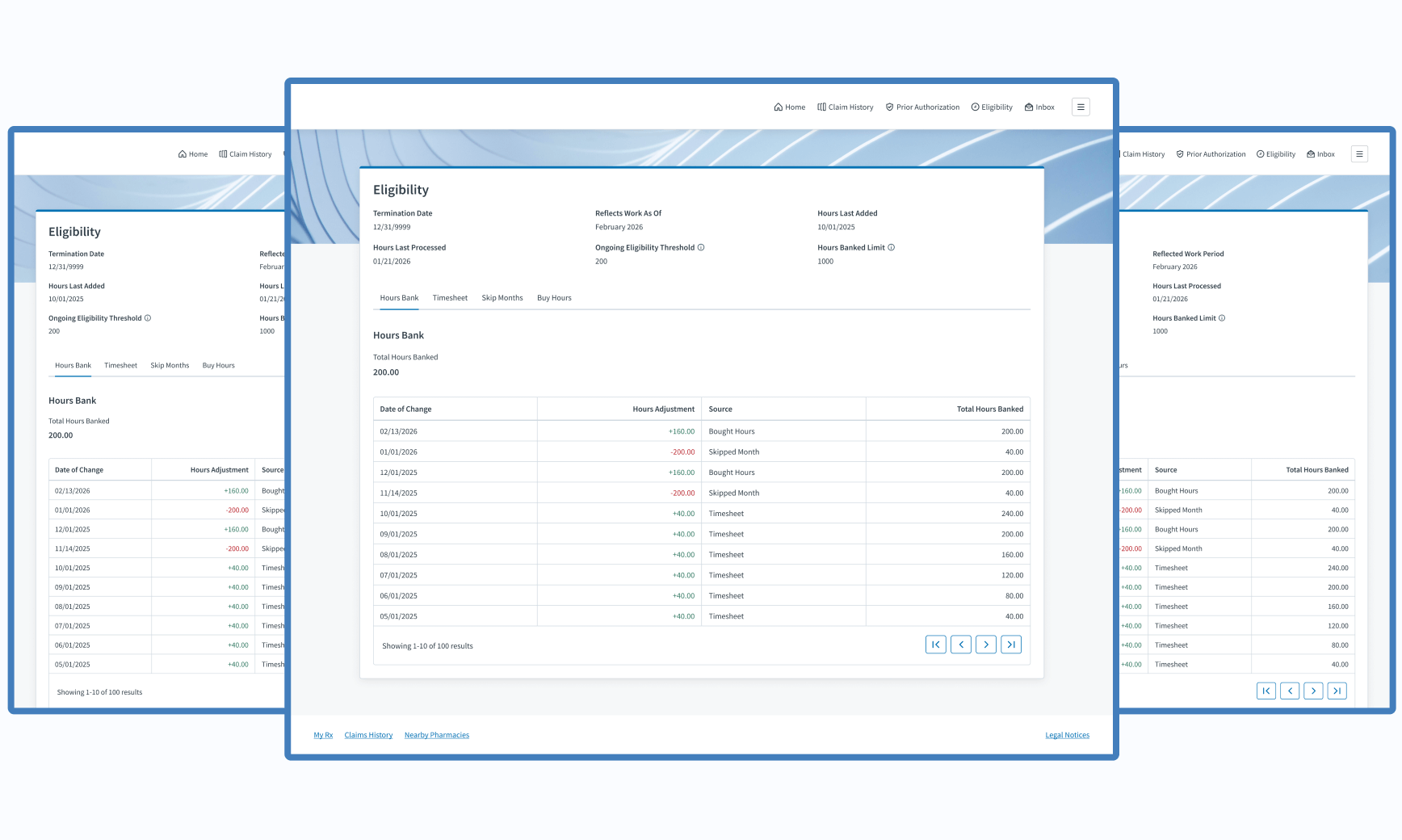
Imagine relying on your manager or an admin to learn about how many hours you’ve worked and whether you’ve qualified for the offered employer benefits. That was the annoying reality for thousands of cardholders within the Eligibility product. They had to contact their manager or a benefit administrator to know their latest hours and benefit eligibility stats. Stakeholders suggested that we give them better access to their information, and the product team did just that.
The Discovery
Business Need
Give cardholders the ability to view their hours data and some control over their benefit eligibility.
How Might We...
How might we allow users to view their hours data?
How might we give more power to cardholders?
How might we increase transparency and autonomy for cardholders?
The Discovery
The Solution
Let’s utilize the member portal, a separate Judi Health product, to display cardholder hours while offering self-service features. Our Eligibility product is restricted to 2 user types that don’t include cardholders, so this was the best route.
The Challenges
Blank Slate
Our Eligibility product didn’t have features in the member portal. I was starting with a completely blank slate.
Thoughts
There will be a menu item to access our features, but what should we call it? Should it just be “Eligibility” to match our module name? I’ll ask users, if possible.
Established Patterns
Since I was starting with a blank slate, I had to follow established design patterns within the member portal.
Thoughts
- Would their design patterns be drastically different than the patterns of my product? If so, how will that affect the experience of my users?
- I’ll ask the member portal UX team for feedback throughout my design process, so I don’t get far into my design and be completely off base; however, I do have access to the wireframes of other parts of the member portal, so that scenario shouldn’t happen.
Multi-Experience Consistency
I needed to ensure the benefit administrator experience within Judi® and the member portal experience aligned in case cardholders called admins for assistance.
Thought
While doing so, what areas could improve within the admin experience that I could apply to the new member experience?
User Access
Historically, I’ve only had access to benefit administrators for design reviews. Access to cardholders has been denied in the past.
Thought
Can I review my design solutions with at least one cardholder, or would I have to depend on benefit administrators or stakeholders to relay user feedback to me?
The Opportunities
Design Collaboration
Adding Eligibility product features to the member portal required collaboration with the UX designers and product manager. Fun!
Product Crossover
For the first time, I had the chance to work on a different product within the greater Judi Health ecosystem.
Thought
What could I learn from its design?
UX Enhancements
Within Judi®, I had the chance to enhance the relevant benefit administrator features.
Thought
Does any design pattern need the latest design handbook updates?
Rare User Interview
Later in my design process, I was told that I could review my design solution with one cardholder!
Thought
With only one design review, what questions should I ask to make interaction as valuable as possible?
The Process
Design
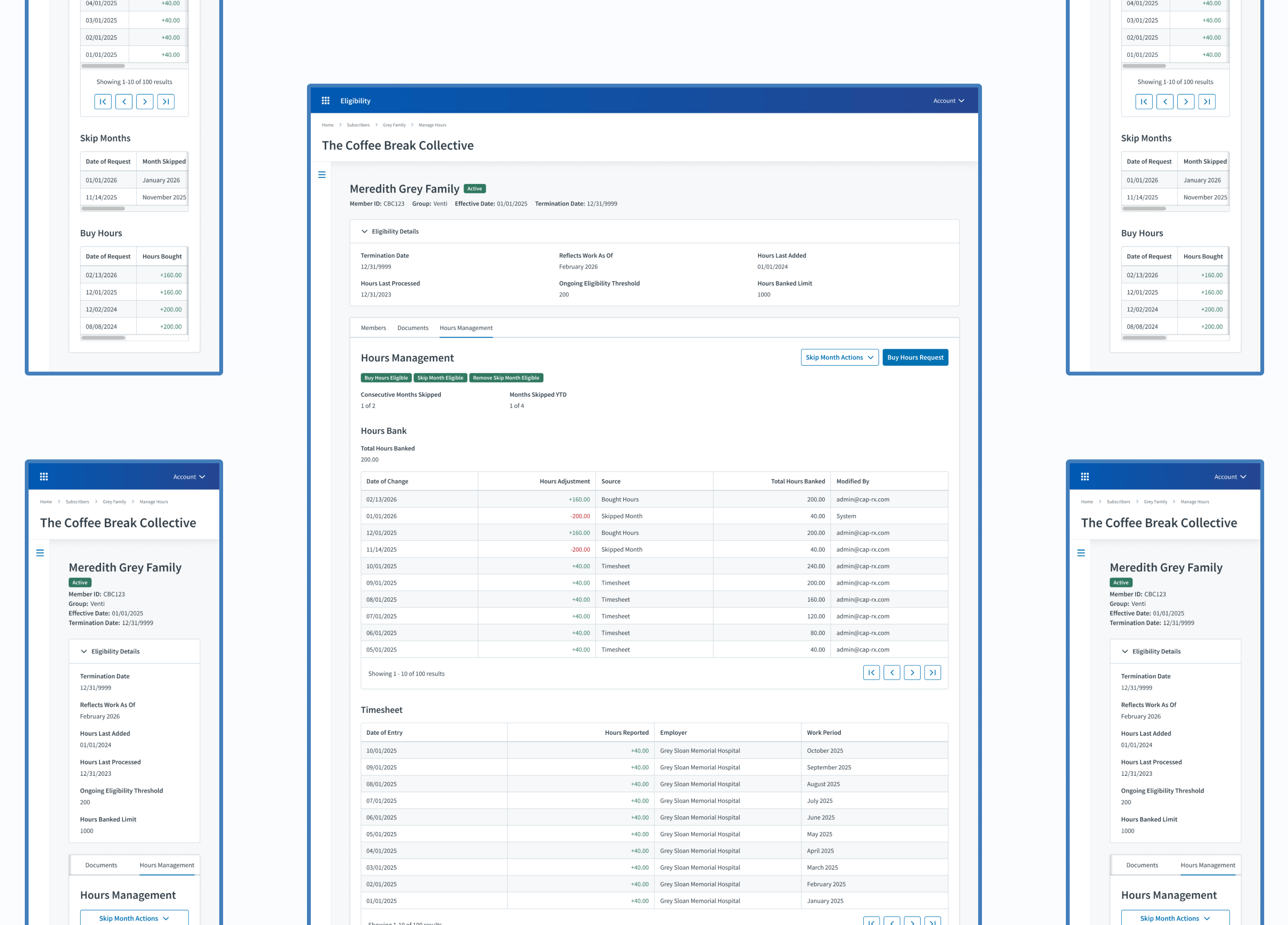
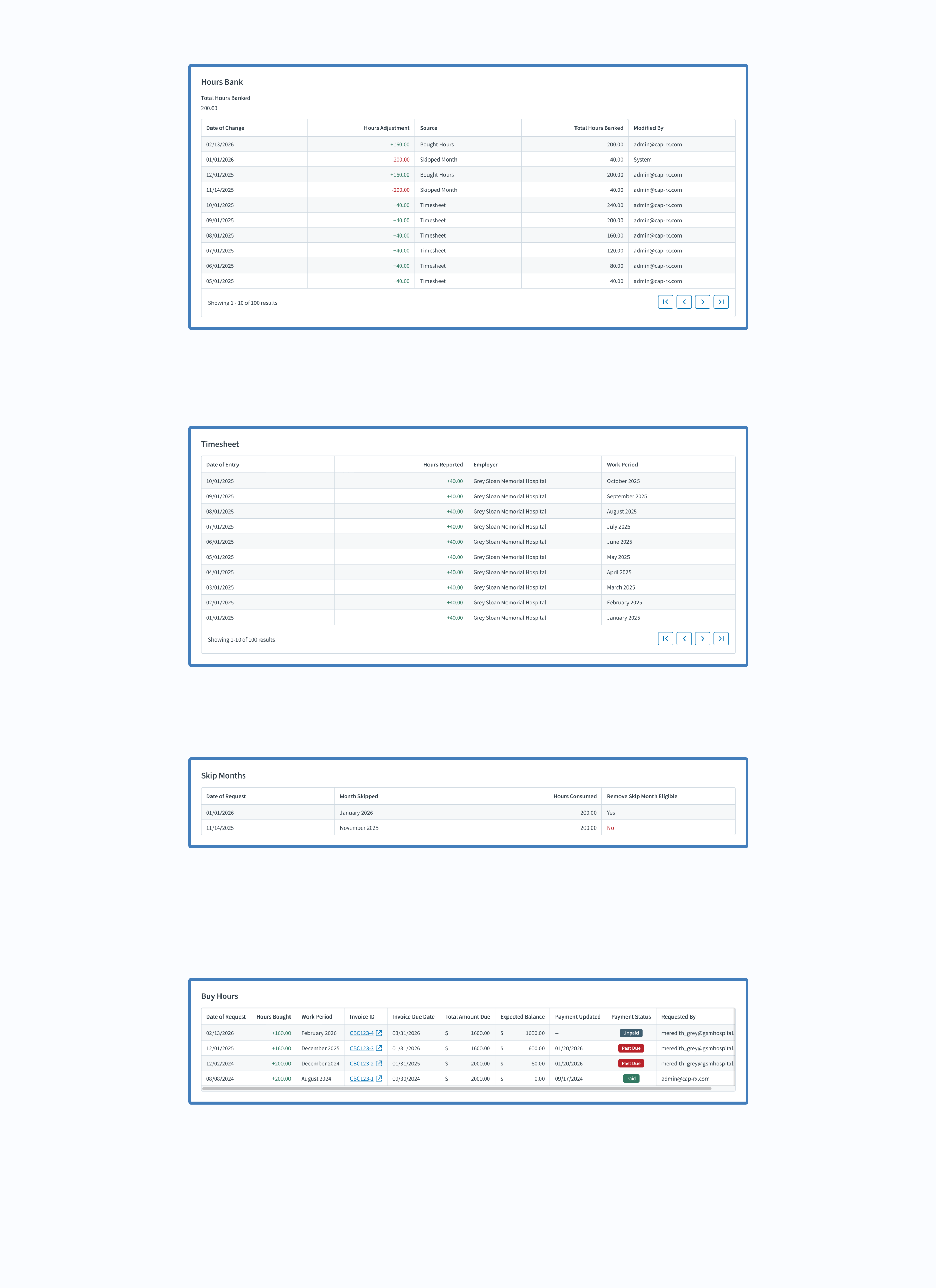
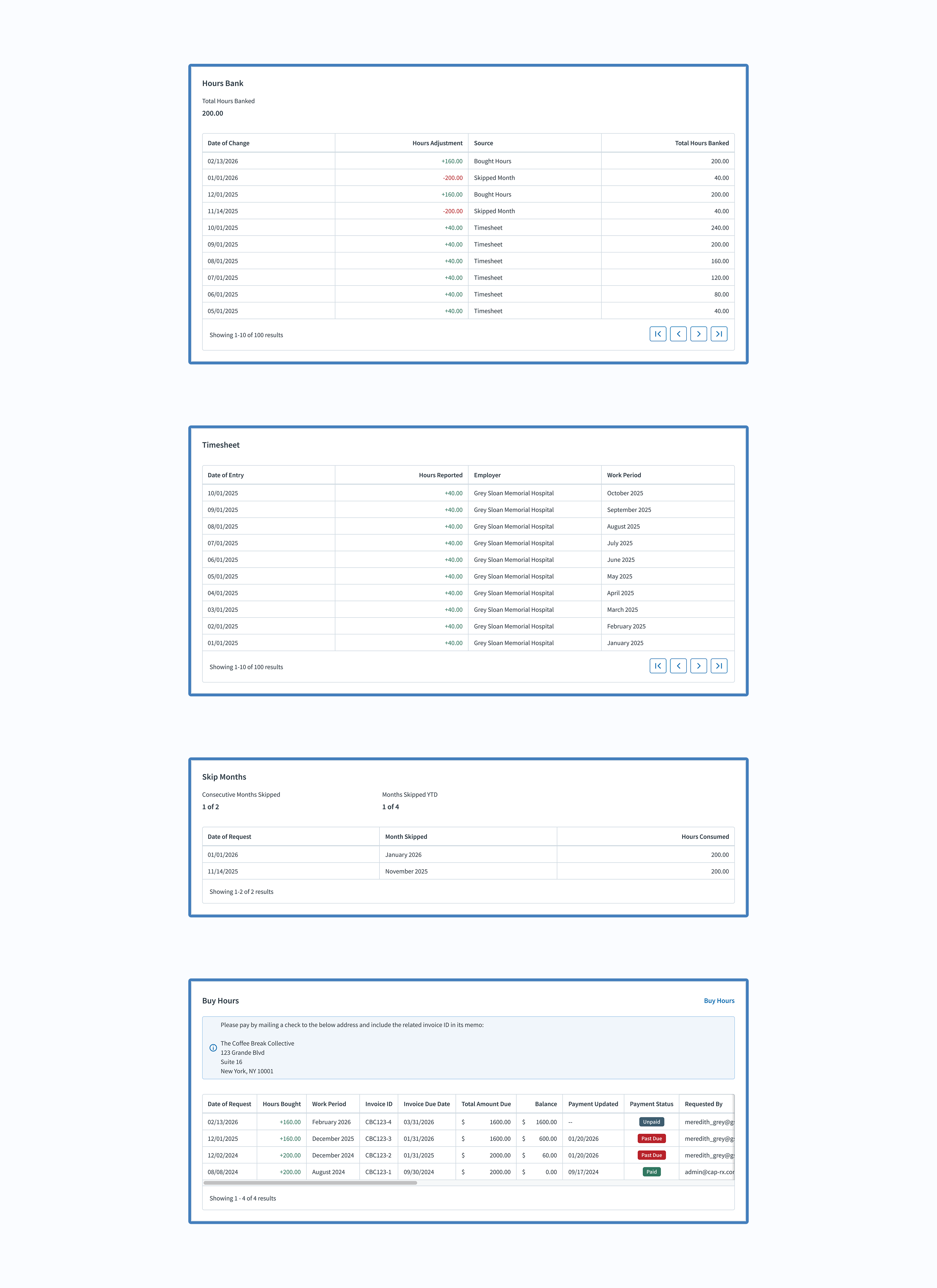
First, I started working on the member portal experience by migrating features from the benefit administrator experience within the Eligibility product. Along with useful information about their benefit eligibility, cardholders were now able to view their hours bank, timesheet, and more.
After finishing the member portal design, I ensured the user interface and copy from the benefit administrator experience matched the member portal experience.
Developer Constraints
Notice in the member portal (below on the right), I gave each table its own tab instead of making it a long panel like for admins. This was due to a developer constraint. I was advised to design separate tabs for each table to lessen the potential of lagging, so that is the design direction I went with.
Design Review
Once I finished the member portal designs, I reviewed them with the member portal UI/UX designers and product manager. That way, they were aware of the updates to their product.
The Process
User Stories
The Cardholder
As a cardholder, I need to view and manage my hours within the member portal to ensure I qualify for my employer’s benefits.
Acceptance Criteria
Give cardholders the ability to view and buy their hours.
The Benefit Administrator
As a benefit administrator, my experience must be consistent with the cardholders’ experience within the member portal, so I can easily address any comments or concerns they may have.
Acceptance Criteria
Ensure the admin experience within our product aligns with the cardholder experience within the member portal.
The Process
User Research
Once my developers confirmed technical feasibility and the member portal team approved the designs, I proceeded to the next step: user research to validate that my designs met the needs of cardholders.
Research Constraints
My team didn’t have great access to our cardholders; nevertheless, thanks to stakeholder magic, I was able to review my designs with one cardholder.
User Interview
Since this cardholder didn’t have access to Figma (nor could we get him access), I decided to simply walk through the designs and ask open-ended questions about the experience. After the meeting, I gathered my notes and highlighted possible improvements for future iterations.
View User Interview Notes
The Final Results
Outcomes
So, how did we increase transparency and autonomy for cardholders?
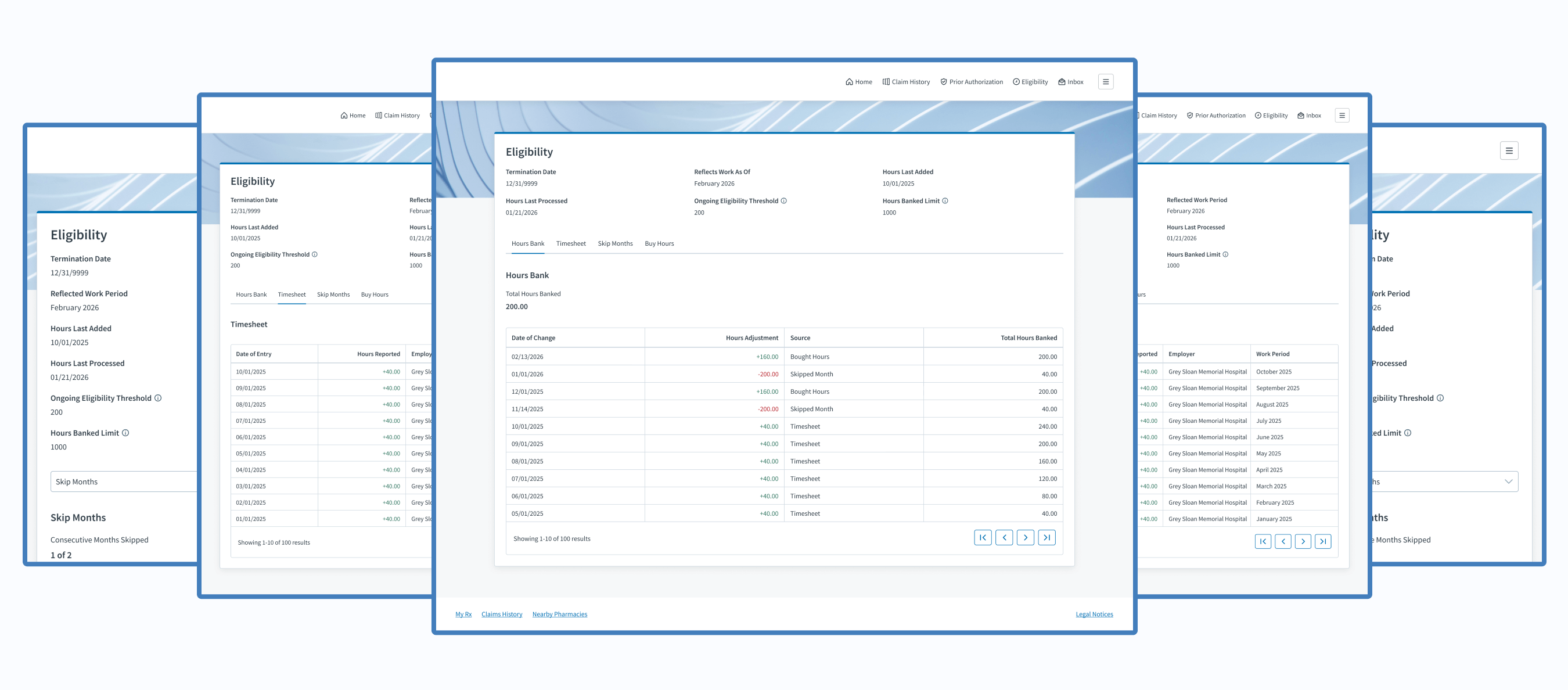
Transparency
By giving cardholders the ability to view their hours bank, timesheet, skipped months, bought hours, and useful information about their benefit eligibility status
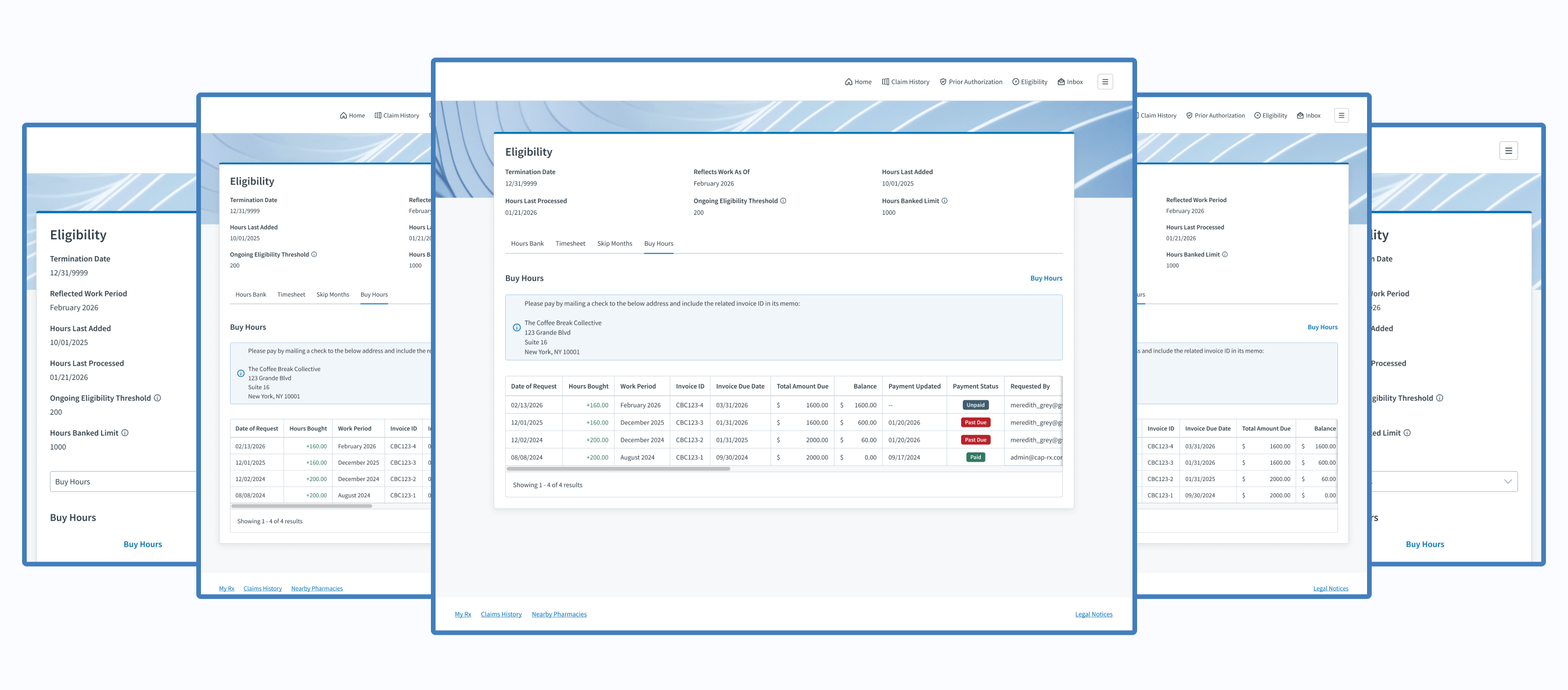
Autonomy
By giving cardholders the ability to buy hours to maintain their benefit eligibility
Experiences
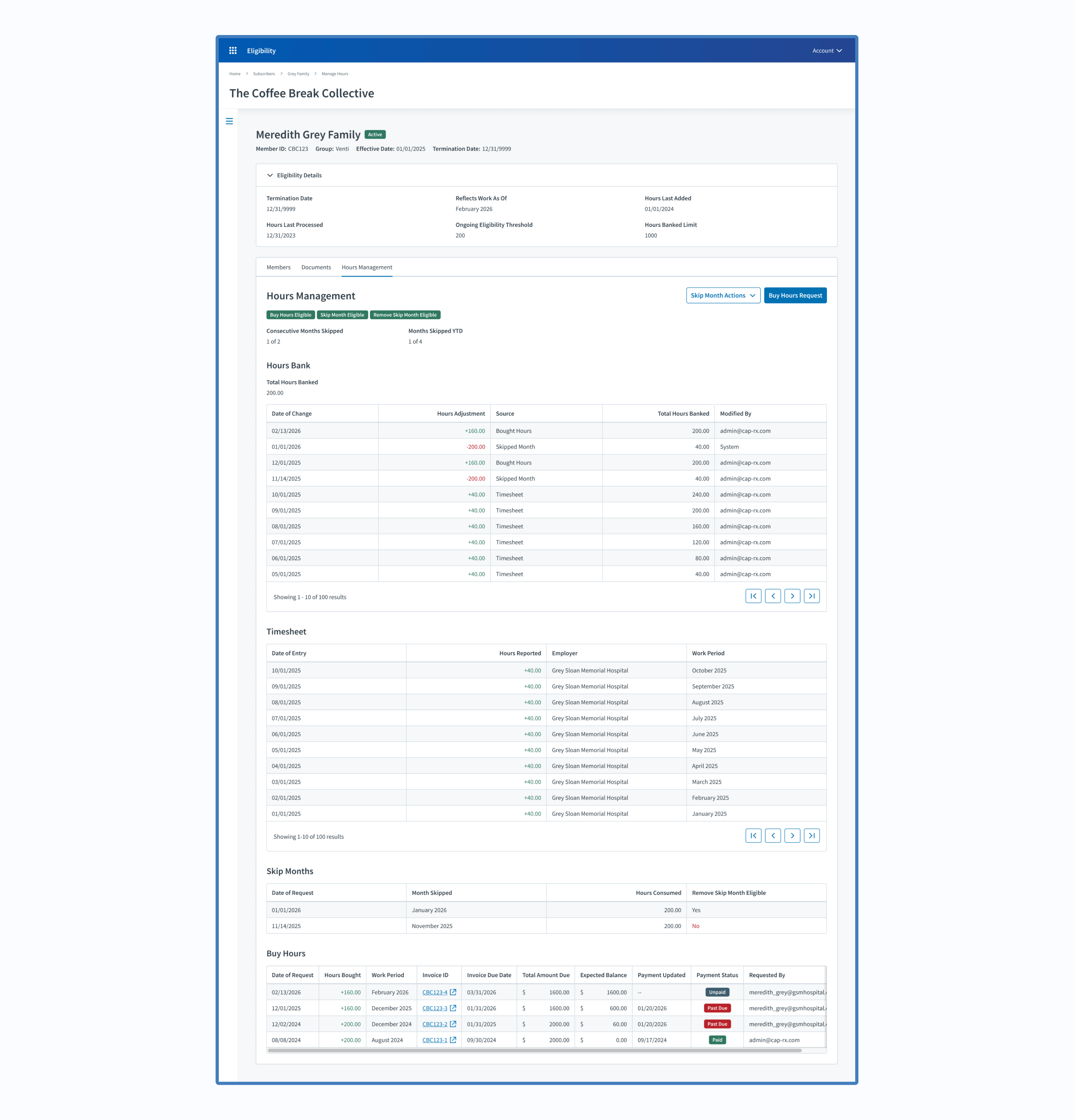
Benefit Administrators (Judi®)
Explore Admin Experience
Cardholders (Member Portal)
Explore Cardholder Experience
Project Achievements
1 Member Self-Service Feature Created
4 Real-Time Data Displays Developed
4 Admin & Member Experiences Unified
66,000+ Members Gained Transparency & Autonomy
Next Steps
Take action on the most valuable, user-suggested improvements mentioned during the user interview.
The Final Results
My Takeaways
Minimal user research capabilities are better than none. If resources are limited, maximize the research value by asking targeted questions and jotting down actionable next steps.
Credits
Project Management
Eric Martinson
Scrum Master
Kelly Smith
Project Manager
Software Engineers
Ahmed Gamal
Technical QA Analyst
Cam Montgomery
Senior Full-Stack Software Developer 2
David Luther
Senior Back-End Software Developer 2
Enrique Mendez Castro
Software Developer
Hector Ubiera
Director Front-End Software Developer
Mindaugas Zukauskas (MZ)
Staff Software Developer
Mohammad Althayabeh
Senior Full-Stack Software Developer 2
User Experience
Raven Caffey
UI/UX Designer
UI/UX Design Portfolio: Year 6 Edition
Case Study
Clarity. Control. Cardholder.
How might we increase transparency and autonomy for cardholders?
Cross-Team Coordination
Omnichannel
Real-Time Data Display
Systemic Design Patterns
A Collaboration Between 3 Teams:
Development, Project Management, & User Experience
At a Glance
Chapter 01
The Discovery
My product team needed to give cardholders the ability to view their hours data and some control over their benefit eligibility; however, our product is restricted to 2 user types that don’t include cardholders. Where would this request come to life?
Chapter 02
The Challenges
- Our Eligibility product didn’t have features in the member portal. I was starting with a blank slate.
- Since I was starting with a blank slate, I had to follow established design patterns within the member portal.
- I needed to ensure the benefit administrator experience within Judi® and the member portal experience aligned.
- Historically, I’ve only had access to benefit administrators for design reviews—not cardholders.
Solution: Let’s utilize the member portal to display cardholder hours while offering self-service features.
Chapter 03
The Opportunities
- Collaboration between two product teams
- Work on a different Judi Health product
- Enhance features within my own product
- Have a user interview with a cardholder (very rare)
Chapter 04
The Process
This is where I designed the necessary features, then reviewed my design solutions with my developers, the member portal team, and a cardholder.
Chapter 05
The Final Results
Cardholders gained the ability…
- to view their hours bank, timesheet, skipped months, bought hours, and useful information about their benefit eligibility status
- to buy hours to maintain their benefit eligibility
My Takeaway: Minimal user research capabilities are better than none. If resources are limited, maximize the research value by asking targeted questions and jotting down actionable next steps.
Fine Print
Role
Lead UI/UX Designer
Responsibilities
User Interface
UX Design
User Research
Duration
2 Weeks / 1 Sprint
Tools
Figma
Lucidchart
Primary Deliverables
4 New Data Displays
4 Updated Data Displays
1 Self-Service Feature
Secondary Deliverables
User Research Feedback
High-Fidelity Wireframes
Prototypes
Company
Judi Health
Industry
Health Tech
Outline
Front Matter
Chapter 01
Chapter 02
Chapter 03
Chapter 04
Chapter 05
Appendix
The Introduction
About Judi Health
This case study originates from work done at Judi Health, a health technology company focused on transforming how prescriptions are priced and patient care works to deliver the healthcare we all deserve. It acts as a pharmacy benefit manager (PBM) and pharmacy benefit administrator (PBA), working with health systems, universities, employers, and more.

Relevant Products
Judi®
Judi® is a health platform built to grow and adapt with any organization. It makes it easy to handle new regulations and requirements, resulting in faster results, smoother operations, and a better experience for members overall.
Eligibility
Within Judi®, my cross-functional Agile team owns the third-party administrator (TPA) Eligibility product, where benefit administrators configure requirements and manage cardholders, and employers submit timesheets and pay invoices.
Member Portal
The Member Portal is a digital platform separate from, but still related to, Judi®. It gives members comprehensive access to their pharmacy benefits and related health information.
New Product Feature
Imagine relying on your manager or an admin to learn about how many hours you’ve worked and whether you’ve qualified for the offered employer benefits. That was the annoying reality for thousands of cardholders within the Eligibility product. They had to contact their manager or a benefit administrator to know their latest hours and benefit eligibility stats. Stakeholders suggested that we give them better access to their information, and the product team did just that.
The Discovery
Business Need
Give cardholders the ability to view their hours data and some control over their benefit eligibility.
How Might We...
How might we allow users to view their hours data?
How might we give more power to cardholders?
How might we increase transparency and autonomy for cardholders?
The Discovery
The Solution
Let’s utilize the member portal, a separate Judi Health product, to display cardholder hours while offering self-service features. Our Eligibility product is restricted to 2 user types that don’t include cardholders, so this was the best route.
The Challenges
Blank Slate
Our Eligibility product didn’t have features in the member portal. I was starting with a completely blank slate.
Thoughts
There will be a menu item to access our features, but what should we call it? Should it just be “Eligibility” to match our module name? I’ll ask users, if possible.
Established Patterns
Since I was starting with a blank slate, I had to follow established design patterns within the member portal.
Thoughts
- Would their design patterns be drastically different than the patterns of my product? If so, how will that affect the experience of my users?
- I’ll ask the member portal UX team for feedback throughout my design process, so I don’t get far into my design and be completely off base; however, I do have access to the wireframes of other parts of the member portal, so that scenario shouldn’t happen.
Multi-Experience Consistency
I needed to ensure the benefit administrator experience within Judi® and the member portal experience aligned in case cardholders called admins for assistance.
Thought
While doing so, what areas could improve within the admin experience that I could apply to the new member experience?
User Access
Historically, I’ve only had access to benefit administrators for design reviews. Access to cardholders has been denied in the past.
Thought
Can I review my design solutions with at least one cardholder, or would I have to depend on benefit administrators or stakeholders to relay user feedback to me?
The Opportunities
Design Collaboration
Adding Eligibility product features to the member portal required collaboration with the UX designers and product manager. Fun!
Product Crossover
For the first time, I had the chance to work on a different product within the greater Judi Health ecosystem.
Thought
What could I learn from its design?
UX Enhancements
Within Judi®, I had the chance to enhance the relevant benefit administrator features.
Thought
Does any design pattern need the latest design handbook updates?
Rare User Interview
Later in my design process, I was told that I could review my design solution with one cardholder!
Thought
With only one design review, what questions should I ask to make interaction as valuable as possible?
The Process
Design
First, I started working on the member portal experience by migrating features from the benefit administrator experience within the Eligibility product. Along with useful information about their benefit eligibility, cardholders were now able to view their hours bank, timesheet, and more.
After finishing the member portal design, I ensured the user interface and copy from the benefit administrator experience matched the member portal experience.
Developer Constraints
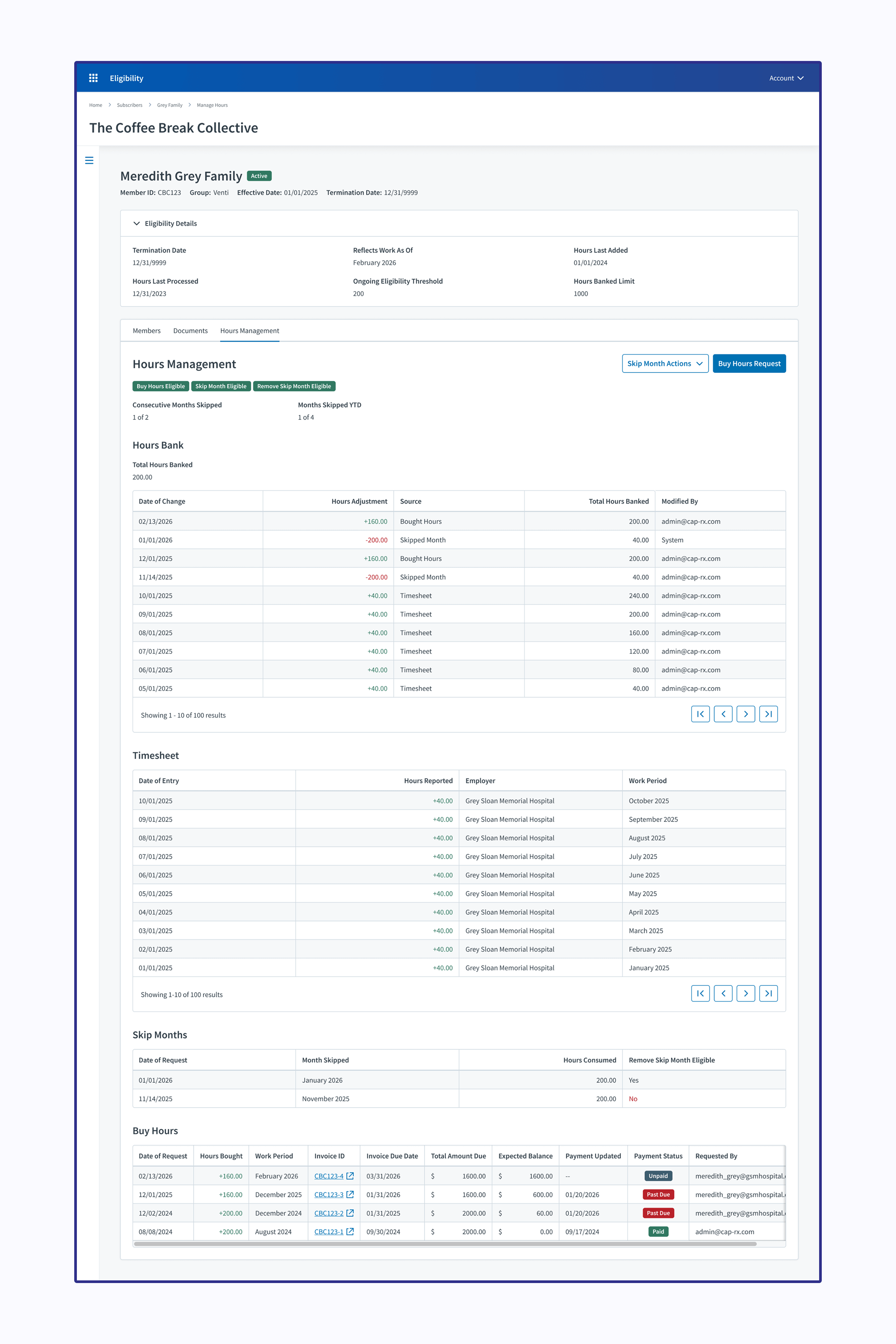
Notice in the member portal (below on the right), I gave each table its own tab instead of making it a long panel like for admins. This was due to a developer constraint. I was advised to design separate tabs for each table to lessen the potential of lagging, so that is the design direction I went with.
Design Review
Once I finished the member portal designs, I reviewed them with the member portal UI/UX designers and product manager. That way, they were aware of the updates to their product.
The Process
User Stories
The Cardholder
As a cardholder, I need to view and manage my hours within the member portal to ensure I qualify for my employer’s benefits.
Acceptance Criteria
Give cardholders the ability to view and buy their hours.
The Benefit Administrator
As a benefit administrator, my experience must be consistent with the cardholders’ experience within the member portal, so I can easily address any comments or concerns they may have.
Acceptance Criteria
Ensure the admin experience within our product aligns with the cardholder experience within the member portal.
The Process
User Research
Once my developers confirmed technical feasibility and the member portal team approved the designs, I proceeded to the next step: user research to validate that my designs met the needs of cardholders.
Research Constraints
My team didn’t have great access to our cardholders; nevertheless, thanks to stakeholder magic, I was able to review my designs with one cardholder.
User Interview
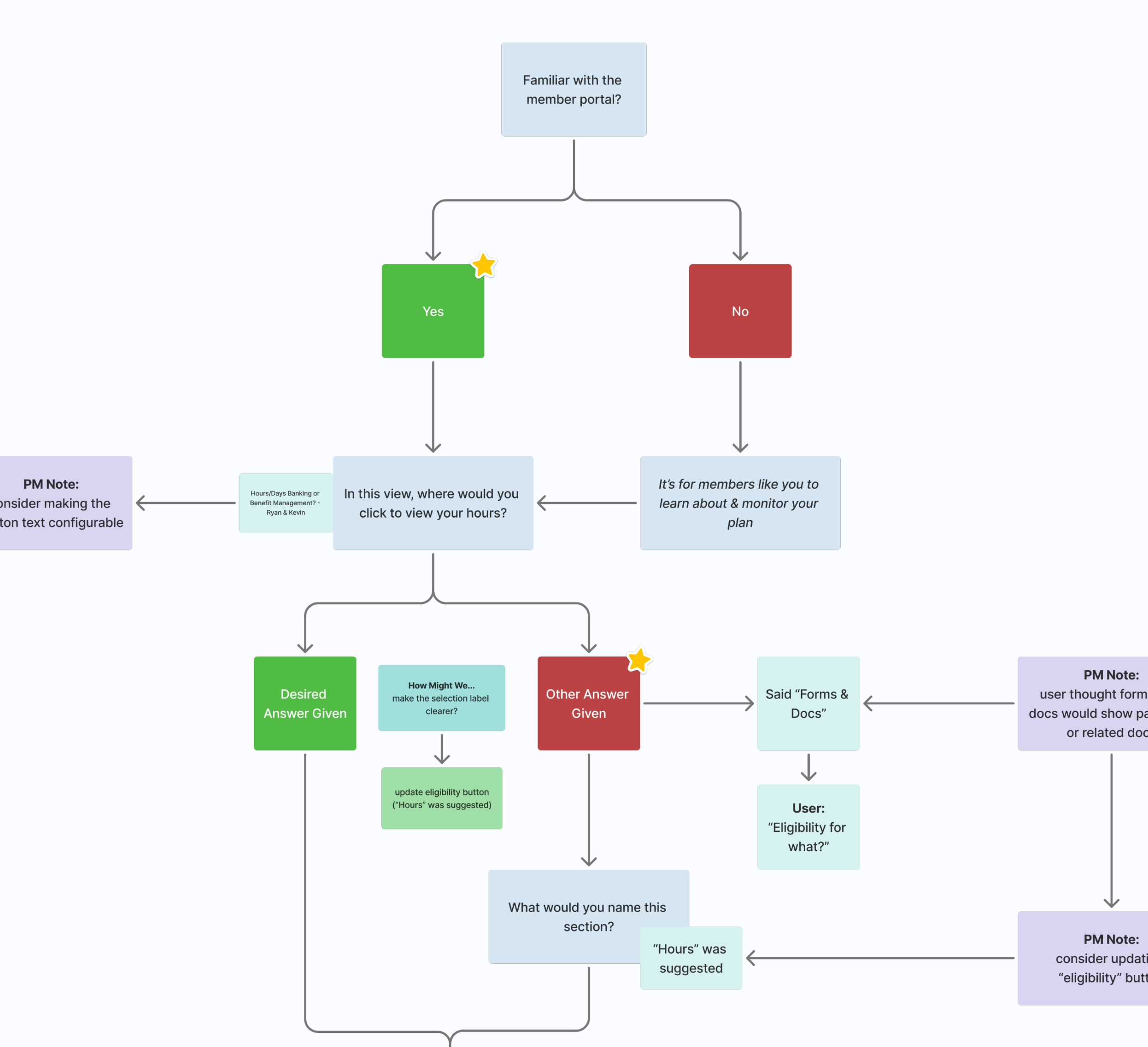
Since this cardholder didn’t have access to Figma (nor could we get him access), I decided to simply walk through the designs and ask open-ended questions about the experience. After the meeting, I gathered my notes and highlighted possible improvements for future iterations.
View User Interview Notes
The Final Results
Outcomes
So, how did we increase transparency and autonomy for cardholders?
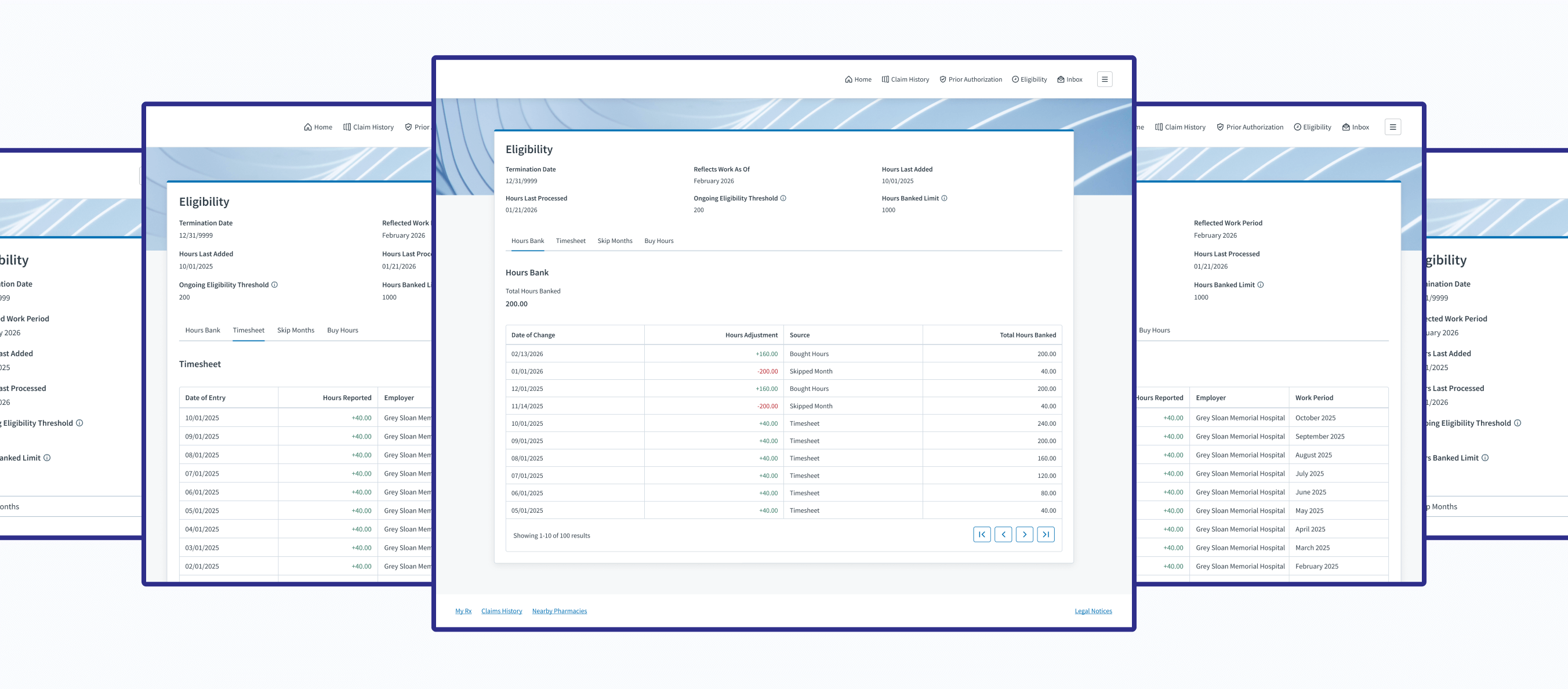
Transparency
By giving cardholders the ability to view their hours bank, timesheet, skipped months, bought hours, and useful information about their benefit eligibility status
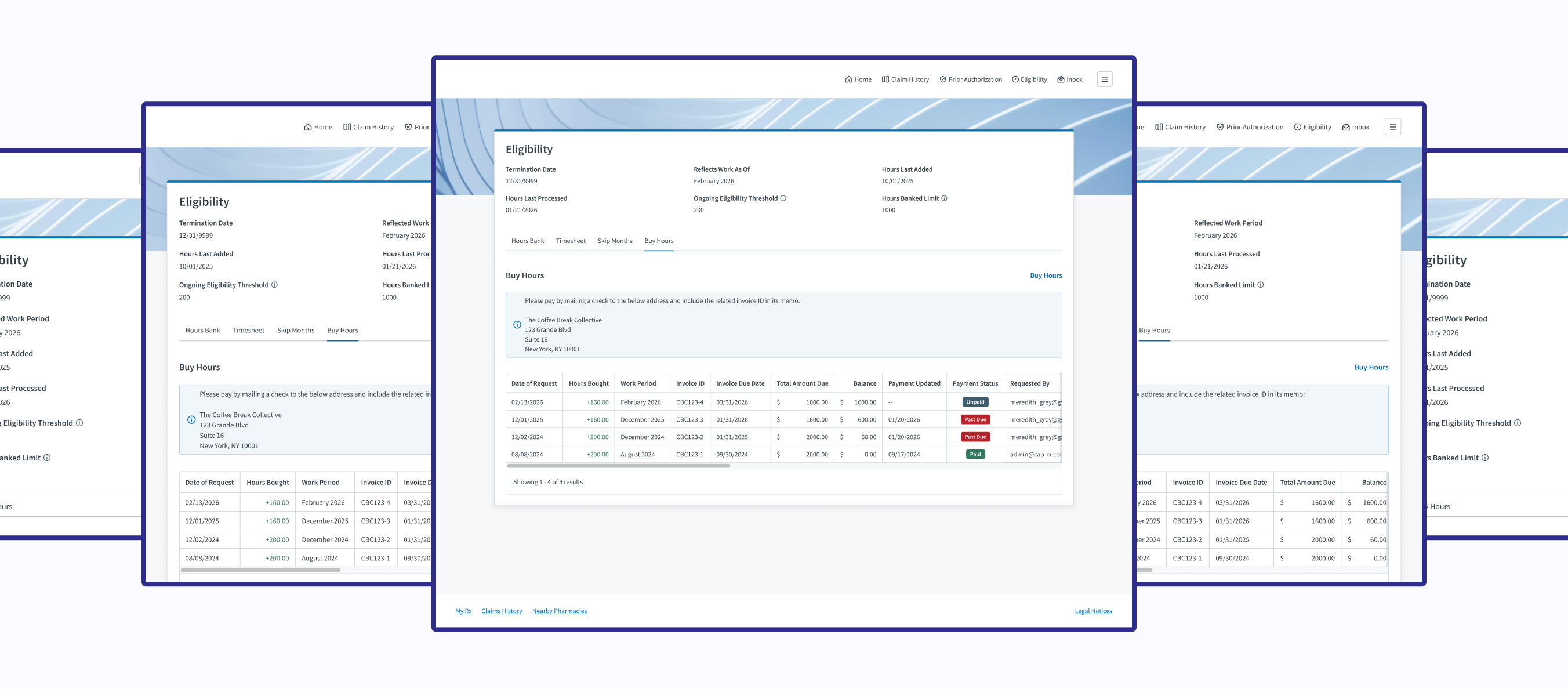
Autonomy
By giving cardholders the ability to buy hours to maintain their benefit eligibility
Experiences
Benefit Administrators (Judi®)
Explore Admin Experience
Cardholders (Member Portal)
Explore Cardholder Experience
Project Achievements
1 Member Self-Service Feature Created
4 Real-Time Data Displays Developed
4 Admin & Member Experiences Unified
66,000+ Members Gained Transparency & Autonomy
Next Steps
Take action on the most valuable, user-suggested improvements mentioned during the user interview.
The Final Results
My Takeaways
Minimal user research capabilities are better than none. If resources are limited, maximize the research value by asking targeted questions and jotting down actionable next steps.
Credits
Project Management
Eric Martinson
Scrum Master
Kelly Smith
Project Manager
Software Engineers
Ahmed Gamal
Technical QA Analyst
Cam Montgomery
Senior Full-Stack Software Developer 2
David Luther
Senior Back-End Software Developer 2
Enrique Mendez Castro
Software Developer
Hector Ubiera
Director Front-End Software Developer
Mindaugas Zukauskas (MZ)
Staff Software Developer
Mohammad Althayabeh
Senior Full-Stack Software Developer 2
User Experience
Raven Caffey
UI/UX Designer